Best Computer for Day Trading | What 6 Platforms Officially Require
The best computer for day trading is a boring one: six or more CPU cores, 16GB to 32GB of RAM, an NVMe SSD, and a wired connection. That's it. Nobody's broker cares how many RGB fans you own.
Quick Answer
Six major desktop trading platforms publish hardware minimums, and not one of them asks for a $4,000 machine. Interactive Brokers wants an Intel i5 with 8GB of RAM at the floor and recommends an i7 with 16GB, per the official IBKR Trader Workstation requirements page. TradeStation's "power user" tier asks for a quad-core 3GHz processor and 12GB or more, according to its published system requirements. The best computer for day trading is the cheapest machine that clears the highest bar among the platforms you actually run, plus headroom for the scanners and charts you'll add later.
Quick pick: best computer for day trading
- Beelink SER8 mini PC Best for: triple monitors, tiny desk footprint. $859 on Amazon.
- Orbital Silenced x2000 Best for: quiet configure-to-order trading workstations. Price listed on Orbital's site.
- MacBook Pro 16 M4 Max Best for: mobile charting on browser platforms. Price on Apple's site.
Skip it if: you trade one chart from a phone app and never open a desktop platform.
Key Takeaways
- No major platform requires more than 16GB, so the best computer for day trading is cheaper than vendors suggest. IBKR recommends 16GB; TradeStation's power-user tier recommends 12GB or more.
- DAS Trader Pro's published floor is ancient: a Core 2 Duo 2GHz with 4GB of RAM, per its hardware requirements doc. It's also Windows only.
- Lightspeed Trader states plainly that "Trading over Wi-Fi is not recommended" and that SSD systems "perform considerably better overall."
- thinkorswim publishes no CPU or RAM number at all, only supported operating systems: Windows 11 and later, macOS 14 and later, Linux with Zulu OpenJDK 21.
- TradingView Desktop needs a 64-bit Intel or AMD chip. Its docs state "ARM is not supported" on Windows and Linux, and "IPv6 is not currently supported."
- A $859 Beelink SER8 mini PC with a Ryzen 7 8745HS, 32GB of DDR5 and triple display output clears every requirement in the table below.
- Monitors matter more than the CPU once you pass the floor. Most desk guides for active traders land on two to four screens.
What is the best computer for day trading?
The best computer for day trading is a six-to-eight core machine with 16GB of RAM minimum, an NVMe solid state drive, and enough video outputs for your screens. Spend the money you save on monitors, a wired line, and a battery backup. Every platform requirement published by the six brokers below sits well under what a mid-range 2026 desktop ships with.

Here's the baseline most traders should buy to in 2026, built from the platform docs and the specs that current buying guides for trading computers converge on:
| Component | Buy this | Why |
|---|---|---|
| Processor | Intel Core Ultra 5 or 7, or AMD Ryzen 7 | Platform docs ask for quad-core 3GHz at the top tier |
| RAM | 16GB, 32GB if you run scanners | IBKR recommends 16GB |
| Storage | 512GB NVMe SSD or larger | Lightspeed says SSDs "perform considerably better overall" |
| Graphics | Integrated is fine for 2 screens, dedicated for 4 or more | Charts are 2D, not Cyberpunk 2077 |
| Network | Ethernet, not Wi-Fi | Lightspeed: "Trading over Wi-Fi is not recommended" |
Can you day trade on a regular computer, or do you need something special?
You can day trade on a regular computer. Any mainstream desktop or laptop bought new in the last three years with 16GB of RAM clears the published requirements of all six platforms in this review. "Trading computers" sold as a separate product category exist because they bundle multi-monitor support, quiet cooling and phone support, not because the software needs exotic silicon.
A plain office PC falls apart in three specific places: it ships with 8GB and no upgrade slot, it has one video output, and it uses a spinning hard drive. Fix those and the machine is a trading computer.
Does your computer need to be fast for day trading?
It needs to be responsive, not fast in the benchmark sense. Your round-trip to the exchange is dominated by your network and your broker's routing, so a CPU upgrade will not shave milliseconds off a fill. What a quicker processor does buy you is smoother chart redraws when a scanner refreshes 200 symbols during the open.
The practical rule: if your platform stutters when the market gaps at 9:30, you need more RAM or fewer open chart windows, not a new CPU.
Best computer for day trading: what do the platforms require?
Six platforms, six different answers, and they're all lower than the internet thinks. Interactive Brokers publishes the strictest numbers. DAS Trader Pro publishes the loosest. thinkorswim publishes almost nothing. The best computer for day trading is whichever box clears the highest row in this table for the software you run.

| Platform | CPU | RAM | Display | Internet | Notable limit |
|---|---|---|---|---|---|
| IBKR Trader Workstation | Min Intel i5, rec i7 or better | Min 8GB, rec 16GB | Min 2K, rec 4K | Not specified | Raise TWS memory to 2GB+ past 15 chart windows |
| TradeStation desktop | Min dual-core 1.5GHz, power user quad-core 3GHz+ | Min 8GB, power user 12GB+ | Not specified | 2, 6 or 10 Mbps by tier | Mac only through Parallels |
| Lightspeed Trader | Min 2.0GHz i3, rec 3.0GHz i7 | Min 6GB, rec 8GB | Not specified | 25 Mbps down, 5 up | "Trading over Wi-Fi is not recommended" |
| DAS Trader Pro | Min Core 2 Duo 2GHz | Min 4GB | Not specified | 10/10 Mbps recommended | Windows only |
| thinkorswim | Not published | Not published | Not published | Not published | OS list only: Win 11+, macOS 14+, Linux Zulu OpenJDK 21 |
| TradingView Desktop | 64-bit Intel or AMD | Not published | Not published | Not published | "ARM is not supported" on Windows and Linux; "IPv6 is not currently supported" |
Read that table twice before you buy anything. The toughest published CPU ask in the group is a quad-core 3GHz processor, which is a 2017-era specification. The toughest RAM ask is 16GB. A refurbished Windows business desktop with a RAM upgrade can satisfy all six.
How much RAM do you need for day trading software?
Sixteen gigabytes is the practical floor in 2026, and 32GB is the right call if you run a scanner, a browser full of tabs, and a charting platform at the same time. IBKR recommends 16GB and separately tells heavy users to raise the TWS memory allocation to at least 2GB once they pass 15 chart windows.
RAM is where cheap machines choke. One Java-based platform, Chrome with 40 tabs, Discord, and a screen recorder will eat memory fast. Buy a machine with two slots so you can double it later on the cheap.
What operating system is best for trading platforms?
Windows 11 is the safest operating system for day trading because it is the only one all six platforms support natively. DAS Trader Pro is Windows only. TradeStation's desktop runs on a Mac only through Parallels, per its own requirements page. thinkorswim and TradingView support macOS directly.
Choose Windows if you want zero compatibility homework. Choose macOS only after you confirm your specific broker's desktop platform runs on it.
Do you need a $3,000 trading computer?
No. The best computer for day trading costs most traders $800 to $1,500 for the box. Put the rest into screens, a wired line and a battery backup. A $3,000 build makes sense in exactly one case: you run six or more displays with automated scanners feeding a strategy, and downtime costs you money. Buying beyond the published requirements is a tax on anxiety, not an edge.
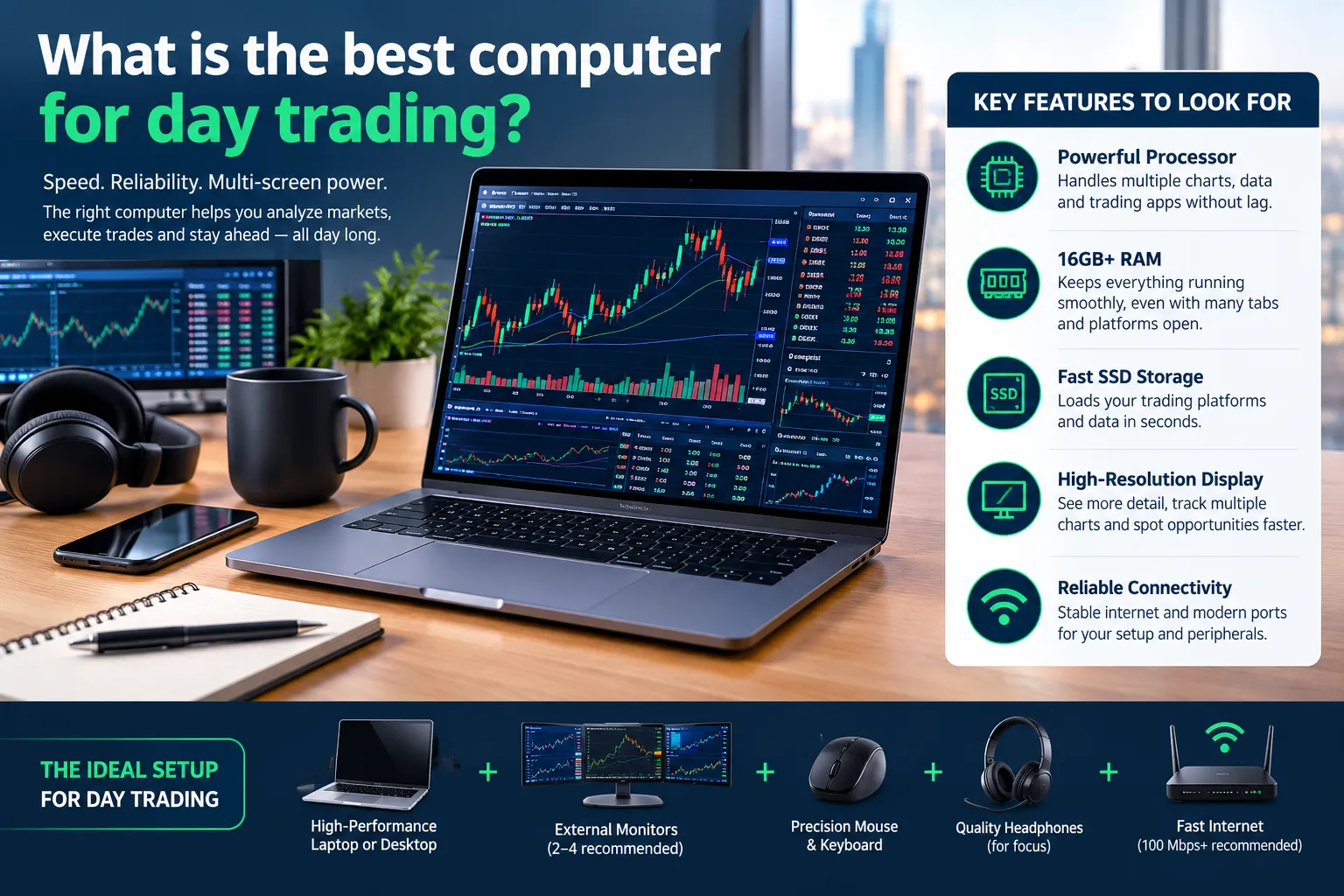
Three tiers that actually map to how people trade:
- Entry, roughly $600 to $900. One or two monitors, one platform, discretionary swing or day trading. A mini PC or refurbished small-form desktop. The best budget computer for day trading lives right here.
- Core, roughly $1,000 to $1,800. Three or four monitors, a scanner plus a charting platform, maybe options trading on a second screen. Intel Core Ultra 5 or 7, 32GB, 1TB NVMe.
- Heavy, $2,500 and up. Six screens, automation, hardware redundancy. This is where purpose-built workstations for stock trading earn their keep, and where guides on best trading computers for day traders start naming specific prebuilt towers.
Here are machines people actually buy, with price last. Where a vendor configures to order, no price is published in this review, so check the official page.
| Machine | Key specs | Best for | Price |
|---|---|---|---|
| Beelink SER8 mini PC | Ryzen 7 8745HS, 32GB DDR5, 1TB, triple display | Two to three screens, small desk | $859 on Amazon, 4.4 stars from 431 ratings |
| Orbital Silenced x2000 | Configure-to-order Intel Core desktop, near-silent cooling | Quiet rooms, four-plus monitors | Configured to order, check price on Orbital's site |
| Gladiator X3D EZ Trading Computer | Prebuilt trading tower, multi-monitor | Traders who want phone support | Configured to order, check the EZ Trading Computers page |
| Legion Tower 7i Gen 8 with RTX 4080 Super | High-end Intel Core, dedicated RTX GPU | Six screens plus media and entertainment use | Varies by configuration, check Lenovo |
| Acer Aspire C27 all-in-one desktop, model C27-1800-UR12 | Intel Core, built-in 27-inch screen | Absolute budget single-screen setup | Varies by retailer, check Acer or Best Buy |
| MacBook Pro 16 M4 Max | Apple silicon, 16-inch display | Mobile charting, macOS platforms | See Apple for current pricing |
Two real drawbacks on the Beelink SER8, since every recommendation should carry them: it's pricey for a mini PC compared to similarly specced towers, and it ships with only one USB-C port, which gets tight once you add a dock and a webcam. Two drawbacks on the Legion Tower 7i Gen 8: the RTX 4080 Super is overkill for candlestick charts, and a gaming tower's fans get loud under load. The Aspire C27 all-in-one desktop has its own problems: you cannot upgrade the display, and all-in-one RAM is often soldered.
Laptop or desktop: which fits day trading?
For the best computer for day trading, desktops win on price per core, upgradability, and screens. Laptops win on mobility and nothing else. If your chair never moves, buy the desktop. The best desktop computer for day trading costs less than a laptop with the same processor and RAM, and you can add memory with a screwdriver instead of a credit card.
Day trading laptop requirements, in plain terms: a current Intel Core Ultra or Ryzen 7 chip, 16GB of RAM minimum, an NVMe SSD, two video outputs, and Ethernet or a USB-C dock with an Ethernet port. The best laptop computer for day trading is one you can dock. A laptop that only outputs to one external screen will frustrate you inside a week.
The honest split: a $900 desktop and a $400 used laptop for travel beats a single $2,200 trading laptop for most people.
Can you day trade on a Mac, or do you need Windows?
You can day trade on a Mac, with one caveat per platform. thinkorswim supports macOS 14 and later. TradingView Desktop runs on Apple Silicon. TradeStation's desktop requires Parallels on a Mac. DAS Trader Pro is Windows only, full stop.
Decision rule: if your strategy depends on DAS Trader Pro's hotkeys or TradeStation's native desktop, buy a Windows machine and stop debating. The best laptop for stock trading on macOS is whichever MacBook Pro your budget allows, but confirm the platform first and buy the computer second.
Which hardware gotchas break trading platforms?
Four things break even the best computer for day trading, and none of them is the processor: Wi-Fi, ARM chips, spinning hard drives, and power cuts. Lightspeed says outright that trading over Wi-Fi is not recommended. TradingView says ARM is not supported on Windows and Linux. Those are published limits, not forum opinions.

Why do day traders need multiple monitors, and how many?
Multiple monitors exist so your watchlist, chart, order entry and news feed stay visible at once without alt-tabbing during the open. Most guides to the best desktop setup for day trading land on two to four screens for active traders, with six reserved for people running automation across sectors.
A clean layout for four screens: one chart on the primary, one scanner, one order entry plus positions, one news and sentiment. If you are searching "trading computers multiple monitors", know this: the setup needs video outputs, not graphics horsepower. Integrated Intel graphics handle two to three displays. Past four, add a dedicated GPU.
Best monitors for a day trading setup
Buy 27-inch 1440p panels at 60Hz or higher, on arms, before you buy a faster CPU. IBKR recommends a 4K display and lists 2K as its minimum, which makes a 27-inch 1440p screen the sweet spot for price and text clarity. Our full breakdown sits in the guide to the best monitor for trading.
Skip curved ultrawides if you run platform windows side by side. Charts are rectangles and they don't like curves.
Common computer problems day traders face
- Wi-Fi drops mid-order. Run Ethernet. The latency case is laid out in our comparison of Wi-Fi versus Ethernet latency.
- Power flickers and the platform dies with a position open. A UPS solves it. See the guide to a UPS battery backup for a trading computer.
- Memory creep after four hours. Close chart windows you aren't watching and raise your platform's memory allocation.
- Thermal throttling in thin laptops. The CPU slows itself to stay cool. A desktop or a cooling stand fixes it.
- A hard drive instead of an SSD. Platform launches crawl. Setup guides for a trading computer setup treat NVMe as standard now, not a luxury.
What do real users say about trading computers?
Ask real users about the best computer for day trading and they are far less impressed by expensive rigs than the vendors selling them. One comment on the thinkorswim subreddit is blunt about overbuilding, and it lines up with what the published requirements show.
"It's a waste of money to build such a machine for ToS." u/paq12x, r/thinkorswim
That's one reader's view on one platform, not a universal verdict. But it matches the numbers: a platform that publishes no CPU requirement at all is not the reason to buy a $3,000 tower.
Vendor reviews and consumer reviews tell different stories, and the gap is the finding. Amazon reviews for the Beelink SER8 sit at 4.4 stars from 431 ratings, which is unsolicited and mostly about reliability. Read both kinds before you buy, and weight the unsolicited reviews higher.
What are the alternatives?
If a dedicated desktop isn't your best computer for day trading, five alternatives cover almost everyone. Each has a clear fit and a clear reason to pass.
- Mini PCs. Best for two or three screens on a small desk. Cheap, quiet, limited ports.
- Gaming PCs. Already common, already fast. A gaming computer is fine for day trading. The drawbacks: fan noise and paying for a GPU your charts ignore.
- Prebuilt trading workstations. Orbital and EZ Trading Computers let you customize cores, RAM, storage and video outputs, and you get a human on the phone. You pay a premium over a self-build and you're locked into their configure-to-order pricing.
- All-in-one desktops. An Aspire C27 all-in-one is the cheapest way to get a working trading computer. No upgrades, one screen, and you replace the whole unit when the panel fails.
- Cloud and VPS. Best for algorithmic strategies that must run while you sleep. Latency to your broker depends on the data center, and you still need a local machine to watch it. Our overview of AI trading platforms covers which tools are browser-based and need almost no local hardware at all.
Comparisons in roundups of the best day trading computer options and in general guides to the best computer for trading tend to land in the same place: the machine matters less than the layout and the connection.
Final Verdict
The best computer for day trading is a mid-range machine with 32GB of RAM, an NVMe SSD, and three to four monitors on arms, bought for under $1,500 total on the box. Every published requirement from IBKR, TradeStation, Lightspeed, DAS Trader Pro, thinkorswim and TradingView sits below that. Spend what you save on Ethernet, a UPS, and screen real estate.
Systems over hacks applies to hardware too. A clean setup with four screens, one platform and a wired line will do more for your execution than another 10,000 benchmark points. Nobody ever lost money because their processor was a generation old. Plenty of people have lost money because their Wi-Fi dropped while they held size.
Stop guessing which machine and which platform fit how you actually trade. We sorted 200+ AI stock tools by strategy, price and what they do, so you can match the software to the box before you spend. See the day trading shortlist.
FAQs
What is the best computer setup for day trading?
A desktop with 16GB to 32GB of RAM, a six-core Intel Core Ultra or Ryzen 7 processor, an NVMe SSD, three to four 27-inch 1440p monitors on arms, a wired Ethernet connection, and a UPS battery backup. That configuration clears every published platform requirement, including IBKR's recommended i7 and 16GB specification, with room left for scanners.
Can you make $1000 a day with day trading?
It's possible and it's rare. Hitting $1,000 a day consistently requires significant capital, a tested edge, and strict risk management, not better hardware. Most active traders lose money, so treat any daily income figure as an outcome of process rather than a target. The math is broken down in our piece on whether day trading is worth it.
What device is best for day trading?
A Windows desktop is the best computer for day trading for most people. It supports all six platforms reviewed here natively, costs less per core than a laptop, accepts RAM upgrades, and drives four or more monitors. Phones and tablets work for monitoring positions and simple orders, but no mobile device runs DAS Trader Pro or the TradeStation desktop platform.
What pc should I get for trading?
Get a PC with an Intel Core Ultra 5 or 7 (or Ryzen 7), 32GB of RAM, a 1TB NVMe SSD, and at least three video outputs. A $859 Beelink SER8 mini PC meets that and clears every requirement in the comparison table. Add a dedicated GPU only if you plan to run five or more monitors.
How much RAM do you need for day trading?
Sixteen gigabytes is the minimum, 32GB is the comfortable number. IBKR recommends 16GB and TradeStation's power-user tier asks for 12GB or more. Buy a machine with a free memory slot so you can upgrade cheaply once you add a scanner, a second platform, and a browser full of charts.
Can you day trade on a laptop?
Yes. A laptop with a current Core Ultra or Ryzen 7 chip, 16GB of RAM, an NVMe drive, and a dock that supports two external screens plus Ethernet handles day trading fine. The tradeoffs are thermal throttling under long sessions and paying more for the same specs than a desktop costs.
Can you day trade on a Mac?
Yes, with platform checks first. thinkorswim supports macOS 14 and later, and TradingView Desktop runs on Apple Silicon. TradeStation's desktop needs Parallels on a Mac, and DAS Trader Pro is Windows only. Confirm your broker's platform before you buy the Mac, not after.
Do you need a graphics card for trading?
Only for four or more monitors. Integrated Intel or AMD graphics drive two to three displays without issue, and charts are 2D workloads that ignore a gaming GPU's power. Buy a dedicated card for the extra video outputs, not for performance, and a modest RTX or entry card is plenty.
Keep reading
These related articles pair well with this one. Start with how to start day trading for the process, then the best stock apps for day trading for the software that runs on your new box. If you trade contracts, the roundup of the best trading platform for options covers which ones need a desktop. Both of those articles assume you already know your terms, so bookmark the trading glossary for anything unfamiliar, and the AI stock screeners directory for the scanner that will eat your RAM.
Prices move faster than a low-float gap at the open, so check the official page before you buy.
This is education, not financial advice.
Your market edge starts with the right tool. Stay alpha.
Some links on this page may earn us a commission at no extra cost to you.