Best Monitor for Trading | 1 Ultrawide or 2 Screens for Your Charts
The best monitor for trading is whichever screen setup keeps your charts, your order ticket, and your watchlist visible without making you tab-hunt during a fast move. For most desks, that means choosing between one 34-inch ultrawide and a pair of standard monitors, and the right call depends on your workflow, not your ego.
Quick Answer
If you run a handful of charts and want one clean canvas with zero bezel gap, a 34-inch ultrawide like the LG 34WR55QK-B gives you room to work without clutter. If you need hard separation between your broker's order window and your charting software, two 27-inch monitors on arms, such as a pair of Dell S2725QC panels, still wins on flexibility. Neither setup will make you a better trader. That part's still on you.
Quick pick: best monitor for trading
- LG 34WR55QK-B: Best for a single clean ultrawide canvas, starting at $344.99
- Dell S2725QC: Best for a 4K dual-monitor pair with USB-C, starting at $329.99
- KYY X90D: Best for a laptop-only portable triple-screen setup, starting at $212.49
Skip it if: you trade from a phone only or you haven't picked a strategy yet, more glass won't fix that.
Key Takeaways
- A 34-inch ultrawide at 3440x1440 and 100 to 120Hz is the single-screen sweet spot most 2026 buying guides converge on for charting, according to updated reviews from sites like ofZen and Computing and Guidespot.
- The LG 34WR55QK-B runs $344.99 on Amazon with a 4.6-star rating across 244 ratings, but its VA panel can smear on fast-scrolling tickers.
- The Dell S2725QC is a 27-inch 4K IPS display at $329.99 with 4.4 stars from 881 ratings, and some buyers report USB-C blackouts.
- Interactive Brokers' TWS platform lists a 2K display as its minimum and 4K as recommended, while TradeStation recommends 512MB of video memory for two monitors and 1GB or more for anything beyond that.
- Two screens, not four or six, is what most trading-focused comparisons call the practical standard for separating execution from analysis, per Day Trade Depot.
- Portable triple-monitor bars like the KYY X90D cost $212.49 and let a laptop punch above its weight, but they need drivers that some work laptops block outright.
- More screens add comfort, not an edge. A clean process beats a bigger desk.
What Is the Best Monitor for Trading?
The best monitor for trading is a display built around fast refresh, readable resolution, and enough screen real estate to see price action without stacking windows on top of each other. It is not whichever monitor has the most marketing copy about "gaming performance." Traders and gamers want different things from the same panel.
A good trading monitor needs to do three jobs at once: show candlesticks cleanly at speed, keep a watchlist and a broker ticket visible without overlap, and sit comfortably in your field of view for six or eight hours a day. That last part gets ignored constantly, and it's the one that wrecks people's backs and eyes by week three.
What actually makes a monitor good for trading:
- A panel that updates fast enough that scrolling price action does not smear or ghost
- Resolution sharp enough to read small candle wicks and tick-level price labels
- Enough horizontal or combined screen space for charts, a watchlist, and an order window at the same time
- A stand that adjusts for height and tilt, because a laptop propped on a stack of books is not ergonomics
A desktop or laptop driving the monitor matters just as much as the glass. Interactive Brokers' TWS software lists a 2K display as the floor and 4K as the recommended setup, which tells you the software side already assumes you are past a single 1080p screen. If your computer can't push that resolution smoothly, the monitor doesn't matter.
Best Monitor for Trading: One Ultrawide or Two Screens?
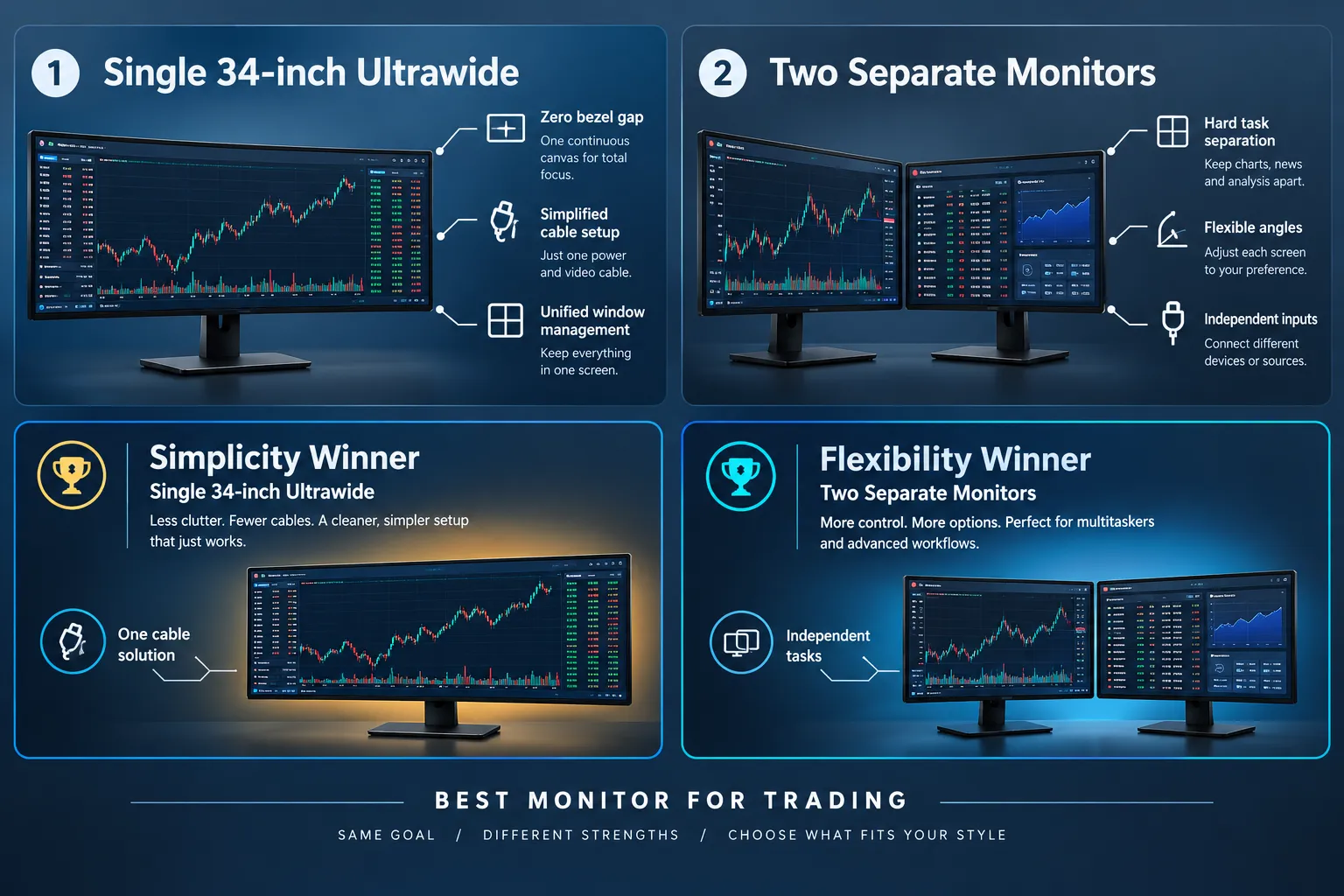
For most traders, one 34-inch ultrawide beats two separate monitors on simplicity, and two separate monitors beat one ultrawide on flexibility. Neither one is universally correct, and anyone telling you otherwise is selling something.
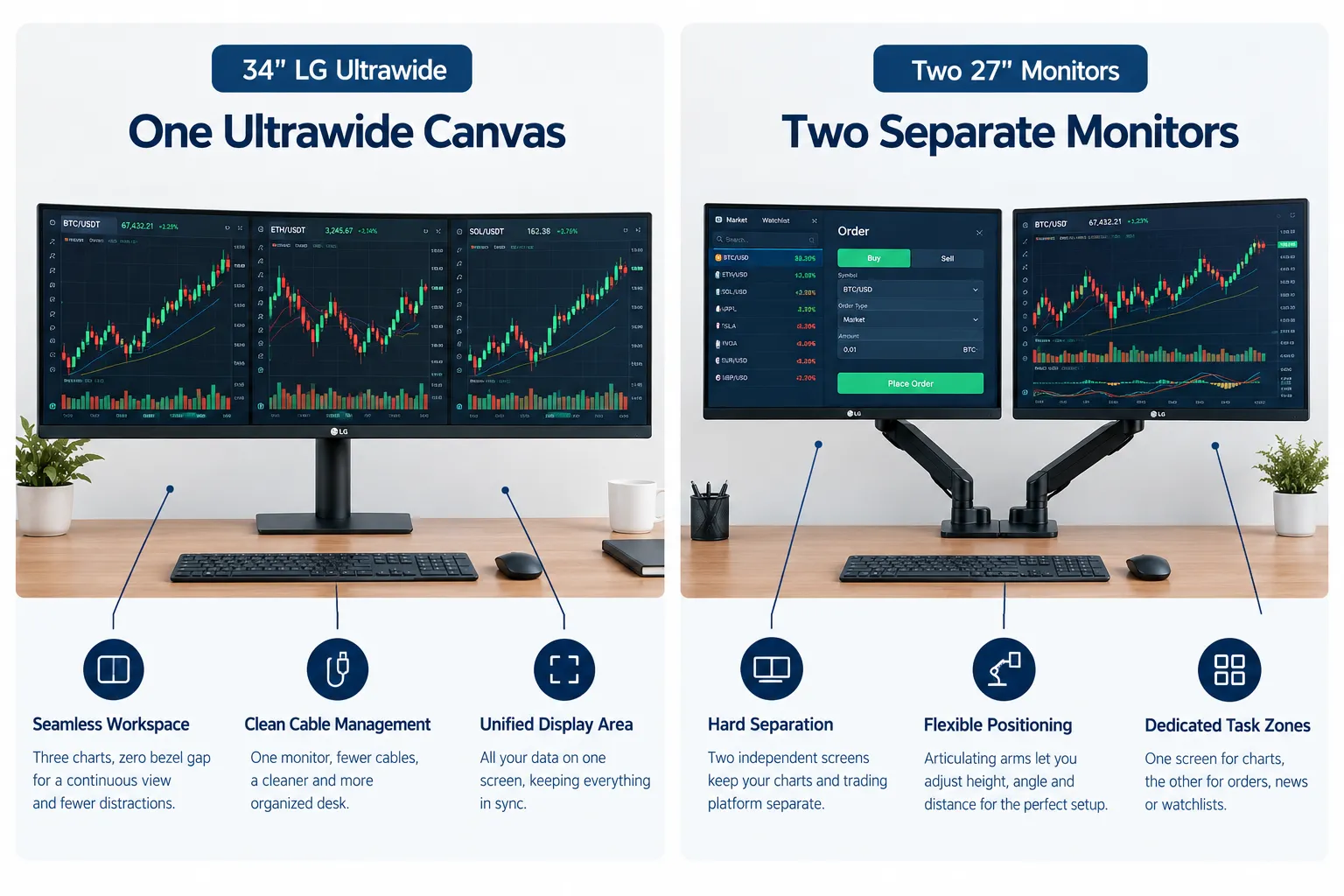
An ultrawide gives you a single canvas. No bezel gap splitting a chart down the middle, no dead space, one cable, one stand, one less thing cluttering the desk. Updated lists of the best monitors for day trading keep landing on the same conclusion: for chart-heavy workflows, a single ultrawide strikes the best balance of workspace and desk cleanliness, according to reviews from Digital NPQ, WhoIsMcAfee, and DogNotebook.
Two monitors win when your workflow actually needs hard separation. Keep your broker's order entry full-screen on one display, charts and news on the other, and you never risk fat-fingering a trade because a chart window popped over your ticket. Day Trade Depot and the trading-hardware breakdown on Alibaba's trading guide both note that dual setups also let you rotate one screen vertically and keep working if a panel dies mid-session. An ultrawide that fails takes your whole rig with it.
Choose the ultrawide if:
- You want one clean setup with minimal cables
- Your charts and watchlist can share one continuous canvas
- Desk space is tight and a second stand won't fit
Choose two screens if:
- You need your order window physically separated from your charts
- You run a coding or backtesting window alongside live charts
- You want redundancy if one display dies during power hour
Do you really need an ultrawide monitor for trading? Not always. If your strategy is three charts and a watchlist, two 27-inch monitors handle that fine for less money. The ultrawide earns its price when you're tired of window-snapping fifteen times a session.
How Many Monitors Does a Trader Actually Need?
Most traders need two monitors, not four, not six. The best monitor for trading is usually the second one, not the sixth. That's not an opinion, it's what practical trading-hardware breakdowns keep landing on when they strip out the flex-desk photos and look at actual workflow.
Two screens cover the two jobs almost every trader has: watching price and managing the order. A third or fourth screen adds comfort for people juggling many correlated instruments, like a forex trader watching eight pairs or an algo trader running code, logs, and live charts in separate zones. But comfort is the word. Day Trade Depot's breakdown and the Alibaba trading hardware guide both frame the choice as workflow and desk space, not some universal number that applies to every trader.
Here's the line worth remembering: screens don't make you money, your process does. A trader running a clean setup on one 27-inch monitor with tight risk management will out-earn a six-monitor rig run by someone revenge trading after a red morning.
A quick rule of thumb:
What Specs Actually Matter for Trading Charts?
For the best monitor for trading, refresh rate, resolution, response time, and color accuracy matter more than raw size or a flashy curve. Get those four right and the rest is personal preference.

Refresh rate. Trading isn't competitive gaming, but 60Hz on a fast-moving five-minute chart feels sluggish once you've used a 100Hz or 120Hz panel. The LG 34WR55QK-B runs at 100Hz, and the Dell S2725QC hits 120Hz, both enough to keep scrolling price action smooth without the GPU demands of a 240Hz gaming panel.
Resolution. The 2026 sweet spot sits in two camps: 34-inch ultrawide at 3440x1440, or 27 to 32-inch 4K at 3840x2160. Interactive Brokers' TWS treats 2K as a minimum and 4K as recommended, so either path clears the bar. TradeStation's own guidance calls for 256MB of video memory for one monitor, 512MB for two, and 1GB or more once you're running three or more displays, which is a reminder that resolution is a graphics card conversation too, not just a monitor one.
Response time. This is where VA panels like the one in the LG 34WR55QK-B show their one real weakness: motion blur on fast-scrolling tickers. IPS panels, like the one in the Dell S2725QC, respond faster and ghost less, which matters more than people think once you're staring at a one-minute chart during a breakout.
Color accuracy. Factory-calibrated color sounds like a cinephile's concern until you realize green and red candles are your entire signal. A panel with washed-out color turns "clearly bullish" into "squint and guess." IPS panels generally hold color better across viewing angles than VA panels, which matters if you sit slightly off-center for half the day.
Can you use a gaming monitor for trading? Yes, and plenty of traders do. A gaming monitor with a fast IPS panel, high refresh rate, and solid color accuracy checks every box a trading monitor needs. The only catch: gaming monitors sometimes skimp on ergonomic stands and USB-C power delivery, two things a trading desk actually uses daily.
When Does a Vertical or Portable Monitor Make Sense?
A vertical monitor for trading earns its spot when you're reading long lists, like Level 2 order books, news feeds, or a tall watchlist, and a portable monitor earns its spot when your trading setup has to travel. Neither replaces your main chart display.

Rotating a monitor 90 degrees turns a wide 16:9 panel into a tall column that's great for scrolling news, a long options chain, or a Level 2 ladder. It's a cheap way to add a dedicated "information" screen without eating desk width. Most monitor arms rotate freely, and prices for a solid arm on Amazon run from $37.48 up to about $199, so check the weight limit before you mount anything ultrawide-sized on a cheap one.
Portable monitors solve a different problem: trading from a laptop that only has one video output. You'd think you'd find a laptop with extra video outputs standard by now, but most still ship with a single HDMI port and maybe one USB-C that doubles as a video output. The KYY X90D gets around that with two 15.6-inch 1080p panels that stack onto a laptop screen over a single USB-C connection, running $212.49. The catch: it needs drivers, and some corporate or work laptops block third-party display drivers outright. Durability complaints also show up in buyer feedback, so this is a travel setup, not a permanent desk solution.
Best Monitor for Trading at a Glance
Here's how the four most common setups stack up side by side, spec for spec, so you're not guessing which category fits your desk.
Best Monitor Brands for Traders
Dell, LG, and Samsung show up the most often on best monitor for trading shortlists, and for good reason: they consistently ship IPS or VA panels with the refresh rates and USB-C power delivery traders actually use. Brand loyalty matters less here than panel type and port selection.
Dell's UltraSharp and S-series lines lean toward IPS panels with strong color accuracy and the ergonomic stands that make an eight-hour session survivable. LG's ultrawide lineup, including the 34WR55QK-B, is one of the more affordable entries into the 34-inch 21:9 category. Samsung's ultrawide and curved panel lines show up frequently in buying guides too, often praised for picture quality on the curved models.
On the computer side pushing those pixels, Intel and AMD both make processors that handle multi-monitor trading setups without issue at this point. Multi-monitor video output is now a graphics card question more than a CPU one, so check how many display outputs your computer's GPU actually supports before buying a third monitor. A dedicated breakdown of the best computer for day trading walks through what RAM, storage, and graphics specs actually matter if you're building or buying the box behind your monitors.
Budget Friendly Trading Monitor Setup
A budget day trading monitor setup does not need the best monitor for trading on paper. It needs the one you will use. The cheapest way to run multiple charts is a single 27-inch 4K monitor paired with your broker's free charting layout, and the second-cheapest is adding a basic second monitor on a $37.48 arm once you've outgrown that. You don't need a 49-inch super ultrawide on day one.
A realistic budget path, in order:
- Start with one monitor, even a 24-inch 1080p panel, and learn to use split-screen layouts inside your broker's software.
- Add a second monitor once you're consistently alt-tabbing or resizing windows mid-trade. A basic monitor arm starts around $37.48 on Amazon.
- Upgrade to 4K or an ultrawide once you know your actual workflow, not before.
How to set up dual monitors for trading, step by step:
- Mount both monitors on arms at the same height and distance from your eyes.
- In Windows display settings, arrange the monitors to match their physical position on your desk.
- Set your primary monitor to whichever screen holds your order entry window.
- Learn Windows' own shortcuts for moving windows between screens, including Windows key plus Shift plus an arrow key, so you're not dragging windows manually during a fast tape.
- Save the layout in your broker's software if it supports layout profiles, so a crash doesn't cost you your setup.
What Do Real Users Say About Trading Monitor Setups?
Ask buyers about the best monitor for trading and the Amazon feedback points in a consistent direction: the LG 34WR55QK-B earns strong marks for value at 4.6 stars across 244 ratings, while the Dell S2725QC holds 4.4 stars across 881 ratings with a smaller but real cluster of complaints about USB-C and Mac display dropouts. That volume gap matters. Dell's rating comes from more than three times the review count, which makes its 4.4 average a more reliable signal than a thinner dataset.
Eddie Z's YouTube walkthrough on setting up four monitors for trading has racked up nearly 54,000 views, which tells you plenty of traders are curious about scaling up their setup even if most never need to.
What Are the Alternatives to a Dedicated Trading Monitor Setup?
If a second monitor isn't in the budget yet, a single 4K laptop screen running a well-organized broker layout is a legitimate alternative, not a compromise you have to apologize for. Plenty of profitable swing traders run lean on purpose.
Realistic alternatives:
- A single high-resolution laptop screen. Fine for swing traders checking positions a few times a day, less fine for someone reading the tape in real time during power hour.
- A smart TV as a secondary display. Cheap per square inch, but refresh rate and input lag are usually worse than a dedicated monitor, and most TVs lack the stand flexibility a desk setup needs.
- Cloud-based trading terminals accessed from any device. Useful for traders who move between a laptop and desktop, though you're trading screen customization for convenience.
- A tablet as a third screen. Some apps support it, but it's a stopgap, not a long-term charting solution.
None of these replace a computer and monitor combination built for trading software that expects at least a 2K display, per Interactive Brokers' own TWS requirements. None of them is the best monitor for trading, and none has to be. They're fine starting points while you figure out what you actually need.
Additional Tips for a Trading Desk That Actually Works
The best monitor for trading is the one that disappears into the background so your attention stays on price action, not your hardware. A few small habits make a bigger difference than another screen ever will.
- Match monitor height to eye level, not desk height. A monitor sitting too low is the single most common ergonomic mistake traders make.
- Check your GPU's video output count before buying a third or fourth monitor. A graphics card with two outputs can't magically drive four screens.
- Keep your trading software's layout saved, so a Windows update or reboot doesn't cost you fifteen minutes rebuilding your watchlist mid-session.
Systems over hacks applies to hardware too. A clean two-monitor setup you actually understand beats a six-monitor flex rig you never fully configured.
Final Verdict: Best Monitor for Trading
The best monitor for trading comes down to one honest question: does your workflow need one continuous canvas, or does it need hard separation between tasks? Answer that first, then shop.
If the answer is "one clean canvas," the LG 34WR55QK-B at $344.99 gives you a 34-inch, 100Hz ultrawide with picture-by-picture support, good enough to split your own screen into chart zones without buying a second stand. If the answer is "I need my order ticket physically separate from my charts," a pair of Dell S2725QC monitors at $329.99 each, mounted on a dual arm, gives you 4K clarity and independent control over each screen. If you're trading from a laptop and need to travel, the KYY X90D at $212.49 turns one laptop into a three-screen setup, drivers permitting.
None of these choices will out-earn a trader with a system over one with a nicer desk. Screens add comfort. Process adds edge. Get the hardware that fits your actual workflow, then go build the process that actually matters.
Stuck choosing between a screen upgrade and a tool upgrade?
A bigger monitor shows you more charts. It doesn't tell you which ones to watch. See the day trading tools built for that job.
FAQ
Can you make $1000 a day with day trading?
Technically yes, with a large enough account and enough volatility on a given day. Realistically, it's rare and inconsistent. Daily results swing wildly with market conditions, position sizing, and risk management, and most traders chasing a fixed daily dollar target end up overtrading to hit it. Consistency beats a number you chase.
What is the best device to use for trading?
A desktop computer paired with at least one monitor, ideally two, handling software like TWS or TradeStation with enough RAM, SSD storage, and video memory for multiple chart windows. A laptop works for swing trading. Phones work for monitoring, not for active execution during fast, choppy tape.
What is the best 4-monitor setup for trading?
A common 4 monitor setup for trading pairs two monitors side by side for charts, one for a broker's order entry window, and one rotated vertically for news or a Level 2 ladder. It needs a graphics card supporting at least four outputs and roughly 1GB or more of video memory, per TradeStation's own guidance.
Which monitor is best for trading?
For most traders, the LG 34WR55QK-B ultrawide at $344.99 or a pair of Dell S2725QC 4K monitors at $329.99 each cover the two most common workflows: one continuous canvas versus hard task separation. The right pick depends on whether you need your order window physically separated from your charts.
Which screen is better for trading?
An IPS panel generally beats a VA panel for trading because it responds faster and holds color better at an angle, which matters when green and red candles are your main signal. VA panels, like the one in the LG 34WR55QK-B, can smear slightly on fast-scrolling data.
Is a curved monitor good for trading?
Yes, a curved monitor for trading makes sense for ultrawide setups specifically. A curved 34-inch panel keeps the edges of a wide chart within a comfortable viewing angle, so you're not turning your head to see the far left or right of the screen. It's a comfort feature, not a performance one.
Is 4K worth it for trading?
It's worth it if you run multiple chart windows on one screen and want them sharp without scaling issues. Interactive Brokers' TWS recommends 4K, and a 27 to 32-inch 4K panel like the Dell S2725QC delivers that clarity. If you mainly run two or three charts max, 2K is often enough.
Do more monitors make you a better trader?
No. More screens add comfort and convenience, not an edge. A trader running a clean, well-practiced strategy on one monitor will consistently out-earn someone with six screens and no process. Hardware supports a system. It doesn't replace one.
Is a vertical monitor good for trading?
Yes, specifically for reading long lists like Level 2 order books, options chains, or a scrolling news feed. It's rarely your main chart display since most charting software is built for a wide layout, but as a secondary screen for dense data, a rotated monitor earns its desk space.
Prices, ratings, and availability on Amazon change fast, often faster than a Monday morning gap. Please check the official product page before you buy anything mentioned here.
This is education, not financial advice.
Your market edge starts with the right tool. Stay alpha.
This article contains affiliate links, and we may earn a commission if you make a purchase through them, at no extra cost to you.