AI Stock Screener | What Plain-English Screens Get Right and Wrong
An AI stock screener finds stocks fast, but it can't read your risk tolerance, your account size, or the fact that you keep chasing green candles at 3:50 pm. That's the whole story in one line, and most of the marketing around these tools conveniently skips it.
Quick Answer
An AI stock screener lets you type a plain English request, like "oversold tech stocks above their 200 day moving average," instead of clicking through 40 filter boxes. It's genuinely faster for research and genuinely bad at telling you when to buy, sell, or size a position. Treat it as a filter, not a signal, and you'll use it the way it's actually built to be used.
Quick pick: AI stock screener
- TradingView AI Screener: Best for chart-first traders who already live on TradingView. Starting price: $12.95/mo.
- Danelfin: Best for a free AI score before you commit any money. Starting price: $0.
- Intellectia AI: Best for credit-based deep dives on fewer names. Starting price: $11.96/mo.
Skip it if: you want a tool to pick stocks for you with zero review on your end.
Key Takeaways
- Seeking Alpha's Ask SA feature, highlighted by Investopedia in October 2026, lets investors type questions in natural language instead of building filters by hand.
- Shibui connects Claude or ChatGPT to a database covering 10,000-plus US stocks with price data back to 1962, a scale no manual filter stack can review by eye.
- ChartingLens pairs a backtesting engine with a plain English screener across more than 2,000 US stocks plus ten additional markets.
- TradeAlgo's TradeGPT uses NLP to read news, earnings calls, SEC filings, and social sentiment and turn it into a quantified signal.
- Danelfin runs a free tier at $0, a Plus plan near $22 a month, and a Pro plan near $59 a month, which puts real pricing pressure on anything calling itself an AI stock screener.
- A Trustpilot reviewer tracked 55 of Danelfin's top-rated picks and reported only 10 beat the market over three months, a reminder that a score is not a guarantee.
- Prospero's 2026 roundup ranks the field on whether a screener explains its picks, not just whether it finds them.
What is an AI stock screener and how does it work?
An AI stock screener is software that reads a plain English request, breaks it into filter logic behind the scenes, and hands you a ranked list of stocks that match. Think of it as a translator sitting between your words and a database of thousands of tickers.
Here's the mechanical part nobody puts in the app store description. A classic screener, like the free version of Finviz, makes you pick every field by hand: market cap, sector, RSI, volume, the works. An AI stock screener skips that setup. You type "cheap industrial stocks with rising revenue and low debt," and the model maps your sentence to the same underlying fields a manual screener would use.
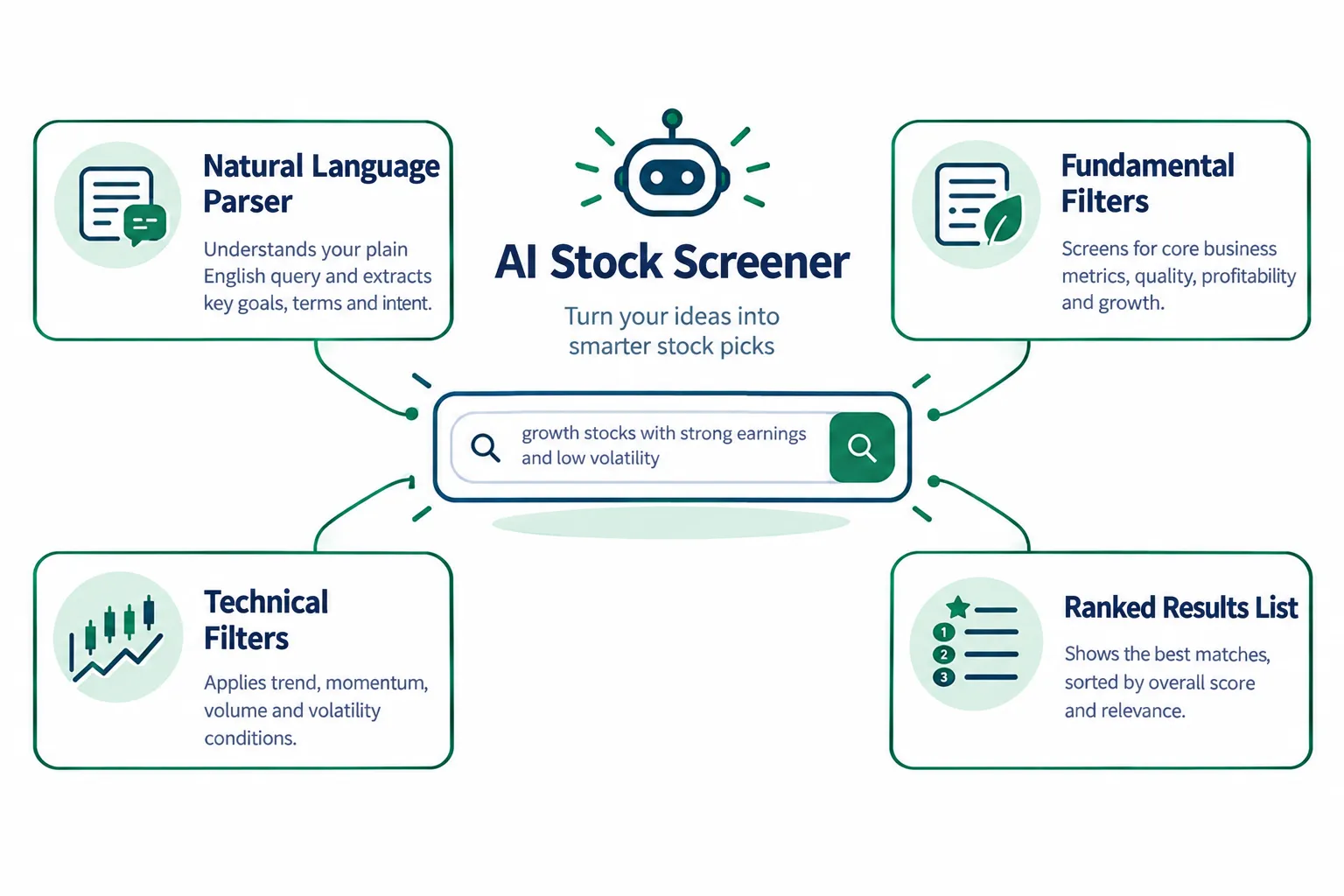
This isn't magic. It's natural language processing doing the tedious part of screening, the part where you'd otherwise spend ten minutes clicking dropdowns before you even see a result. Prospero.ai describes the shift this way: the screener now reads primary sources like filings and transcripts and explains why a stock qualified, which is a step past the old rule-only filter model. If you want the fuller picture of where AI helps and where it quietly guesses, our breakdown of AI for stock market research covers the research side of this same problem.
Practical takeaway: judge the tool by what filters it actually applied under your sentence, not by how smooth the sentence felt to type.
AI stock screener: how do plain-English screens work?
Plain English screens work by converting your sentence into structured filters, then running those filters against market data the same way a traditional screener would, just without you touching the dropdowns. The output looks conversational. The engine underneath is still math and data.

MarketInOut's screener takes a request like "oversold technology stocks above their 200 day moving average with strong revenue growth" and maps it to technical indicators, price action, chart patterns, and fundamentals in one pass. Shibui goes further. It connects a chat model directly to historical data covering 56 technical indicators and more than 31 million daily prices, which means you can ask something layered, like "companies that raised guidance twice in the last year and outperformed the S&P 500 after earnings," and get an actual answer instead of a shrug.
VestAI's tools do something slightly different and more useful day to day. Ask "is NVDA overbought right now" and you get a structured answer covering price action, RSI, MACD, moving averages, and support and resistance in one response, according to VestAI's own comparison. That's a screener acting like a research assistant instead of just a filter.
The market truth: conversational input changes how fast you get to a list. It does not change whether the list is right for your account size or your risk tolerance.
AI stock screener vs. traditional stock screener: what's the real difference?
The real difference is setup time and explanation, not accuracy. A traditional screener like Finviz's free tier gives you raw, fast, unopinionated filters. An AI stock screener gives you the same fields, dressed in a sentence, plus a reason attached to each result.
| Feature | Traditional screener | AI stock screener |
|---|---|---|
| Setup | Manual filter selection, every field | Type a sentence, filters built for you |
| Speed to first result | Fast once configured | Fast immediately, slower to trust |
| Explanation | None, you infer the logic | Often includes a stated reason |
| Learning curve | Steep (dozens of fields) | Shallow (plain language) |
| Risk of hidden logic | Low, you built it | Higher, the mapping is opaque |
The catch, and it's a real one: a plain English screen can quietly misfire. Several 2026 reviews, including ones from ChartingLens and Shibui, recommend pairing a natural language query with a look at the exact filters the system actually generated, because casual phrasing doesn't always map to precise logic the way you assumed it would.
Decision rule: choose the AI version if you don't know the 40 filter names yet. Choose the classic version if you already know exactly what you want and don't need the translation layer.
What do plain-English AI stock screeners get right?
They get discovery right. A plain English AI stock screener turns a vague idea, "cheap stocks with momentum," into an actual list in seconds, which used to take a working knowledge of a dozen ratios.
A few things these tools consistently nail:
- Speed to a first draft list. You skip the filter-building step entirely.
- Multi-factor and multi-period requests. Asking for something that spans two earnings seasons, like a guidance raise followed by outperformance, used to require a spreadsheet. Shibui's model handles it in one line.
- Narrative context attached to a number. VestAI and Prospero both return a short explanation with the match, not just a bare ticker.
- Lower intimidation for a first-time user. You don't need to know what "RSI" stands for to ask for an oversold stock. (Quick definition: RSI, or relative strength index, measures how fast and how far a stock has moved recently, on a 0 to 100 scale.)
Why it's better than the rest of the old filter-only crowd: it removes the learning curve that used to keep beginners away from screening entirely. That's a real improvement, not a marketing line.
Practical takeaway: use the plain English version for the first pass. Use the generated filter list as your second check.
Where do AI stock screens get it wrong?
They get it wrong when the sentence you type doesn't map cleanly to the filters the system builds, and you never check the gap. A screener that silently guesses at your intent is worse than one that forces you to pick every field, because at least the manual version shows its work.
Here's where this breaks down in practice. You ask for "strong momentum stocks" and the model decides that means a 20 day price change above some threshold it picked. You wanted something closer to relative strength against the sector. Same words, different filter, different list. Nobody flags the mismatch unless you go looking.
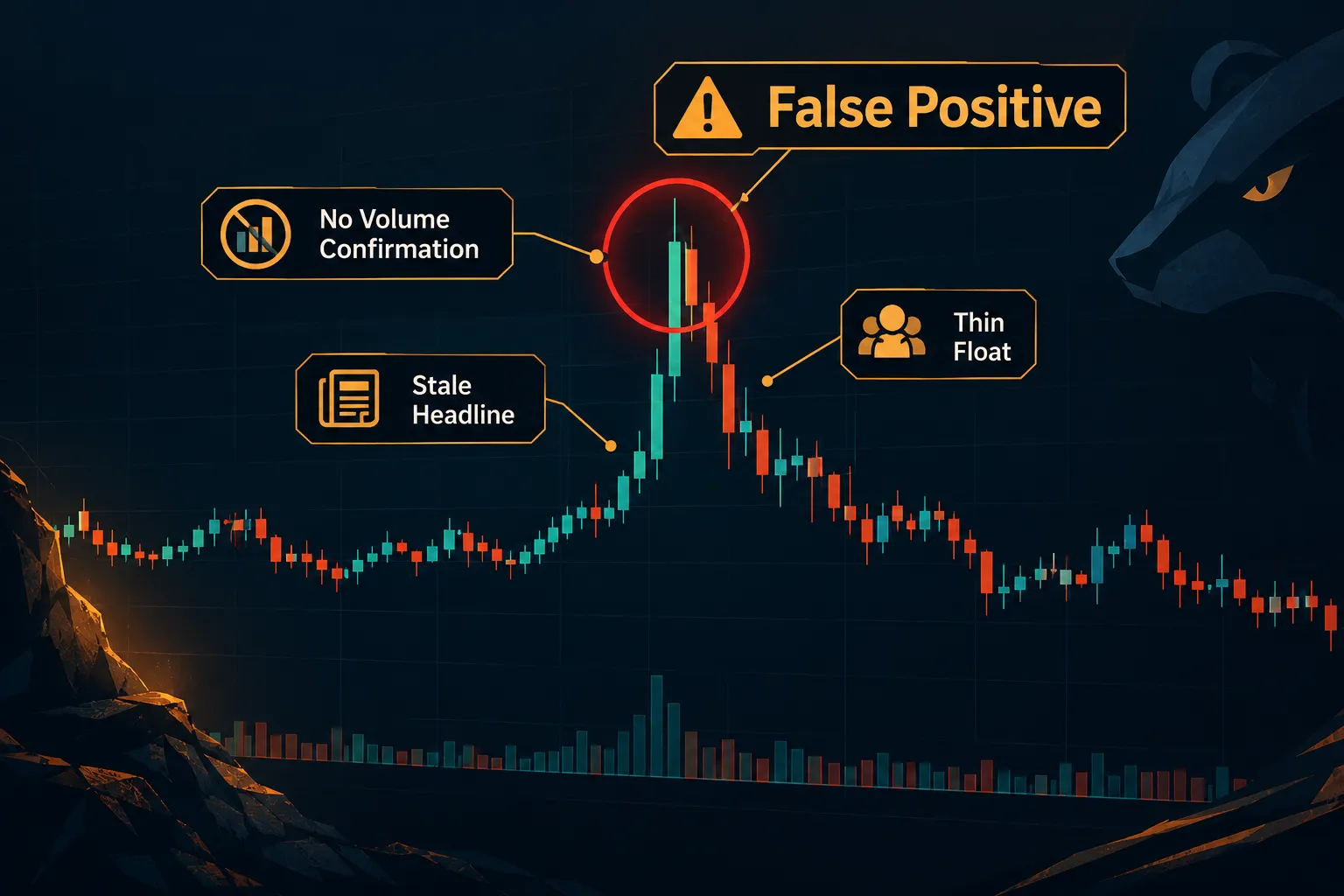
AI stock screener false positives and how to avoid them
A false positive happens when a stock clears the screen's logic but fails the thing you actually cared about, like volume confirmation or a real catalyst. Low float penny stocks are a classic trap here. They pop on thin volume, trigger a momentum filter, and look like a breakout when it's really just a choppy tape with nobody behind it.
To avoid getting burned:
- Open the generated filter list every time, don't trust the sentence alone.
- Check volume against the average, not just price change.
- Cross-reference the pick against a second data source before you act.
- Treat any result tied to a single news headline as unconfirmed until the next session's price action agrees.
Systems over hacks. A screener is a filter, not a verdict.
How accurate are AI stock screeners, really?
Nobody publishes a universal accuracy number for AI stock screener tools because "accuracy" depends entirely on what you asked it to find. The honest answer is: accurate at matching stated criteria, unproven at predicting what happens next.
Danelfin is the clearest example of this gap. A Trustpilot reviewer reports testing 55 of its top-rated picks and found only 10 beat the market over three months. That's not a condemnation of the tool's filtering logic, which did exactly what it claimed, surfacing stocks that scored well on its model. It's a reminder that a high score describes the present, not the next quarter.
Market truth: accuracy in screening means "it found what matches the criteria." It does not mean "it found what will go up." Confusing the two is how beginners end up overconfident on their first trade.
AI stock screener free vs. paid: what you actually get (and what it costs)
Free tiers get you a usable screener with limits on depth, history, or query volume. Paid tiers add more credits, more market coverage, or more advanced filters, and the jump in price varies wildly by product.
A quick look at what's confirmed:
- Danelfin: Free at $0, Plus near $22/mo, Pro near $59/mo.
- TradingView Essential: $12.95/mo billed annually, and the AI screening layer on top typically needs that paid tier, per a viewer comment on a walkthrough of the feature.
- Intellectia AI: plans from roughly $11.96/mo up to $71.96/mo, credit-metered, with 400 one-time free credits to start.
- Classic Finviz: free, and still the non-AI baseline most of these tools get compared against.
A plain English screen is only as good as the fields behind it, so before you pay anything, open the filter list the tool actually applied and confirm it matches what you asked for. If a price can't be confirmed on a vendor's own page, like Gimli's current plan structure, check the official pricing page directly rather than trust a secondhand number.
Decision rule: start free, confirm the tool finds what you actually want, then pay only for the specific gap the free tier can't close.
Can you actually make money with an AI stock screener?
A screener can shorten your research time, but it cannot make you money by itself, because finding a candidate and managing a position are two different skills. The money comes from your entry, your exit, your position sizing, and your discipline, not from the list the screener handed you.
Think of it like a gym app that builds your workout plan. A good plan matters. It still doesn't lift the weight for you. Process over prediction: a screener narrows 3,000 stocks to 15. What you do with those 15, the stop loss, the risk-reward, the position size, is the part that actually decides the outcome.
Practical takeaway: paper trade it first. Run the screener's picks through a simulated account for 30 days before any of it touches real money.
Is an AI stock screener better than doing your own research?
An AI stock screener is better than doing filter-by-filter research manually, but it's worse than your own judgment once a stock clears the list. It replaces the grunt work, not the decision.
Reading a 10-K, checking a chart's support and resistance, confirming a setup isn't overextended, that's still on you. The screener just gets you to a shorter list faster. If you want the tool that handles the document-reading side specifically, see how an AI stock research tool built to read 10-Ks fits into the same workflow.
Market truth: a screener answers "what matches." Your own research answers "what's actually a clean setup." You need both.
AI stock screener for day trading vs. long-term investing
Day traders need a screener that's fast and current, built for intraday volume and gap plays. Long-term investors need one that's thorough on fundamentals, built for dividend consistency or multi-year growth, not minute-by-minute price action.
- Day trading / scalping: speed matters more than depth. You want low float scanners, volume spikes, and a tool that flags the breakout the moment it happens, not four minutes late.
- Swing trading: you want tight consolidation and basing patterns flagged, with enough lookback to judge if a setup is clean or just noise. Our stock screener built for swing trading goes deeper on this specific use case.
- Dividend investors: you want payout ratio, dividend growth streak, and debt coverage front and center, which is a different filter set than growth screens entirely.
- Growth investors: revenue acceleration and margin trend matter more than yield.
Decision rule: match the screener's refresh speed to your holding period. A tool built for power hour scalps is overkill, and often a bad fit, for someone holding a position for six months.
How to use an AI stock screener effectively
Use an AI stock screener as the first filter in a repeatable process, never as the final word on a trade. Type the request, review the generated filters, then run your own checklist before a single dollar moves.
A clean five-step loop:
- Write the plain English request with specific numbers, not vague adjectives. "Revenue growth above 15%" beats "strong growth."
- Check what filters the tool actually built from that sentence.
- Pull the top five results onto a chart and look for a clean setup, not just a matching score.
- Confirm volume and a real catalyst before adding anything to the watchlist.
- Set your entry, stop loss, and position size before you act, not after.
The trend is your friend, but only after the screener's list survives your own checklist. Skipping step two is the single most common shortcut that turns a good tool into a bad habit.
Common mistakes people make with AI stock screeners
The most common mistake is treating the screener's output as a recommendation instead of a starting list. A second close second: never checking the filters the AI actually generated from your sentence, which is how false positives sneak through.
Other recurring ones:
- Overtrading the results. Running the same query every ten minutes and chasing every new name that appears is a fast path to revenge trading your own account.
- Ignoring position sizing entirely. A screener ranks stocks. It doesn't size your trade.
- Catching a falling knife. A screen built around "oversold" can surface a stock that's oversold because it's broken, not because it's cheap.
- Analysis paralysis from too many tools. Six screeners open at once produces six slightly different lists and zero decisions.
Fix: pick one screener, run it the same way every session, and let a 30-day log of outcomes argue back before you add a second tool.
Which AI screeners are worth trying first for beginners?
The best starting point for a beginner is whichever tool has a real free tier, since that lets you test the plain English matching before paying for anything. Danelfin's free plan and classic Finviz filters are the two lowest-risk starting points on the list below.

Comparison table
| Screener | How you query it | Market coverage | Main drawback | Price |
|---|---|---|---|---|
| TradingView AI Screener | Plain English prompt inside TradingView | Broad, global tickers on TradingView's charting platform | AI screening layer generally requires the paid tier, per user comments | $12.95/mo (Essential, annual) |
| Gimli | Natural language screener, conversational query | Currently India-focused; US coverage unconfirmed | One user reported a query response that "never returned" | Unconfirmed, check official site |
| Intellectia AI Screener | Credit-metered natural language queries | See vendor site | Credit system draws complaints as a steep paywall | From $11.96/mo |
| Danelfin | AI score plus plain language filters | See vendor site | Only 10 of 55 top picks beat the market over 3 months per one Trustpilot report | Free, Plus near $22/mo, Pro near $59/mo |
| Classic Finviz filters | Manual dropdown filters, no natural language | Broad US equities, free tier | No AI interpretation, you build every filter by hand | Free |
A fuller rundown of how these manual fields stack up against the newer natural language layer is in our AI stock screeners vs. the old filters guide, and if you want to see the manual version configured well before you compare, our Finviz screener settings walkthrough is worth the ten minutes.
What do real users say?
Real user feedback on these tools skews toward two complaints: paywalls and reliability, with almost nobody complaining about the plain English input itself. That split is the most useful signal in the whole category.
On TradingView's natural language screening, one viewer on a walkthrough video noted bluntly that "one need to have paid version" to get the full feature. On Gimli's conversational screener, a viewer identified as @aab9502 wrote, "I asked below query to GIMLI and response never returned." And on Intellectia AI, an iOS reviewer put it plainly: "Outrageous Paywall:: You'll get more use out of the basic TradingView plan."
None of those three complaints are about the English-to-filter translation failing. They're about cost and uptime, which tells you the natural language layer itself is the least broken part of this category right now.
What are the alternatives?
If you are really asking for the best stock screener with no AI attached, the answer is still a boring one. If a dedicated AI stock screener feels like overkill, the alternative is a broker-native screener plus a manual filter tool, which costs nothing extra if you already have a brokerage account. Webull bundles a free screener into its trading app, and it covers the basics: market cap, sector, volume, and simple technical filters, without any conversational layer.
Other paths worth knowing about:
- Broker-native tools. Webull's screener, like most broker-native options, trades natural language for zero extra cost.
- Manual screeners. Classic Finviz remains the free, no-frills baseline every AI tool gets measured against.
- Full research platforms. Tools built around options flow, sentiment, or scanning can go deeper than a screener alone; see our breakdown of what options flow actually shows if options are part of your process.
- Scanner-style tools. A screener (or scanner, same idea, different marketing word) built for intraday speed is a different animal than one built for quarterly fundamentals; our AI stock scanner breakdown covers that distinction directly.
Final Verdict
An AI stock screener earns its place in your process when you use it to shrink 3,000 tickers into 15 worth a second look. It does not earn a place as the thing that decides your entry, your stop loss, or your position size. Discipline beats prediction, every time, and no plain English sentence changes that math.
The category has genuinely improved. Setup time is down, explanations are up, and beginners no longer need to memorize 40 filter names to run a decent first pass. What hasn't changed: the gap between finding a stock and managing a trade is still entirely yours to close.
Stop guessing which screener fits how you actually trade. We sorted the field by strategy, price, and what each tool actually does: see the AI stock screener shortlist.
Prices, plans, and credit limits change on vendor sites more often than their marketing emails admit, so confirm the current number before you pay for anything.
FAQs
What is the best AI stock screener?
There's no single best one, it depends on your style. Chart-first traders tend to prefer TradingView's AI Screener near $12.95/mo. Beginners wanting a free first look often start with Danelfin's $0 tier. Credit-based deep research favors Intellectia AI. Match the tool to your account size and your holding period, not a ranking list.
Is there an AI that can read stock charts?
Yes. Tools like VestAI and TrendSpider's Sidekick AI read a chart and return a structured summary covering price action, RSI, MACD, moving averages, and support and resistance in plain English. They explain what a chart shows; they don't predict what it does next. Always confirm the read against your own eyes before acting.
What is the best free stock screener?
Classic Finviz remains the strongest fully free option for manual filtering across US equities. For a free AI-assisted layer, Danelfin's $0 tier gives you an AI score without a credit card. Neither includes the full feature set of their paid tiers, so expect limits on history, depth, or query volume.
Is there a free AI stock screener?
Yes, several offer a genuine free tier. Danelfin runs a $0 plan with AI scoring included. Intellectia AI gives 400 one-time free credits before its paid plans kick in. Treat any free tier as a test drive: confirm it finds what you actually need before paying for the upgrade.
Are AI stock screeners accurate?
They're accurate at matching the criteria you stated, which isn't the same as predicting future performance. A Trustpilot reviewer tracked 55 of Danelfin's top-rated picks and found only 10 beat the market over three months. The filter logic worked; the market didn't cooperate. That gap is normal, not a defect.
Can ChatGPT screen stocks?
Not on its own with live market data, but tools built on top of it can. Shibui connects Claude or ChatGPT to a database covering over 10,000 US stocks with history back to 1962, letting you ask layered plain English questions the base chatbot alone couldn't answer without that connected data.
Can AI suggest stocks to buy?
AI tools can surface candidates that match stated criteria and explain the reasoning, but "suggest" shouldn't be confused with "recommend." No AI stock screener can account for your account size, risk tolerance, or timeline. Treat every AI-generated list as a research starting point, never as personalized investment advice.
How to earn $5000 per day from the stock market?
There's no reliable, repeatable method that guarantees a fixed daily dollar amount from trading, and any claim promising otherwise should raise a flag immediately. Consistent results come from risk management, position sizing, and a tested process over time, not a daily dollar target. Anyone promising guaranteed daily income is selling a story, not a system.
This is education, not financial advice.
Your market edge starts with the right tool. Stay alpha.
This article may contain affiliate links; FullStack Alpha may earn a commission at no extra cost to you.