DAS Trader vs TWS vs TradeStation | Day Trading Hotkeys Compared
DAS Trader wins on hotkey depth, and it isn't close.
Quick Answer
DAS Trader vs TWS vs TradeStation | Day Trading Hotkeys Compared ends in one sentence: DAS Trader Pro is the only one of the three with a scripting language inside the hotkey, so one keystroke can size a position by dollar risk, send the order, and attach the stop. IBKR TWS and TradeStation both give you real speed keys (close position, cancel all orders, reverse), but they're fixed actions, not scripts. If you scalp low float movers, DAS. If you trade a few clean setups a day, TWS is free and good enough.
Quick pick: day trading hotkeys
- DAS Trader Pro Best for scalpers who need scripted risk sizing. From $125/mo at Cobra Trading.
- IBKR TWS Best for cost-conscious traders wanting solid speed keys. Platform free.
- TradeZero ZeroPro Best for small accounts wanting attachable hotkeys. From $59/mo.
Skip it if: you place fewer than five trades a week. Hotkeys solve a speed problem you don't have yet.
Key Takeaways
- DAS Trader Pro chains commands with semicolons, and Advanced Hotkeys with variables and loops arrived in version 5.8.1.6, documented in the DAS hotkeys and hot buttons knowledge base.
- The default panic key, Shift plus Esc, flattens open positions with market orders per DAS hotkey documentation.
- IBKR TWS hotkeys cover Close Position, Cancel All Orders, Add Auto Stop Order and Add Trailing Stop Order, listed in the TWS hotkeys reference. No scripting language inside them.
- TradeStation maps Close position, Cancel all orders and Reverse to keys, plus command line macros, per TradeStation's hot keys help page.
- Cost spread is wide: DAS runs $125/mo at Cobra Trading (waived at 200,000 shares a month), TWS is free, ZeroPro is $59/mo, Lightspeed Trader is $130/mo plus $25 data.
- DAS is Windows only, with a published minimum of a Core 2 Duo 2GHz and 4GB RAM. The rest of the setup detail sits in the DAS user guide and manuals.
Which platform has the best day trading hotkeys?
DAS Trader Pro has the deepest day trading hotkeys of the three, because its keys hold scripts instead of single actions. TWS and TradeStation win on breadth of platform and price, not on execution depth.
Here's the practical split:
- DAS Trader Pro: one key can read your account, calculate share size from a fixed dollar risk, send a limit order at a price offset, and attach a stop. Script examples are published by brokers like RizeTrade's DAS hotkey script library.
- IBKR TWS: fast, reliable, fixed. Great for closing a position or killing every working order. Nothing conditional. IBKR's lesson on configuring TWS hotkeys shows the ceiling.
- TradeStation: keyboard mapping plus command line macros, so you get repeatable order entry, but quantity moves by spinner increments, not by risk math.

Decision rule: if your edge depends on being flat in under a second on a low float runner, you want DAS. If your edge is a clean setup you planned an hour earlier, free beats scripted.
What is DAS Trader and how does it work?
DAS Trader is direct market access trading software licensed through day trading brokers, built around a Montage order entry window, a Level 2 depth ladder, and a programmable hotkey engine. You don't buy it from DAS directly in most cases. You get it as a platform add-on from your broker.
Everything flows from the Montage: price, share size, route. Get the price Montage settings wrong and the hotkey sends the wrong order, which is why the order entry window matters more than the chart. DAS Trader level 2 data feeds that Montage, and the depth ladder is what scalpers are actually paying for. The full feature documentation lives in the DAS support knowledge base.
DAS Trader system requirements and setup
Windows only, and the published minimum is modest: a Core 2 Duo 2GHz processor with 4GB RAM on the DAS hardware requirements page. Real-world setups run far above that. Most traders install, then spend an evening laying out Montage, charts, and time and sales before writing a single hotkey. Please do the layout first. Hotkeys on a messy desktop just make mistakes faster.
Does DAS Trader have a mobile app or is it desktop only?
DAS Trader Pro is a Windows desktop platform. Brokers offering DAS also offer web and mobile front ends for position checks, but scripted hotkeys and the Montage are desktop features. If you want phone-first trading, see our rundown of the best stock apps for day trading instead.
DAS Trader: how do its hotkey scripts work?
DAS hotkeys work by chaining short commands with semicolons into one string, which the platform runs top to bottom when you hit the key. That's the whole trick, and it's why DAS Trader hotkeys can do things TWS keys can't.
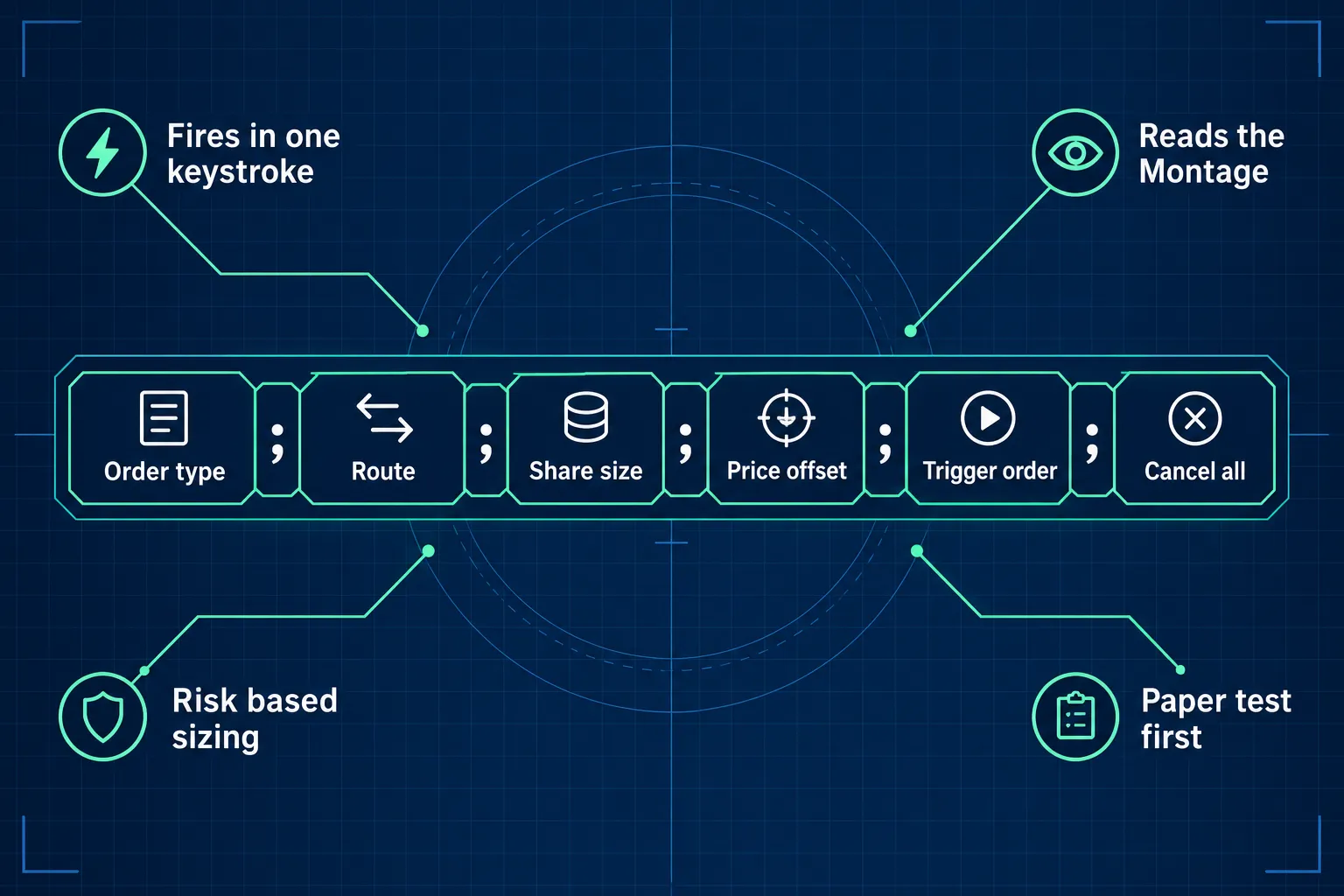
| Command type | What it does |
|---|---|
| PANIC | Flattens open positions with market orders (default Shift plus Esc) |
| CXL ALLSYMB | Cancels all working orders on the symbol |
| TriggerOrder | Builds an OTO order, so the stop attaches after the entry fills |
| Route, share, price offset | Order fields set inside the same string |
Dynamic dollar-risk sizing scripts (set a stop distance, let the script solve share size) are documented by brokers and traded around the community. A plain-English breakdown sits in this glossary entry on DAS Trader hotkeys.
Prerequisites before you build an exit hotkey
Four things, in order:
- A funded or simulated account on DAS Trader Pro with Level 2 enabled.
- A locked Montage layout, so share size and route don't drift between sessions.
- A written risk rule. Position sizing is the input your script needs.
- A read through DAS's own hotkey walkthrough so the syntax is yours, not copied blind.
The universal EXIT hotkey and what it does
A universal exit hotkey does two jobs with one keystroke: cancel every working order on the symbol, then flatten the position. In DAS that's a cancel command chained to a close command, which is why traders call it the one key you can hit while panicking.
And it doesn't care about your chart. Use any timeframe chart you like, one minute or daily, because the script reads position size, not candles.
How to call the exit hotkey from an alert or a script
If you want the exit to fire from a condition rather than a keystroke, that lives on the alert side of the platform, in the MyAlert window, where a price trigger can call a script. Syntax here changes between builds, so confirm against current DAS release notices and the hotkeys and hot buttons category before you trust a MyAlert chain with real money.
The limits
Scripts fire what you typed, not what you meant. A share size left over from a $4 stock will happily buy the same size in a $180 name. DAS also can't fix a thin book: a market exit in a wide spread fills where the liquidity is, not where the price was. And a MyAlert trigger still needs the platform open and connected.
How do you set up DAS Trader hotkeys and test them safely?
Build one hotkey, paper test it for a week, then add the next. Traders who wire fifteen keys in one night are the ones posting screenshots of accidental 2,000 share fills.
- Open the hotkey config from the Montage, add a line, name it plainly (SELL HALF, EXIT ALL).
- Paste the script, save, and assign a key you won't hit by accident. Never put EXIT next to BUY.
- Run it in simulation at least twenty times, including a partial fill and a fast tape.
- Print the key map and tape it to your monitor for two weeks.
Our longer build guide covers the exact strings most traders start with: DAS Trader hotkeys explained. If your fingers keep missing, a labelled deck helps more than another script, and we covered that in Stream Deck for trading.
How do TWS and TradeStation hotkeys compare?
TWS and TradeStation both give you real hotkeys, just action-based instead of script-based. You pick a function from a list and bind it to a key. That's fast and predictable, and it's also the ceiling.
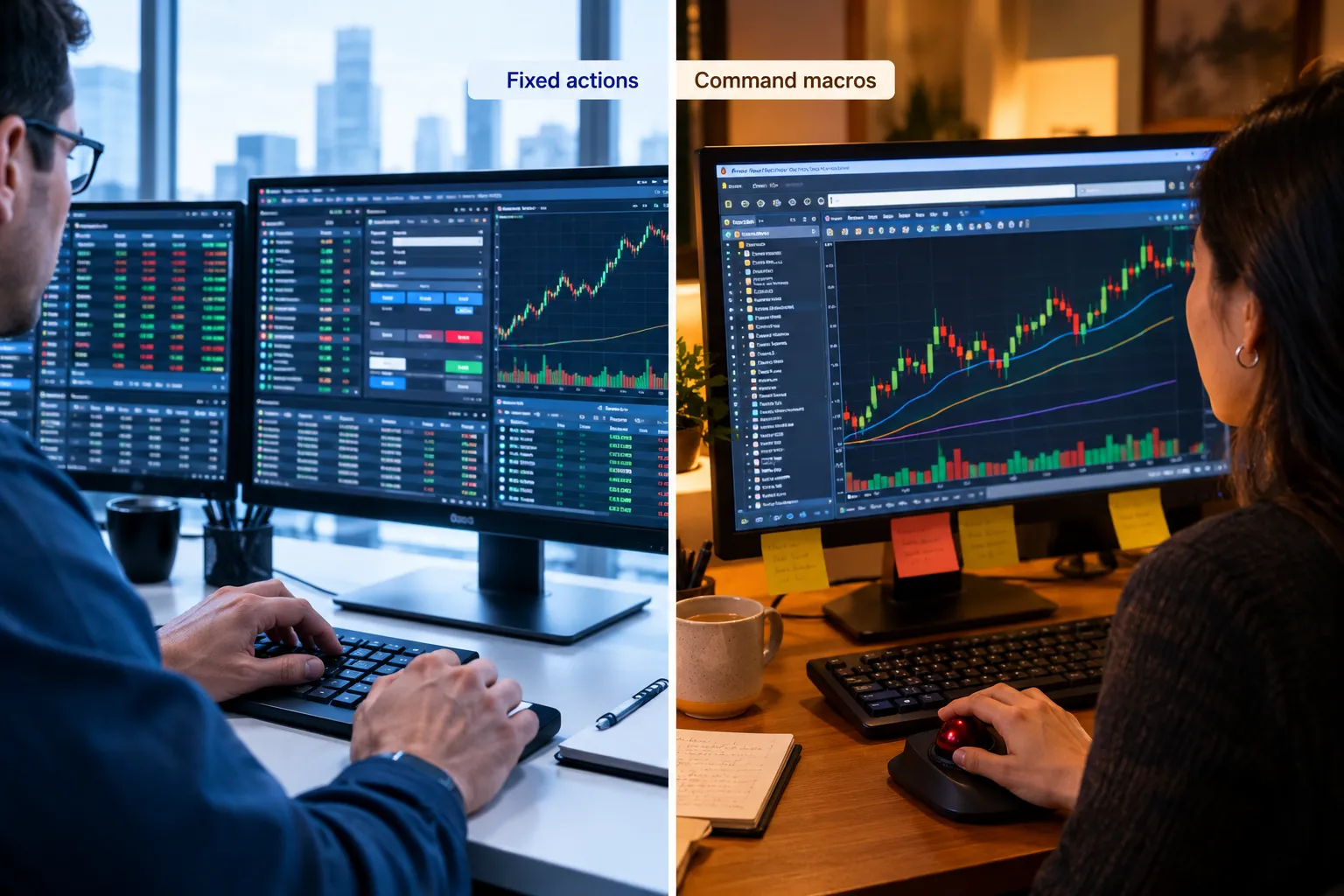
IBKR TWS covers Close Position, Cancel All Orders, Add Auto Stop Order, Add Trailing Stop Order, plus keys that increase or decrease price or size. There's no scripting language inside a hotkey and no native risk-based sizing key, which the TWS hotkey action list makes clear. DAS Trader Interactive Brokers questions usually end the same way: you can't run DAS scripts on an IBKR account unless your broker licenses DAS.
TradeStation maps Close position, Cancel all orders and Reverse, and adds command line macros for repeatable entries, per the TradeStation keyboard mapping docs. Quantity moves by spinner increments, so there's no DAS-style risk script. For a DAS Trader vs tradestation hotkey comparison, DAS wins the scalp, TradeStation wins the strategy automation.
DAS Trader vs thinkorswim: thinkorswim is free, has strong charting and options tools, and its keyboard shortcuts are nowhere near DAS. For sub-second exits, it's not the same category.
How much does each platform cost per month?
DAS Trader Pro cost depends on your broker, not on DAS. At Cobra Trading it's $125 a month, waived at 200,000 shares a month, with data at $20 (Basic, non-pro) or $70 (Advanced, non-pro). TWS is free. Prices move, so confirm on the broker's own pricing page.
| Platform | Flatten key | Cancel all | Risk sizing | Scripts | Monthly cost |
|---|---|---|---|---|---|
| DAS Trader Pro | Yes (PANIC, Shift+Esc) | Yes (CXL ALLSYMB) | Yes, scripted | Yes | $125 at Cobra, waived at 200k shares |
| IBKR TWS | Yes (Close Position) | Yes | No | No | Free |
| TradeStation | Yes (Close position) | Yes | No | Macros only | See TradeStation's pricing page |
| TradeZero ZeroPro | Yes | Yes | No | 16 attachable hotkeys | $59, free after 100k shares |
| Lightspeed Trader | Yes | Yes (ESC) | Limited | Programmable keys | $130 minus commissions, plus $25 data |
On DAS Trader pro vs lightspeed: Lightspeed's programmable keys are genuinely quick and ESC cancels all orders, but the script depth isn't DAS. On "DAS Trader free," there isn't a free tier. Simulator access comes through your broker.
How do you export trades from DAS Trader Pro into TradeZella?
There's no live sync, so you move data into TradeZella using file upload. The file upload method DAS traders use starts in the Trades window and ends with a CSV.

Login to DAS Trader Pro and access the Trades window
Log in to your live or simulated account, then open the Trades window from the main menu. Trade history is session-based in some broker builds, so pull the file at the end of each day rather than hunting a month later.
Configure the columns, then export to CSV
Right-click the column header and add symbol, side, share quantity, price, date and time. Then export to CSV. TradeZella says it connects to 500+ brokers, so look for DAS Trader Pro in its import list, upload the saved file, and map the columns.
Common errors on upload
Most failed uploads trace to two things: a column the journal does not expect, or a date format mismatch. Multiple fills on one order also import as separate trades unless you aggregate them. If the upload fails twice with the same message, open the raw file and look for a blank row at the bottom or a comma inside a number.
What do real users say about DAS Trader?
Sentiment in DAS Trader Reddit threads is split: traders love the scripts and complain about setup friction. One widely shared take on AI-written scripts, from u/Partnikl: "ChatGPT is absolutely capable to create functional DAS Hotkeys." The same thread also reports AI getting DAS syntax wrong, so paper test first.
Lag and troubleshooting: most reported DAS lag is upstream of DAS. Wifi, a loaded CPU, or too many charts on a one-minute refresh. Cut the chart count, go wired, and confirm your data package in the DAS manuals library. Terms of your market data subscription (pro vs non-pro) also change what you see.
What are the DAS Trader alternatives for day traders?
If DAS is too much platform or too much money, three alternatives cover most of the field. Check the broker's own page first: Cobra Trading publishes its DAS pricing.
- TradeZero ZeroPro at $59/mo, free after 100,000 shares a month. Sixteen attachable hotkeys, lighter scripting. Good small-account fit. Drawbacks: offshore and US entities differ, and the platform feels thinner than DAS.
- Lightspeed Trader at $130/mo minus commissions plus $25 data. Programmable keys, fast routing. Drawbacks: price, and a dated interface.
- Sterling Trader, the other direct access name. Drawbacks: usually tied to prop and pro accounts, and data fees add up.
Nothing in DAS, other than hotkey scripts, is irreplaceable. Nothing in DAS borrows Tradervue's analytics either. Tradervue platforms and TradeZella both sit outside the broker, and both take a file upload.
Ready for more
Final Verdict
DAS Trader Pro is the right call if you're an active scalper placing dozens of trades a day and your exits need to be mechanical. Two real drawbacks: it's Windows only, and you're paying $125 a month plus data for speed you may not use. Very few swing traders need it, and for DAS Trader review purposes, that's the honest line. TWS is the value pick. TradeStation is the macro-friendly middle.
Systems over hacks. A hotkey is a tool for a rule you already wrote down. No rule, no hotkey.
Stop paying monthly for execution speed your strategy never uses. We sorted 200+ trading and AI stock tools by strategy, price and what they actually do.
See the day trading shortlist: https://aistockpickerapps.com/day-trading
Frequently asked questions
What is a DAS trader?
A DAS trader is someone using DAS Trader Pro, a direct market access platform licensed through brokers. It gives Level 2 depth, a Montage order entry window, and scriptable hotkeys. Traders use it for speed and order precision, mostly for intraday stock trading rather than long-term investing.
How much does DAS Trader cost?
Cost depends on the broker. Cobra Trading publishes $125 a month, waived at 200,000 shares traded monthly, with market data at $20 for Basic or $70 for Advanced on non-pro accounts. Other brokers price differently and add their own data fees, so confirm on the official pricing page before signing up.
How much can a day trader make with $1000?
No honest answer exists as a dollar figure. With a 1% risk rule, a $1,000 account risks $10 per trade, so returns are capped by position sizing, not ambition. Commissions, data fees, and spreads eat small accounts fast. Build the process first, then ask the account to grow.
What brokers work with DAS Trader?
DAS is licensed by day trading brokers rather than sold direct. Cobra Trading is the most commonly cited. Availability changes, so check the broker's platform page. You cannot run DAS scripts on a standard IBKR account that only offers TWS.
Does TWS have hotkeys?
Yes. IBKR TWS supports hotkeys for Close Position, Cancel All Orders, Add Auto Stop Order, Add Trailing Stop Order, and keys that increase or decrease price or size. There's no scripting language inside a TWS hotkey and no native risk-based sizing key, which is the main gap against DAS.
Is DAS Trader good for beginners?
Rarely. The platform assumes you already have a written risk rule, a position sizing method, and screen time on Level 2. Beginners get more from a free platform and a trading plan. Come to DAS when order speed is genuinely your bottleneck, not before.
Does DAS Trader work on Mac?
Not natively. DAS Trader Pro is Windows only. Mac users run it through Parallels, Boot Camp on older Intel machines, or a Windows virtual desktop. Each adds a layer between your keystroke and the order, which defeats the point of scripted hotkeys. A cheap Windows machine is usually the better answer.
Prices move faster than most traders' stop losses, so confirm every figure on the official page before you pay.
This is education, not financial advice.
Your market edge starts with the right tool. Stay alpha.
Some links on this site are affiliate links, which may earn us a commission at no cost to you.