UPS Battery Backup for Computer Traders | The $310 Outage Kit

A UPS battery backup for computer traders buys you minutes, not hours, and minutes are exactly what it takes to flatten a position before the lights go out. That is the whole pitch behind this UPS Battery Backup for Computer Traders build, the $310 outage kit: one line interactive UPS for the tower and a mini UPS for the router. Nothing exotic, nothing with a subscription.
Quick Answer
A UPS battery backup for computer use is an uninterruptible power supply that sits between the wall and your gear, so a blackout, brownout, or voltage sag does not kill the machine mid order. The kit: a CyberPower CP1500PFCLCD at $239.95 plus a TalentCell 97.2Wh router mini UPS at $64.99, roughly $304.94 before tax (Amazon prices, approximate). Expect minutes of runtime on a loaded desk, not the 8 hours people search for.
Key Takeaways
- The $310 kit is two parts: CyberPower CP1500PFCLCD ($239.95) for the computer and a TalentCell 97.2Wh mini UPS ($64.99) for the router and modem. Add the TP-Link ER605 multi-WAN router at $49.99 if you want automatic ISP failover.
- Size the UPS above your load. Daily Coin Feed's trading desk sizing guide says add 20 to 25 percent headroom, so a 300W desk wants a 400 to 500VA unit minimum.
- Popular Mechanics recommends capacity at 120 to 130 percent of measured load.
- Day traders should target 10 to 60 minutes of runtime, per this day trading UPS checklist, long enough to exit and switch to a hotspot.
- A three monitor rig with a high end CPU draws roughly 400 to 500W according to this power backup analysis for trading stations.
- ENERGY STAR is blunt: the typical under desk unit mainly gives you time to save work and shut down properly.
- A UPS fixes your power. It does nothing for a broker login outage. Keep a second broker and resting stop orders.
Quick pick: UPS battery backup for computer traders
- CyberPower CP1500PFCLCD: best for a single tower and one monitor. From $239.95.
- TalentCell 97.2Wh mini UPS: best for keeping router and modem online. From $64.99.
- TP-Link ER605: best for automatic second ISP failover. From $49.99.
Skip it if: you only swing trade and never hold an intraday position you cannot abandon.
What is the best UPS battery backup for computer traders?
For most retail traders, the best UPS battery backup for computer setups is a 1500VA line interactive unit with pure sine wave output, automatic voltage regulation, and at least six battery outlets. The CyberPower CP1500PFCLCD fits that profile at $239.95: 1500VA/1000W sine wave, AVR, 6 battery outlets, and a 3-year warranty that includes the battery. It carries 4.5 stars from 11,443 Amazon ratings.
Gaming PC versus office computer changes the answer. An office box with one monitor sips power and only needs enough battery backup to save and shut down. A gaming or multi monitor trading rig has a power supply with active PFC that can choke on a simulated sine wave, which is why this trading station engineering write up argues traders should stick to pure sine wave units and size at least 50 percent above peak load.
Best UPS battery backup for your home desk, by profile:
- Day trader, one tower, two monitors: CyberPower CP1500PFCLCD, $239.95.
- Wants the APC name: APC BR1500MS2 pure sine, $299.99. Search "apc battery backup 1500" and you will also hit the APC BX1500M at $189.99, which is simulated sine.
- Cheapest battery backup UPS that actually works: the BX1500M. It is honest budget gear, not a bargain miracle. Bullish Bears' computer battery backup guide puts entry level traders around a $150 APC Back-UPS Pro and steps advanced multi machine desks up to an Eaton 5P750RC near $409.
- Server or NAS, not a personal computer: go rack mount with external packs. Newegg's 2026 UPS roundup notes small desktop units only cover short outages.
UPS battery backup for computer: what size do traders need?
Add up the watts your gear actually pulls, then buy a UPS battery backup for computer loads rated 20 to 50 percent above that number. Most single tower trading desks land in 1000VA to 1500VA. A 1500VA/1000W unit covers a 400 to 500W rig with room to spare.
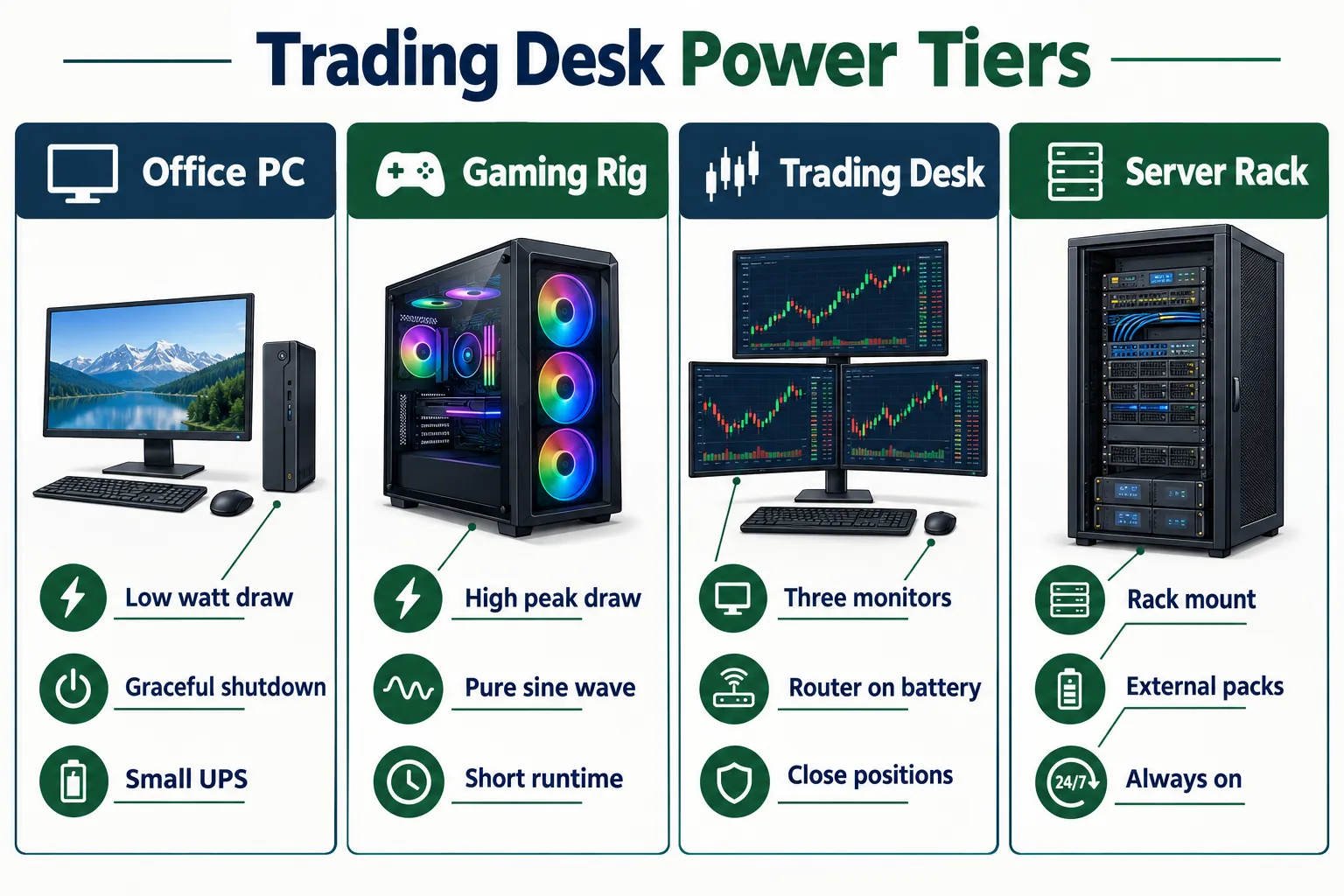
The four step sizing method:
- Inventory the devices. Tower, one monitor (not all four), modem, router, and any networking equipment you cannot trade without.
- Determine your power requirements. Read the wattage off a plug meter or the power supply label. Three monitors plus a strong CPU runs 400 to 500W.
- Add the buffer. Daily Coin Feed uses 20 to 25 percent. Popular Mechanics uses 120 to 130 percent of measured load. Either gets you to the same shelf.
- Check the features, not the box art. You want AVR, surge protection, and a number of battery outlets that matches your real plug count. Trading desk setup guidance calls for 1500VA units and surge protectors with 8 or more outlets as standard kit.
What happens if you overload a UPS battery backup? The unit beeps, flashes an overload warning, and on battery it either cuts the load or shuts down immediately. Plug a laser printer or a space heater into it and you have built a very expensive beeping brick. Printers, heaters, and vacuums are the classic overload offenders.
A quick note on what to skip: the fourth monitor. Pull it off the battery outlets and onto the surge only side. You can trade on one screen for 90 seconds. Position sizing matters more than screen count anyway, which is the same lesson in the position sizing mistake that wipes out new traders.
How does a UPS battery backup work, and which type fits a trading desk?
A UPS battery backup system watches the incoming power, and the instant it goes bad it flips your gear onto battery power from an internal pack. Line interactive units take a few milliseconds to transfer. Online double conversion units take zero.
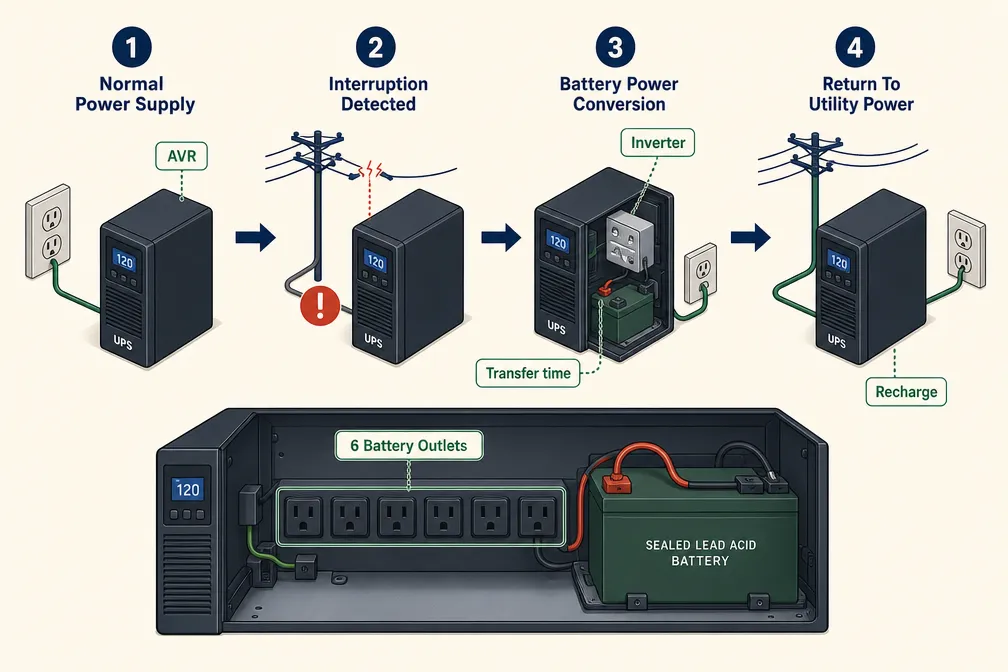
Normal power supply, interruption detection, battery conversion, return to utility power
- Normal power supply: wall power passes through, AVR trims high or low voltage without touching the battery.
- Power interruption detection: the UPS sees the sag, spike, or blackout in milliseconds.
- Battery power conversion: the inverter turns DC from the backup battery into AC for your electronics.
- Return to utility power: when the grid steadies, the unit hands the load back and recharges.
Types of UPS battery backup systems
Select the right battery type. Sealed lead-acid is cheap, heavy, and lasts about 3 to 5 years. Lithium iron phosphate costs more and lasts longer. The CP1500PFCLCD uses lead-acid, which is why it is a two hand lift.
Can a regular power strip replace a UPS? No. A power strip splits outlets. A battery backup surge protector combo with no battery still has no battery. A surge protector clamps a spike; only a UPS battery backup keeps the computer running through a blackout. Litupliv's UPS guidance for financial institutions points out that even a few seconds of downtime can change an execution.
What goes in a $310 outage kit, and how much should you spend?
The kit is $304.94: CyberPower CP1500PFCLCD at $239.95 plus the TalentCell 97.2Wh mini UPS at $64.99 for the router. Call it $310 with tax. Spend more only when you have a second computer or a rack.

Can you use a UPS for a monitor and router too? Yes, and you must. The computer surviving while the router dies is a useless outcome. Both the trading station analysis and the day trading power checklist say to put modem and router on backup power so the data stream and the session stay alive.
The build:
- Computer plus one monitor: CP1500PFCLCD battery outlets. Everything else goes to the surge only outlets.
- Modem and router: TalentCell mini UPS, 12V/9V DC plus an 18W USB-C port. Match the voltage to your router's brick or you will fry something. It holds 4.2 stars from 744 Amazon ratings, with negative reviews citing battery life of about 1 to 3 years.
- Optional, $49.99: TP-Link ER605 multi-WAN router for automatic failover to a phone hotspot or second ISP.
Do you need a UPS if you have a generator? Yes. A generator needs time to start and stabilize. Your computer shuts off in a fraction of a second. The UPS covers the gap and smooths the generator's dirty output. Litupliv treats the UPS and the generator as layers, not substitutes.
What does a UPS not protect you from?
A UPS battery backup for computer gear protects your power. It does not protect your internet, your broker, or your decisions. Two 2026 examples make the point: Interactive Brokers had a login outage on August 5, 2026 during US trading hours, reported by Finance Magnates, and IG had a login outage on August 24, 2026 near the US open, reported by FinanceFeeds. A $300 battery backup fixes neither.

What cannot be plugged into a UPS: laser printers, space heaters, vacuums, medical equipment, and any high draw appliance. Also skip plugging a UPS into another UPS.
The fixes for the things a UPS cannot cover:
- A second broker account, funded and logged in.
- Resting stop orders on the broker's server, not mental stops living in your head.
- The broker's phone desk number saved in your phone before you need it.
- A hotspot plan on your phone, tested once, not theorized about.
Play stupid games, win stupid prizes: the trader with no stop and no second route is one brownout from a problem no equipment solves. Wired versus wireless latency matters here too, since a hotspot failover changes your fill timing.
How long will a UPS keep a trading desk running?
Minutes. A 1500VA UPS battery backup for computer use on a loaded trading desk delivers minutes, not hours, and the exact figure depends on your watts. Searching for the best UPS battery backup 8 hours for home is the wrong search. A UPS battery backup 8 hours long needs a battery system many times larger than anything in this price class.
Do not trust a marketing runtime number. Pull the manufacturer's runtime chart, find your wattage, read the minutes. Newegg is clear that continuous operation through long outages requires larger units with external battery packs. Trading desk guidance targets 30 to 45 minutes on a 1500VA class unit, and financial branch guidance uses a 15 to 30 minute window.
Lifespan, replacement, and a UPS that will not charge
Lead-acid packs last roughly 3 to 5 years. Replace at the first "replace battery" light, not the third. If the UPS battery backup for computer duty will not charge, check these in order: the unit is in surge only outlets, the battery connector shipped unseated from the factory, the pack is past end of life, or the UPS has been sitting discharged for months. Test the battery every quarter by pulling the wall plug for 30 seconds.
Prices are approximate Amazon figures. Confirm on the listing before you buy.
What do Amazon listings really tell you about a UPS battery backup for computer shoppers?
Ratings volume tells you a product sells. It does not tell you the unit is good. Type "amazon UPS battery backup" into the search bar and the page shows badges before it shows a single spec.
How to read the page without getting played:
- Check who sells and ships the unit before you add to cart. Third party sellers are where the 2026 "used sold as new" complaints on the CyberPower come from.
- Read the specs, not the badges. A popularity badge means popular. It does not mean your power supply likes the waveform.
- Read the two star reviews. That is where the Mac auto-shutdown quirk and the short battery life complaints live.
Tool shopping and chart reading use the same muscle: data over noise.
What are the alternatives to a UPS battery backup?
If you need hours instead of minutes, a portable power station replaces the UPS, and it costs several times more. If you need a second tower covered, step up to Eaton or Tripp Lite class gear instead of stacking cheap units.
A lithium portable power station, the kind Anker and others sell, covers the desk for far longer than any 1500VA unit. Confirm capacity and price on the maker's official product page, since station pricing moves constantly. Two drawbacks: it is bulky and costs well above the $310 kit, and the switch-over time on a power station is not always fast enough to keep a PC from rebooting. Check the UPS mode specs before you trust one with an open position.
Other routes: a rack mount battery backup UPS for multi machine desks, a cheap laptop plus hotspot as a pure exit terminal, or an Eaton 5P750RC near $409 per Bullish Bears. The laptop route is the real sleeper, and it pairs with our notes on picking a day trading computer.
Final Verdict
Buy the UPS battery backup for computer kit that keeps your exit path alive, then stop shopping. The CyberPower CP1500PFCLCD at $239.95 and the TalentCell at $64.99 cover the tower, one monitor, and the router for roughly $304.94, which is cheaper than one panicked market order in a thin tape. Its drawbacks are real: a heavy lead-acid pack, Mac shutdown quirks, and seller risk on used units shipped as new.
What to do this week:
- Measure your desk's watts. Buy at 120 to 130 percent of that.
- Put the computer, one monitor, and the modem on battery outlets. Everything else goes to surge.
- Pull the wall plug for 30 seconds and time what you get. Write the number on the unit.
- Set a resting stop and save your broker's phone number.
Systems over hacks. Power is equipment. Your exit plan is the actual edge.
Stop guessing which gear and which tools belong on your trading desk. We sorted 200+ AI stock tools by strategy, price, and what they actually do. See the day trading shortlist.
FAQs
What is the best UPS for battery backup for my computer?
For a single trading computer, a 1500VA pure sine wave line interactive unit with AVR is the sweet spot. The CyberPower CP1500PFCLCD at $239.95 covers 1000W with 6 battery outlets and a 3-year warranty including the battery. The APC BR1500MS2 at $299.99 is the closest pure sine alternative.
How long will UPS keep a computer running?
Minutes, not hours. How many minutes depends on your load, so read the manufacturer runtime chart at your wattage. ENERGY STAR describes the under desk unit's purpose as saving work and shutting down properly.
What is the best UPS for power backup for a laptop?
A laptop already has a battery, so the UPS job is the router and modem. The TalentCell 97.2Wh mini UPS at $64.99 covers networking equipment with 12V/9V DC plus 18W USB-C output. Match the output voltage to your router's adapter exactly, or you risk damaging it.
What cannot be plugged into an UPS?
Laser printers, space heaters, vacuums, air conditioners, and medical equipment. High draw devices trip overload protection and can shorten battery life. Never daisy chain one UPS into another. Put low priority electronics on the surge only outlets so the battery outlets stay reserved for the computer, monitor, and modem.
Can a UPS run for 8 hours?
Not a consumer tower unit at desk load. An 8 hour window needs a much larger battery system or external packs, which Newegg's 2026 roundup flags as the dividing line between short outage coverage and continuous operation. A portable power station is the realistic path to multi hour backup.
Do I need a pure sine wave UPS for a PC?
If your power supply uses active PFC, which most modern gaming and trading rigs do, yes. Simulated sine wave can cause buzzing, heat, or refusal to switch to battery. This trading station analysis argues professional stations should use pure sine wave systems only.
Does a UPS protect against internet outages?
No. A UPS battery backup for computer and network gear keeps your router powered through a blackout, but it cannot fix an ISP failure or a broker login outage like the Interactive Brokers event on August 5, 2026. Pair it with a phone hotspot, a TP-Link ER605 failover router at $49.99, and a funded second broker account.
Can a UPS power an entire house?
Not the kind on this page. Whole home coverage means a transfer switch with a generator or a large battery system, sized in kilowatt hours rather than volt amperes. A 1500VA desk unit handles one computer, one monitor, and networking equipment for minutes. Use it for a clean exit, not for keeping the fridge cold.
Prices move faster than a low float stock at the open, so confirm current pricing on the official listing before you add to cart.
This is education, not financial advice.
Your market edge starts with the right tool. Stay alpha.
Some links on this page may earn us a commission at no extra cost to you.