WiFi vs Ethernet Latency | What Brokers Say in Writing About Trading
WiFi vs Ethernet latency is real, small, and wildly inconsistent, and that inconsistency is exactly why brokers put "use a cable" in writing.
Quick Answer
Ethernet has lower and far steadier latency than WiFi because it does not share airtime, retransmit dropped frames, or fight your neighbor's microwave. The size of the gap is usually small in good conditions and ugly during congestion, which is the whole argument. That is WiFi vs Ethernet Latency | What Brokers Say in Writing About Trading in one line: Lightspeed states plainly that "Trading over Wi-Fi is not recommended" and asks for 25 Mbps down and 5 up. A cable fixes jitter, dropouts and interference inside your house. It does not fix a broker outage, and it will not make your retail order compete with a co-located firm.
Quick pick: wiring a trading desk
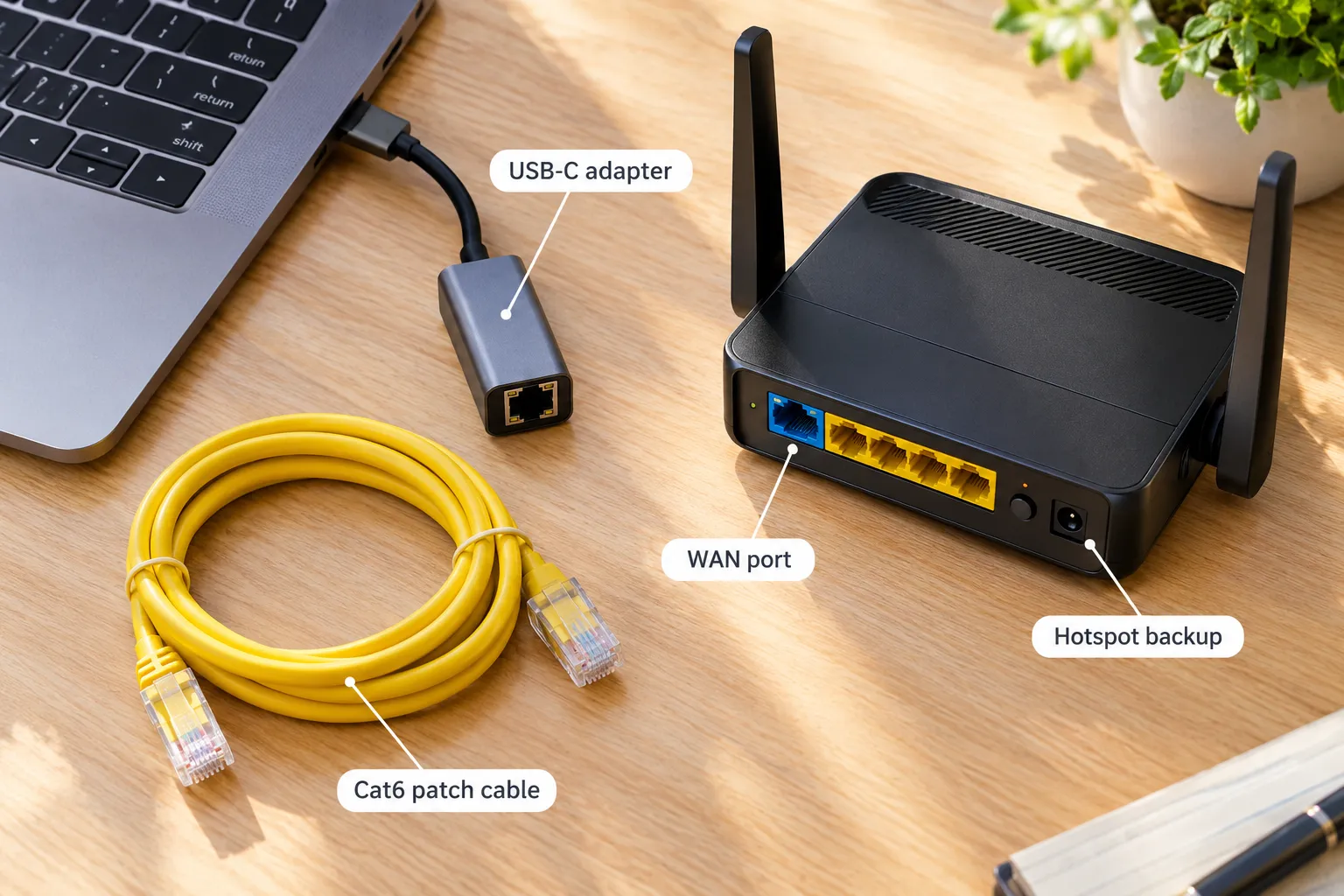
- TP-Link UE300C USB-C adapter: Best for laptops with no Ethernet port. From $12.99 on Amazon.
- TP-Link ER605 multi-WAN router: Best for adding a second internet line. $49.99.
- Interactive Brokers TWS: Best for traders who want broadband guidance in writing. Free with a funded account.
Skip it if: you hold positions for weeks and never place intraday market orders.
Key Takeaways
- Lightspeed's support knowledge center says "Trading over Wi-Fi is not recommended" and lists 25 Mbps down, 5 Mbps up.
- DAS Trader Pro asks for "Cable or DSL (at least 10/10 DL/UL speed recommended)".
- TradeStation lists 2, 6 or 10 Mbps download depending on the tier you run.
- Interactive Brokers TWS states that "Broadband connection is the minimum connection we require to avoid connectivity issues for all users."
- A TP-Link UE300C or UE302C USB-C Ethernet adapter is listed between $12.99 and $28.99 on Amazon, which is the cheapest reliability upgrade on your desk.
- The real difference in WiFi vs Ethernet latency is variance, not the average, and variance is what kills a market order at the open.
Does WiFi or Ethernet have lower latency?
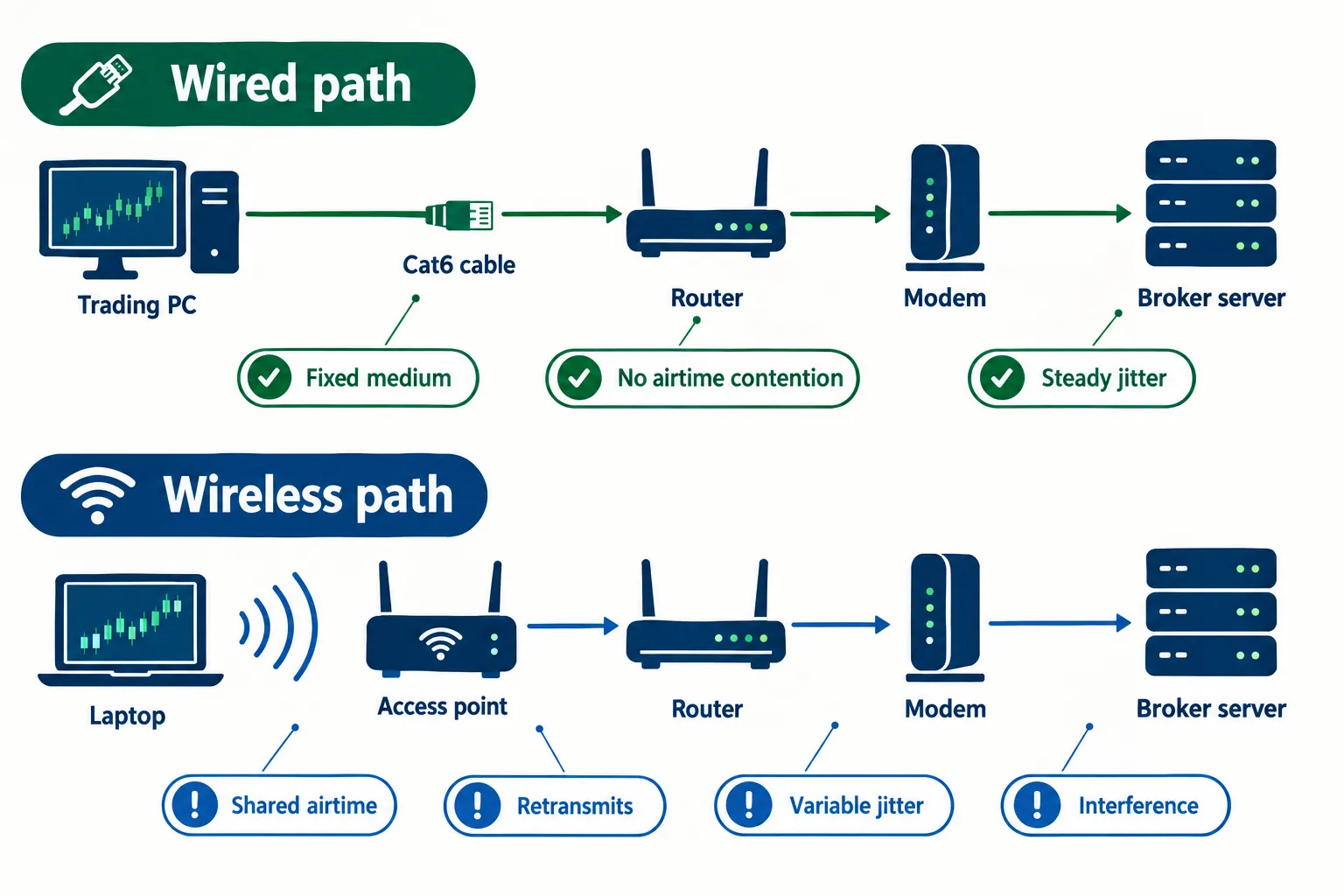
Ethernet has lower latency than WiFi, and the gap widens the busier your air gets. A wired link sends your packet down a dedicated copper path. WiFi has to ask permission to talk, wait its turn, and resend anything the air eats.
What's the difference between WiFi and Ethernet latency?
Latency is the delay between your click and the exchange acknowledging it. On a cable, that delay is boring and repeatable. On WiFi you add three extras: airtime contention with every other device in the house, retransmission when a frame gets corrupted, and power-saving behavior on your network adapter that parks the radio between bursts.
Guides that break down ethernet vs wifi latency describe a wired local hop measuring close to the floor of what the hardware can do, while a wireless hop adds a small, variable delay on top, growing sharply with distance, walls and neighbors.
How much latency does WiFi add compared to Ethernet?
In a quiet apartment with a modern router at close range, the added delay is small enough that a discretionary trader will not feel it. In a congested building at 5pm with four streaming devices, it is a different animal. Comparison write-ups on ethernet vs wifi speed and reliability frame it the same way: WiFi can match a cable on a good day and cannot promise it on any day.
Most guides frame it as Ethernet faster, WiFi more convenient. The honest framing is Ethernet predictable, WiFi occasionally unpredictable at the worst possible second.
How much does WiFi latency vary compared to Ethernet?
Variance is the headline. Run the same ping test twice on a cable and the numbers look nearly identical. Run it twice on WiFi and the maximum can jump several multiples over the average. Explainers on ethernet vs wifi speed, mobility and reliability point at the same culprit: shared spectrum. That spread is called jitter, and it is the part of the connection your platform hates.
Common mistake: judging your setup on an average ping. Averages hide the one spike that stalled your stop order.
WiFi vs Ethernet latency: what do brokers say in writing?
Brokers rarely publish millisecond targets. They publish bandwidth minimums and, in several cases, a blunt instruction to plug in. That written guidance is the closest thing to an industry position on WiFi vs Ethernet latency that you will get.
Lightspeed is the most direct. Its support documentation says "Trading over Wi-Fi is not recommended" and sets 25 Mbps down and 5 up as the recommended line. Charles Schwab's thinkorswim reconnecting FAQ takes the troubleshooting angle: "The reconnecting status can indicate there are problems with your Internet connection," then tells you to power-cycle the router and check the Ethernet cable. The platform assumes you have one.
| Platform | What the official page says | Recommended connection | Source |
|---|---|---|---|
| Lightspeed | "Trading over Wi-Fi is not recommended" | 25 Mbps down, 5 Mbps up | lightspeed.com |
| thinkorswim (Schwab) | "The reconnecting status can indicate there are problems with your Internet connection." Advises checking the Ethernet cable | Power-cycle router, verify cable | schwab.com |
| DAS Trader Pro | "Cable or DSL (at least 10/10 DL/UL speed recommended)" | 10 Mbps down and up | dastrader.com |
| TradeStation | Download requirement scales by platform tier | 2, 6 or 10 Mbps download | tradestation.com |
| Interactive Brokers TWS | "Broadband connection is the minimum connection we require to avoid connectivity issues for all users." | Broadband minimum | interactivebrokers.com |

Notice what nobody promises: a latency number. They specify bandwidth because bandwidth is measurable on a support call. The jitter problem gets handled with a one-line instruction about the cable, which tells you where the support team's experience actually points. If you want the deep dive on the platform side of that decision, the Interactive Brokers tool page covers what TWS asks of your machine.
How much does WiFi vs Ethernet latency matter for a retail day trader?
For a discretionary trader clicking market and limit orders on liquid names, WiFi vs Ethernet latency matters far less than the dropout risk hiding behind it. A few milliseconds of difference will not change your fill. A three-second reconnect in the middle of a breakout absolutely will.
Think of it like a kitchen. The cable is not a faster knife. It is a knife that does not randomly vanish while you are cutting.
Can bad WiFi latency cause missed trades?
Yes, but usually by stalling the whole session rather than by shaving milliseconds. The failure pattern traders describe over and over is the same: charts freeze, the order ticket greys out, the platform shows reconnecting, and by the time the data feed catches up, the setup is gone. Day trading connectivity guides describe slow or unstable internet as a direct route to slippage, which is the difference between the price you wanted and the price you got.
What's considered good latency for online trading?
Workable targets, in plain terms:
- Your own router should answer almost instantly. If it does not, the problem is inside your house.
- To your broker's servers, a steady number matters more than a low one for manual order entry on liquid stocks.
- Stable is the real test. A steady connection beats a faster, jumpy one.
- Automated strategies are the exception. If a program is firing orders for you, jitter becomes a direct cost.
Decision rule: if your edge depends on being first, you are not solving this with a router. You are solving it with a different strategy. Process over prediction applies to infrastructure too.
Reliability, interference and jitter: where WiFi vs Ethernet latency really splits
Reliability is where the wired case stops being theoretical. Ethernet does not care about microwaves, baby monitors, Bluetooth headphones, or the dozen access points your apartment building broadcasts. WiFi cares about all of them.
Sources of WiFi interference that show up as latency spikes:
- Neighboring networks on the same 2.4GHz channel
- Microwave ovens and cordless phones
- Thick walls, metal studs, mirrors and floors between you and the router
- Too many devices sharing the same band at once
- Adapter power management parking the radio to save battery
Reviews of router setups for traders make the same argument in hardware terms: a better router raises the ceiling, and a cable removes the question. Trading computer builders are blunter still. Wired versus wireless internet write-ups from trading PC specialists treat the cable as standard equipment for the primary machine.
Put your laptop, phone and TV on the air. Put the primary trading PC on copper. Wired, wireless, or a mix, that split costs you nothing and removes one variable from your worst-case day.
Is 5GHz WiFi fast enough for trading, and is WiFi 7 as good as Ethernet?
5GHz WiFi is fast enough for every retail trading platform's bandwidth requirement. It is not as consistent as a cable, and newer standards narrow the gap without closing it.
5GHz has more channels and less congestion than 2.4GHz, with shorter range. For a desk in the same room as the router, 5GHz or 6GHz is the right band. The newest WiFi, WiFi 7, brings multi-link operation and wider channels, and people searching wifi 7 vs ethernet gaming want the same answer traders do: has radio caught up?
Partly. Side-by-side breakdowns of WiFi vs Ethernet still put wired ahead on stability and interference immunity, because the physics of shared airtime has not changed. At the same speed, Ethernet wins on consistency, and ethernet speed to your broker is capped by your internet plan anyway, not by the cable.
Edge case: if your router is three rooms away behind a brick chimney, a cheap adapter and a long cable will beat an expensive WiFi 7 router. Spend on the boring thing first.
Security and portability: the two rounds WiFi wins
WiFi wins on portability, and Ethernet wins on security, which is the trade every trader makes without thinking about it. A cable cannot be sniffed from a parking lot. A laptop cannot follow you to the couch with a cable attached.
Wired links are a closed physical path, so there is no credential to crack and no handshake to intercept. WiFi depends on encryption, a strong password and firmware that is actually patched. If you trade from coffee shops, that risk is yours to manage, and public networks are where account security goes to die.
Portability is the honest counterweight. Phones, tablets and mobile hotspots exist for a reason. Keep a hotspot as a backup connection for the day your ISP goes dark, and keep your desk wired for every other day. Pair it with a UPS battery backup for your computer so a flicker in the power does not take the modem with it.
How do you measure WiFi vs Ethernet latency on your own computer?
Measuring WiFi vs Ethernet latency takes five minutes and a terminal window. Ping your own router first, because that isolates your house from the internet.
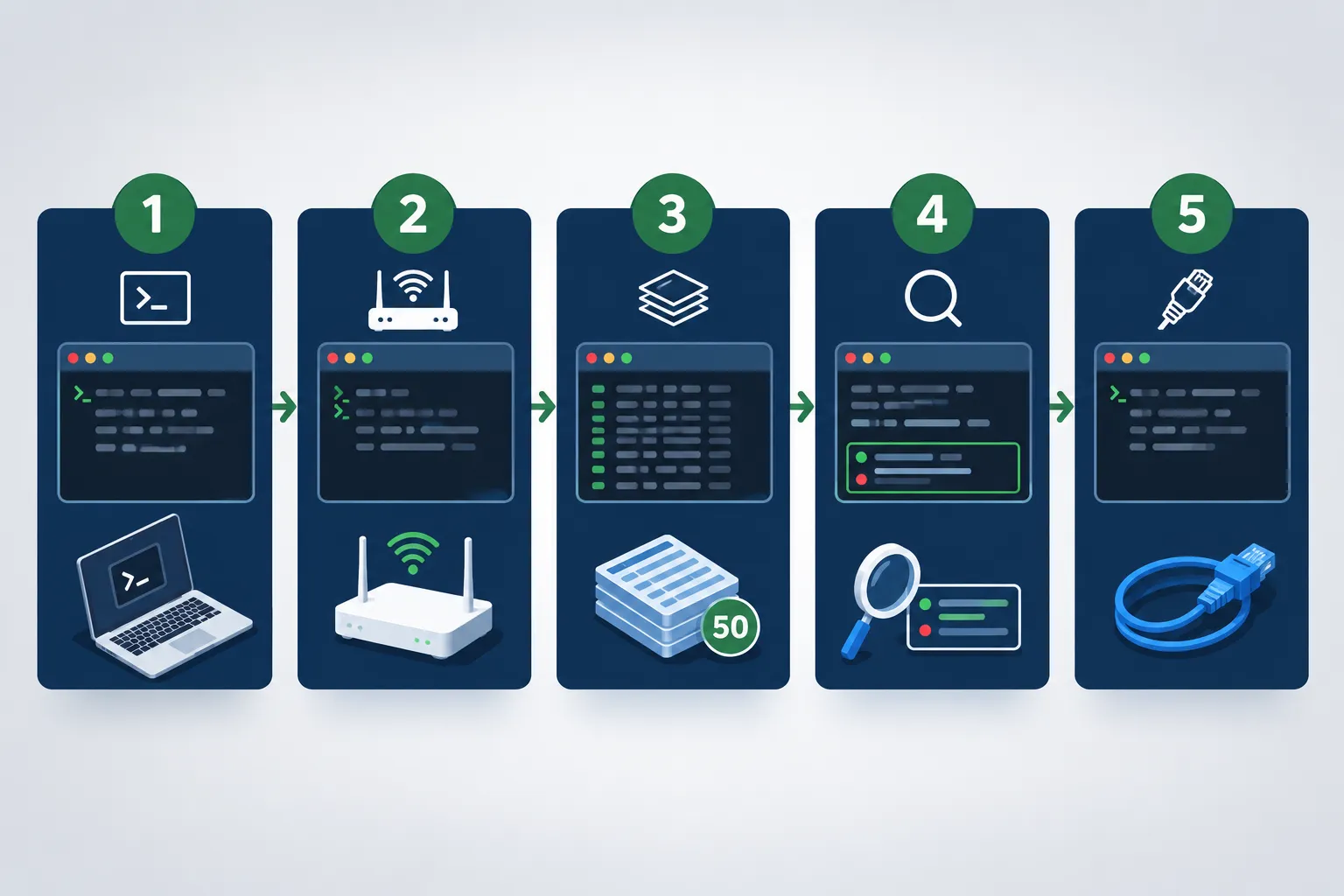
- Open Command Prompt on Windows or Terminal on macOS.
- Find your gateway address:
ipconfigon Windows,netstat -nron macOS. - Run a long test on WiFi:
ping -n 50 <gateway>on Windows,ping -c 50 <gateway>on macOS. - Write down the minimum, maximum and average. The spread between minimum and maximum is your jitter.
- Plug in the Ethernet cable, disable WiFi, and run the identical test.
- Repeat both tests against a public address to see the internet leg.
- Run it again at 9:30am and at 8pm. Congestion is time-of-day dependent.
What you learn: if WiFi's maximum is many multiples of its minimum and the cable's maximum sits near its average, you have your answer without a single statistic from a blog. That is your own data, on your own hardware, which beats any benchmark somebody else published.
What should you check before blaming your connection?
Before you blame WiFi, know that platform software, your CPU and your broker's servers cause more freezes than the local network does. Check them in order, cheapest first.
Run this list:
- Is the broker down? Check the status page and social feed before touching the router.
- Is your machine the bottleneck? Six chart windows, a scanner and 40 browser tabs will choke a thin laptop. The best computer for day trading guide covers the spec that actually matters.
- Is something uploading? Cloud backup syncing large files mid-session will spike latency on any connection type.
- Is the adapter sleeping? Turn off power management on your network adapter in Device Manager.
- Is the cable actually the cable? A flaky Cat5 patch cord fails quietly. Swap it before buying a router.
If WiFi latency keeps spiking after all that, move to 5GHz, change channels, shorten the distance, then wire it. A cable makes the connection better in the ways you can control, and controllable is the whole point.
What do real users say about ethernet vs wifi reddit threads?
Forum threads split between people who wire the primary machine and people who say WiFi has been fine for years. Both camps are describing their own houses.
Search ethernet vs wifi reddit or WiFi vs Ethernet latency reddit and you land on the same recurring threads. The r/Daytrading discussions titled Internet speed: wireless or wired? and WiFi or Ethernet? cover it repeatedly.
No verbatim quotes here, because putting words in a stranger's mouth is how bad articles get written. Read the threads yourself. Look for one thing as you read: whether people describe fewer dropouts after wiring up, or better fills. Those are different claims, and only the first one is what a cable can deliver. Plenty of traders also search WiFi vs Ethernet gaming and WiFi vs Ethernet latency for gaming for the same reason, because gamers stress-tested this question a decade before retail traders cared.
What are the alternatives?
If you cannot run a cable, you have three workable alternatives and one bad one. Ranked by how much of the WiFi vs Ethernet latency problem they actually solve.
- Powerline adapters. Use your home's electrical wiring. Better than distant WiFi, worse than Cat6, and sensitive to which circuit you plug into.
- A mesh node with a wired backhaul. Put the node in your room, cable the PC to it, and the wireless hop happens between access points instead of at your desk.
- A mobile hotspot as a failover. Not a primary link. A recovery plan for the morning your ISP dies mid-session.
- A multi-WAN router. The TP-Link ER605 at $49.99 lets you run two internet lines and fail over automatically. Overkill for most, cheap insurance for full-time traders.
Drawbacks worth naming: powerline performance is unpredictable and can be worse than WiFi on old wiring, and a hotspot burns data fast while a level 2 feed streams. The ER605 also assumes you are comfortable with router configuration, which some traders are not.
Good next step: review how much platform you are actually running, because the best stock apps for day trading differ enormously in bandwidth appetite.
Final verdict: which one to use, wired vs wireless?
Wire the primary trading PC. Use WiFi for everything else. That is the entire answer to WiFi vs Ethernet latency for a retail trader, and it costs less than one bad fill.
Choose Ethernet if you place intraday orders, run a level 2 feed, trade the open, or use any automated program that submits orders without you. Choose WiFi if you are a swing trader checking charts twice a day, or if your desk physically cannot reach the router and powerline is not an option. If you must use WiFi, sit close, stay on 5GHz or 6GHz, and turn off adapter power saving.
What a cable will not do: fix a broker outage, beat a professional firm's co-located server, or make a bad setup profitable. Keep the expectation honest. The cable removes one preventable failure from your day, which is exactly the kind of boring fix a repeatable process is built from.
Stop debating your router and go wire the one machine that places your orders.
Stop guessing which platform your connection has to keep up with.
We sorted 200+ AI stock tools by strategy, price and what they actually do, so you can match the software to the setup you have.
Frequently asked questions
How much slower is WiFi compared to Ethernet?
WiFi adds a small amount of delay on top of a wired link, and the honest answer is that the number moves constantly. Published explainers on ethernet vs wifi latency describe wired hops sitting near the hardware floor while wireless hops rise with distance, walls and congestion. Measure your own with a ping test rather than trusting an average.
Is wireless or Ethernet better for gaming?
Ethernet is better for competitive gaming for the same reason it is better for trading: consistency. Jitter and packet loss cause rubber-banding and missed inputs far more often than raw bandwidth does. WiFi 6E and WiFi 7 have narrowed the gap for casual play, but a cable still removes interference, airtime contention and retransmissions entirely.
Do you get 0 ping with Ethernet?
No. Zero ping is not physically possible, because light takes time to travel and every device adds processing delay. A local ping to your own router can be very low on a cable, which explainers on ethernet vs wifi latency describe as the practical floor. Reaching a broker's server always costs more.
Is 40 ms of latency bad?
For manual stock trading, 40 milliseconds is fine. You cannot click faster than that. It becomes a problem in competitive gaming, in voice calls, and for automated strategies where a program submits orders on your behalf. A steady 40 milliseconds also beats a lower average with frequent spikes.
Is WiFi 7 as good as Ethernet?
For bandwidth, often yes. For consistency, not yet. WiFi 7 adds multi-link operation and wider channels, which reduces latency spikes, but it still shares spectrum with every neighboring network and device. Wired remains immune to interference. If your desk is already cabled, WiFi 7 gives you nothing for order entry.
Does Ethernet reduce lag in trading platforms?
It reduces the kind of lag that breaks a session: reconnecting banners, frozen charts, stalled data feeds and dropped order confirmations. The thinkorswim reconnecting FAQ specifically tells users to check the Ethernet cable and power-cycle the router. Ethernet will not speed up a platform that is already starved of CPU or RAM.
Do I need Ethernet for day trading or is WiFi okay?
You do not strictly need it, since no broker refuses wireless connections. You want it. Lightspeed writes that trading over WiFi is not recommended, and DAS Trader Pro asks for cable or DSL at 10/10. For a serious intraday setup, a $12.99 adapter is the cheapest risk reduction available.
Conclusion
The WiFi vs Ethernet latency question has a smaller technical answer and a bigger practical one. Technically, the delay gap is modest. Practically, the variance gap is the one that costs money, and brokers wrote their connection guidance around exactly that.
Three things to do this week:
- Run the ping test on WiFi and on a cable, at the open and at night. Keep the numbers.
- Buy the adapter and the cable if your desk is not wired. The adapter is listed from $12.99.
- Fix the rest of the stack before buying a router, starting with your machine and your platform load.
Then stop thinking about it. One less variable, one less excuse.
Prices move faster than your fills, so check the current listing before you click buy.
This is education, not financial advice.
Your market edge starts with the right tool. Stay alpha.
Some links on this page may earn us a commission at no extra cost to you.