PickMyTrade Review | Pricing, Brokers and Setup Notes
This PickMyTrade review covers a cloud bridge that turns your TradingView alerts into broker orders, mostly for futures traders on Tradovate, Rithmic, TopstepX and similar platforms. The official pricing page lists $50 a month, $135 a quarter or $500 a year, with a seven-day free trial that needs no card. PickMyTrade does not supply strategies, and it does not support MT4, MT5, DXtrade or crypto exchanges. Before you pay, check two things: that your broker is on the supported list, and that your prop firm actually allows automated orders, because Take Profit Trader and Apex ban them outright.
Key insights
- Price: $50 monthly, $135 quarterly ($45 a month), $500 annually ($41.67 a month), all with unlimited strategies and trades and no per-trade fees.
- One login per subscription. Unlimited sub-accounts under one connected broker login; a second broker or prop-firm login needs its own subscription.
- Ten supported destinations as of the vendor's October 1, 2026 table: Tradovate, Rithmic, Interactive Brokers, TradeStation, TradeLocker, ProjectX, Match Trader, Tradier, cTrader and Ironbeam.
- TradingView side: webhook alerts need a paid plan (Essential or higher) and two-factor authentication turned on.
- Prop firm fit decides everything. Topstep bars VPS and remote servers from order flow, and Take Profit Trader bans bots on every account.
By FullStack Alpha Editorial Team | Reviewed by Jay Rocco, Chief Editor
Every price, broker and limit in this PickMyTrade review comes from PickMyTrade's own pages and docs, TradingView's pricing and help pages, and each prop firm's rulebook, read in 2026.
What Is PickMyTrade and What Does It Do?
In one line: PickMyTrade is a webhook relay, and that is the frame for this whole PickMyTrade review. Your TradingView chart fires an alert, PickMyTrade receives it in the cloud, turns it into an order, and sends it to your connected broker account. Its own footer puts it plainly: "You keep the trading decisions; we transmit the orders."
A webhook is just a message one website sends another when something happens. TradingView's help center describes it as an HTTP POST request sent "as soon as the alert is triggered, with the alert message in the body of the request."
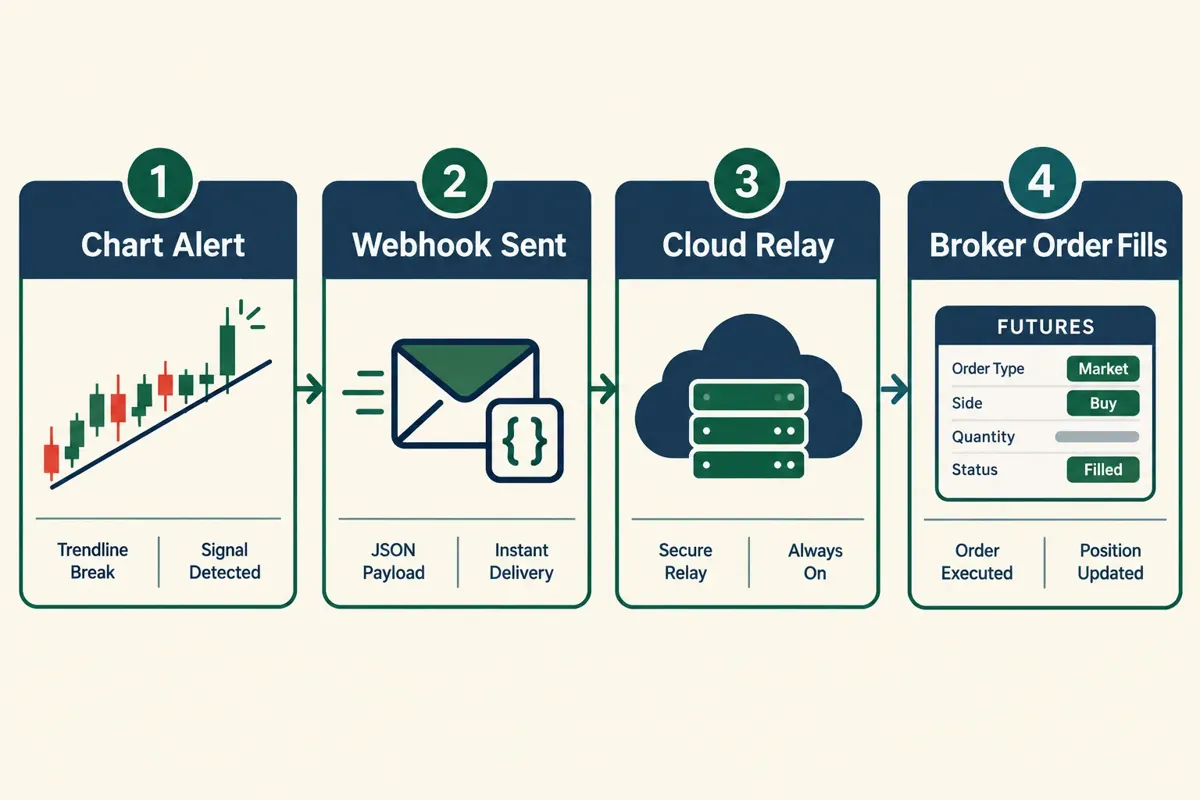
What this PickMyTrade review is not about: a strategy. PickMyTrade's FAQ says it "does not tell you what to trade or when." If your setup is bad, you have now automated a bad setup that fires in milliseconds.
The actual chain
- You build or buy a TradingView strategy, indicator or alert condition.
- You paste the JSON payload PickMyTrade generates into the alert message and point the webhook at PickMyTrade's URL.
- PickMyTrade matches the alert to your broker connection and account, then sends the order.
- Your broker fills it, rejects it, or holds it for lack of margin.
Why traders use it
No VPS and no desktop install. PickMyTrade runs in the cloud, so once the alert and broker link are set, your laptop can sleep. Its homepage also says it "doesn't require enabling API access on your broker."
Speed, with an asterisk. PickMyTrade says it processes orders "in under 200ms on our side," and adds that total fill time depends on your broker, your network and how fast TradingView sends the alert. Its own slippage doc estimates the full trip at fifty to five hundred milliseconds. That is one link in the chain, not an end-to-end promise.
Multi-account futures. One subscription covers unlimited sub-accounts under one broker login, plus copy trading across your own prop-firm accounts.
Who runs it
The footer reads "© 2026 PickMyTrade Pvt. Ltd." and lists an Indian phone number and an email contact. PickMyTrade says its only official domains are pickmytrade.com, pickmytrade.trade (for Tradovate users) and pickmytrade.io (for other brokers). Docs are split the same way. Team bios were not published on the pages we checked (2026).
The ProjectX page claims "50,000+ traders" and "99.9% uptime." Those are vendor numbers, not audited figures.
Who it suits, per this PickMyTrade review: a futures or equities trader who already has a tested TradingView strategy and wants it executed without watching the screen. Who it doesn't suit: anyone hoping the tool itself produces an edge.
What Does PickMyTrade Cost?
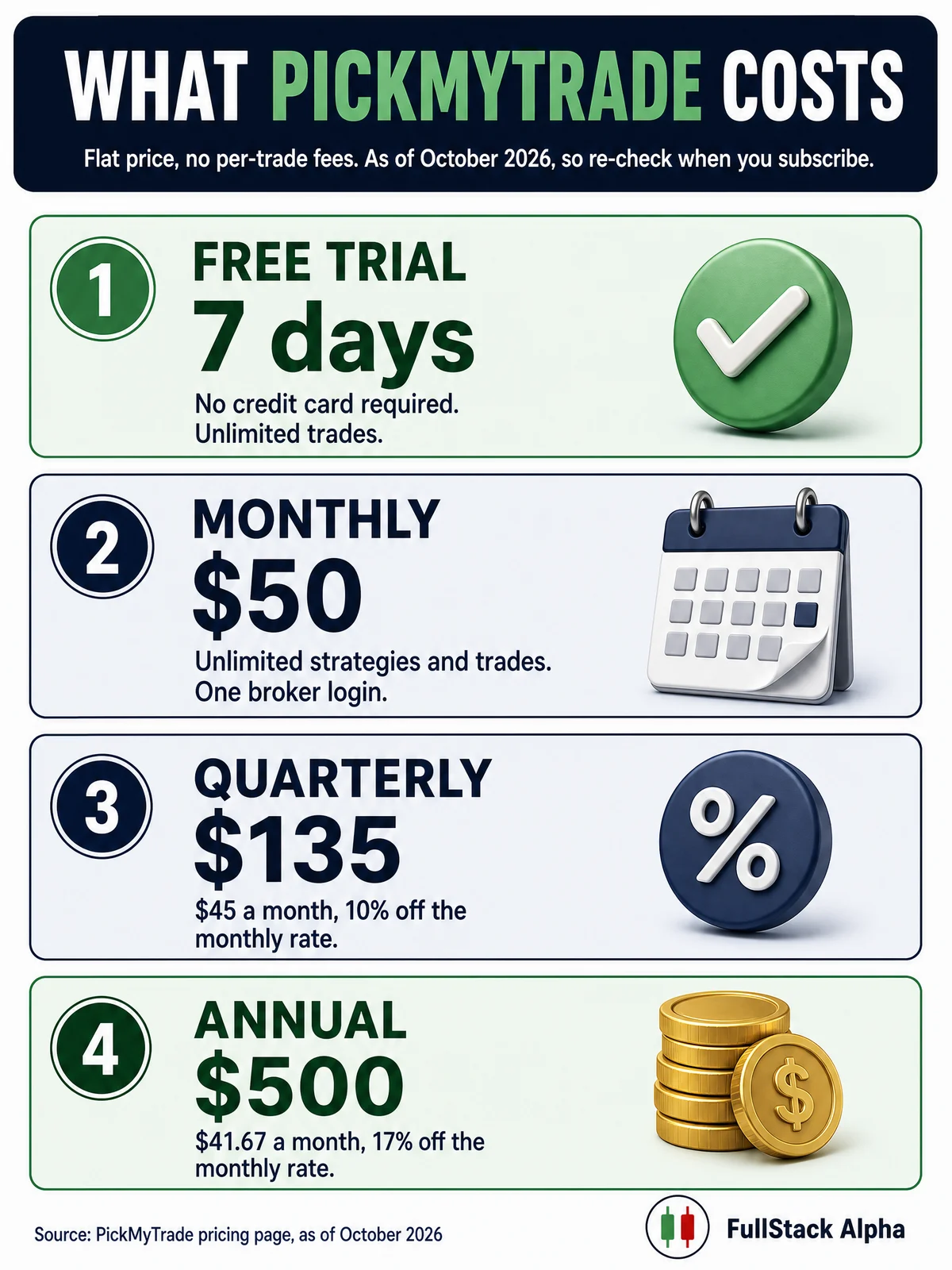
Pricing is the easy part of any PickMyTrade review. PickMyTrade charges a flat subscription with no per-trade fees. As listed on the official pricing page in 2026:
| Plan | Price | Effective monthly | What's included |
|---|---|---|---|
| Free trial | $0 for 7 days | $0 | No credit card required, unlimited trades |
| Monthly | $50 | $50.00 | Unlimited strategies and trades, one broker login, unlimited sub-accounts under it |
| Quarterly | $135 | $45.00 | Same features, 10% off the monthly rate |
| Annual | $500 | $41.67 | Same features, 17% off the monthly rate |
Every plan includes "multi-account copy trading across 27+ prop firms," "no per-trade fees and no API rate limits," and the same feature set. There is one product; you only choose the billing cycle.
What "unlimited" actually means
The limit sits in the account structure. One subscription covers one connected broker login with unlimited sub-accounts under it. PickMyTrade's homepage FAQ is explicit: "a second broker or prop-firm login needs its own subscription."
Its pricing FAQ gives the Apex example. Several accounts inside one Tradovate login need one subscription. Several separate Tradovate logins need separate PickMyTrade accounts. If you trade at three prop firms with three logins, budget three subscriptions.
The costs that don't show in the headline
- TradingView. The free Basic plan can't send webhooks. TradingView's pricing page shows webhook notifications on Essential and up, with Essential at $12.95 a month billed annually or $14.95 month to month.
- Market data. Brokers bill exchange data separately. Topstep, for example, includes Level 1 data and charges $38 a month for Level 2.
- Commissions and exchange fees. Per contract, per side. Automation tends to raise them because you trade more.
- Prop firm fees, if you route to an evaluation or funded account.
Worked example: annual PickMyTrade ($500) plus annual TradingView Essential ($155.40, or $12.95 times 12) is $655.40 a year before data and commissions. Trade 20 automated round trips a month and the software alone costs about $2.73 per trade. Trade 4 a month and it is about $13.65. Low frequency makes the math ugly fast.
PickMyTrade review decision rule: if your TradingView plan already sends webhooks and you place more than about 20 automated trades a month, the annual plan is the cheapest sensible entry to hands-off execution. If you're still paper trading a strategy, don't pay for anything yet.
Which Brokers Does PickMyTrade Connect To?
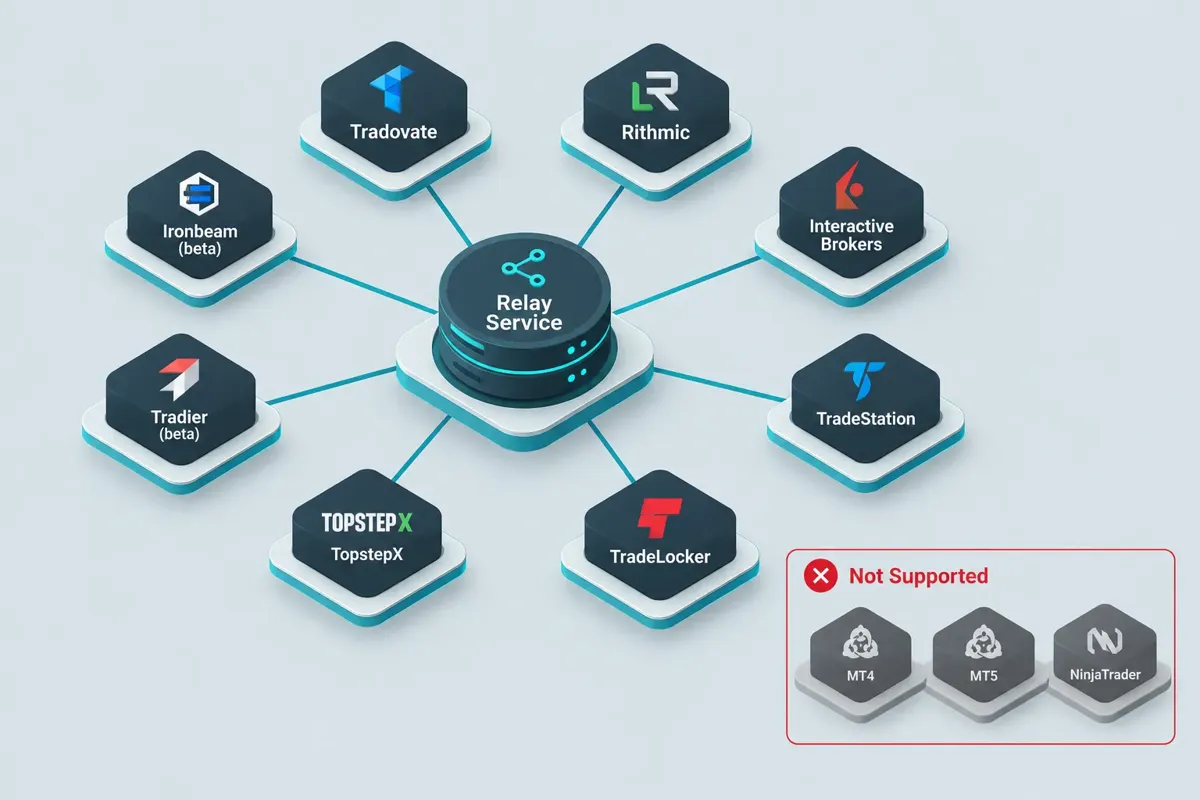
Broker support is where a PickMyTrade review earns its keep. PickMyTrade's homepage table of "supported brokers, markets and setup pages, as of October 1, 2026" lists ten destinations. Its pickmytrade.io menu marks three of them as beta.
| Broker / platform | Primary assets | Notes |
|---|---|---|
| Tradovate | Futures | Original focus, served from pickmytrade.trade, fullest feature support |
| Rithmic | Futures | Common execution layer at prop firms |
| Interactive Brokers | Stocks, options, futures, forex | Broadest asset coverage; multi-TP support varies by routing |
| TradeStation | Stocks, options, futures | Listed as supported |
| TradeLocker | Forex and CFDs | No break-even, no trailing stop, no multi-TP yet |
| ProjectX / TopstepX | Futures (prop-firm platform) | Licensed only to Topstep since February 28, 2026 |
| Match Trader | Forex and CFDs | Prop-firm platform |
| Tradier | Stocks and options | Marked beta |
| cTrader | Forex and CFDs | Marked beta |
| Ironbeam | Futures | Marked beta |
Beta means beta. Run Tradier, cTrader and Ironbeam on a demo account for a couple of weeks before you trust them with size.
What PickMyTrade does not support
The homepage lists it in one block: cryptocurrency exchanges; MT4, MT5 and DXtrade; trading signals; and unlimited broker logins. NinjaTrader's desktop platform and OANDA are not on the supported list either. If your funded account runs on DXtrade or MetaTrader, PickMyTrade is the wrong tool.
Feature gaps by broker
PickMyTrade's Tradovate documentation is specific about what works where:
- Trailing stops: available for Tradovate only. TradeLocker and ProjectX don't support them.
- Break-even stops: Tradovate supports them; TradeLocker and ProjectX don't.
- Multiple take-profit levels: not supported from a single TradingView strategy alert on Tradovate. ProjectX and TopstepX support one TP and one SL per symbol.
- Strategy alerts: market orders only. Limit and stop orders are not supported in strategy mode.
The workaround for multi-level exits is separate CLOSE alerts at each target, which PickMyTrade processes independently.
The ProjectX change in 2026
PickMyTrade's ProjectX page says ProjectX has been "licensed only to Topstep since 28 February 2026; it now runs as TopstepX." You connect with a TopstepX API key from your Topstep account. If you are following an older guide that connects a generic ProjectX account at another firm, stop and check what your firm migrated to.
One more thing on that page needs a flag. It lists "Pro, Pro+ or Premium" as the TradingView plans needed. TradingView renamed its tiers; today's pricing page shows Essential, Plus, Premium and Ultimate, with webhooks from Essential up.
How Do You Set Up PickMyTrade With TradingView Step by Step?
The setup half of this PickMyTrade review is a checklist. Setup takes 30 to 60 minutes the first time, and order matters: broker connection first, then symbol mapping, then the alert. Most failures come from building the alert before the account was ever linked.
Step 1: Confirm your TradingView plan can send webhooks
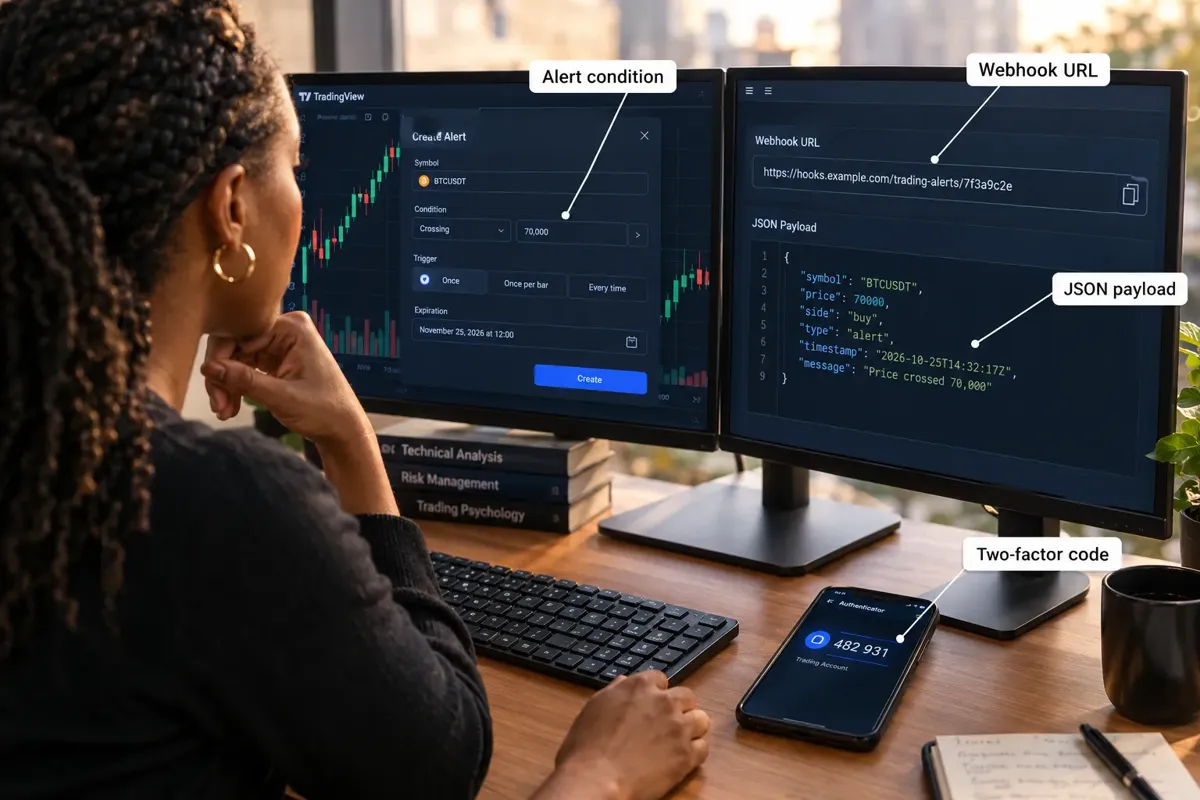
The free plan can't. TradingView's webhook help page also says "webhook alerts are only allowed when 2-factor authentication is enabled." Webhooks only go to ports 80 and 443, and if the receiving server takes longer than three seconds, the request is cancelled.
What you should see: the Webhook URL box in the alert's Notifications tab is clickable.
Step 2: Create your PickMyTrade account and start the trial
Seven days, no card. Use all seven.
Step 3: Connect the broker
Pick your broker and authorize it. For TopstepX, you generate an API key inside TopstepX first. What you should see: your account ID or sub-account list in the dropdown. An empty dropdown means the link failed.
Most common error: connecting a demo account and then expecting live fills, or the reverse.
Step 4: Map the symbol
TradingView's continuous ticker and your broker's contract symbol are not always the same string. Most common error: an expired contract month. Futures roll quarterly, and an alert aimed at a dead contract fails while you think it's working.
Step 5: Paste the JSON payload
PickMyTrade generates the JSON payload for your account inside its dashboard. Remove TradingView's default message and paste the generated payload in unchanged. Don't hand-write it from a blog post, since the fields differ by broker and include your account details. TradingView sends valid JSON with an application/json header and anything else as plain text. A stray comma or a curly quote from a word processor breaks it.
Step 6: Set the condition, webhook URL and expiration
Paste PickMyTrade's webhook URL (the FAQ names the v2/add-trade-data-latest endpoint) and set the alert to open-ended so it doesn't expire. Most common error: choosing "Once Per Bar" when you meant "Once Per Bar Close," which can fire on every qualifying tick.
Step 7: Fire one test trade
One micro contract, demo first. Confirm three things: the alert fired in TradingView, PickMyTrade's log shows "Order Placed" with an entry trade ID, and the position shows at the broker. TradingView's alert log also has a "Webhook status" column, so check delivery there.
Step 8: Run it small for two weeks
Watch for failures that only appear over time: contract rolls, session gaps, broker maintenance and expired authorizations. Our guide to testing a TradingView alert before you connect it to anything has a checklist you can reuse.
The failure chain, in plain terms
A valid TradingView alert can still produce no trade because of a wrong symbol, the wrong account in the payload, missing margin, an expired contract, broker risk limits, malformed JSON or an expired API key. Six of those seven are on your side of the chain.
Which Prop Firms Allow PickMyTrade Automation?
This is the section most PickMyTrade review pages skip, and it can cost you a funded account. PickMyTrade's own ProjectX page lists "guaranteed compliance with Topstep rules" under what it does not support, and says automation, API and copy-trading policies "are set by Topstep and can change." Here is what each firm's own pages say.
- Topstep: automation is allowed with conditions, through the TopstepX API at $29 a month ($14.50 with code "topstep"). But Topstep's API access article says all trading must originate from your personal device, VPS and remote servers are prohibited, and a private server may not route or relay orders on your behalf. It also says third-party applications connected to the API are used "at your own risk." Whether a cloud relay like PickMyTrade fits those words is a question to put to Topstep support, in writing, before you connect.
- Lucid Trading: its help center says automated trading systems and trade copiers are permitted, with HFT and microscalping banned.
- MyFundedFutures: automated strategies are allowed if they don't exploit simulated fills, and HFT is not allowed.
- Take Profit Trader: policy #1 bans trading bots and algos on every account. A PickMyTrade alert placing orders there is a rule break.
- Apex Trader Funding: its prohibited-activities page says "No Automation or Algorithm Usage allowed."
Our Topstep review and Take Profit Trader review cover those rulebooks in full.
Decision rule: never connect PickMyTrade to a prop account until you have the firm's automation clause open in another tab and a support reply saved.
What Risk Controls Does PickMyTrade Include?
A PickMyTrade review should judge the guardrails, not just the pipe. These are the controls PickMyTrade documents, and each one maps to a prop-firm rule that ends accounts.
- Stop loss, take profit and trailing stops. Configured per alert. Trailing stops work on Tradovate only, per the docs.
- Automatic position sizing. The homepage says it can "auto-calculate position size based on your account balance and risk percentage."
- Trading Time Settings. Alerts that arrive outside your active window are marked "Order Paused." Set the window to end before your firm's flat-by time, such as 3:10 PM CT at Topstep or 4:45 PM ET at Lucid.
- News Filter. It pauses new alerts during scheduled events you choose (high-impact examples include NFP, CPI and FOMC), with buffer minutes before and after. It only covers symbols on its supported list, and existing positions stay open with their stops.
- Pause Trading button. A manual kill switch that stops all automated execution.
Where this helps: Take Profit Trader's PRO accounts require you to be flat around FOMC, NFP and CPI, and LucidDaily treats red-folder USD news as a hard breach. A news filter can't make a bot legal at a firm that bans bots, but at a firm that allows automation it can stop the one alert that would breach a news rule.
Where it doesn't: the filter ignores new alerts but leaves open positions alone. If your rule says "flat," you still need an exit alert before the window.
What Do Users Complain About With PickMyTrade?
Any honest PickMyTrade review has to admit public discussion is thin compared with bigger tools, which limits how confidently anyone can summarize sentiment. The themes below are drawn from PickMyTrade's own troubleshooting docs and FAQ, which tell you what breaks most often.
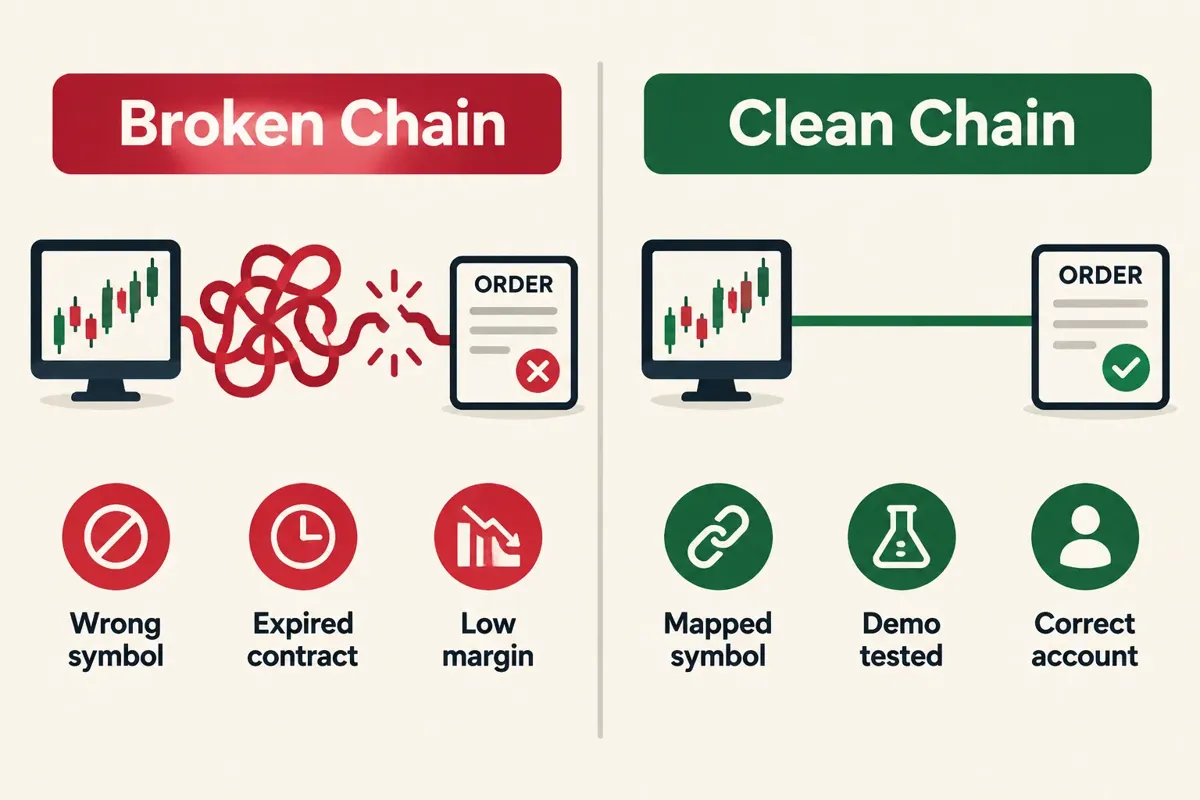
- "Why didn't my trade get placed?" It is the first question on the pricing FAQ. The fix path: check TradingView's alert log, then PickMyTrade's alert status for "Order Placed" and an entry trade ID.
- "The order isn't visible in Tradovate." Usually the wrong account selected or a rejection for low funds.
- Duplicate copied trades. PickMyTrade tells you to disable Tradovate's built-in copier, which can double your trades.
- Feature gaps by broker. Trailing stops, break-even and multi-TP behave differently outside Tradovate.
- Documentation split across domains. Tradovate docs live on pickmytrade.trade and other brokers on pickmytrade.io, which is how older ProjectX guides kept circulating after February 2026.
PickMyTrade has a Trustpilot page at trustpilot.com/review/pickmytrade.trade. Read it alongside Reddit. Reddit skews negative because people post when frustrated; Trustpilot skews toward billing and support. The gap between them is the real finding.
Is PickMyTrade Worth the Money, and Does It Work for Beginners?
The value question in this PickMyTrade review has a clean answer. For a trader with a tested TradingView strategy and a supported broker, $41.67 a month on the annual plan is reasonable for cloud execution with no VPS. For a beginner without a tested strategy, it's $500 spent automating a coin flip.
Worth it if
- Your strategy has a documented record over several months.
- Your broker is Tradovate, Rithmic, IBKR, TradeStation or TopstepX.
- Your prop firm's rules allow automated orders from a third-party service.
- You already pay for a TradingView plan with webhooks.
Not worth it if
- Your platform is MT4, MT5 or DXtrade.
- Your funded account is at a firm that bans automation.
- You place fewer than about ten automated trades a month.
- You're still searching for a strategy.
Does PickMyTrade work for beginners?
Partly. The concept is simple; the configuration isn't. You'll touch JSON, webhook URLs, symbol mapping and API keys. None of it needs programming, but all of it needs care. The free trial exists so you can find out which kind of beginner you are at zero cost.
Can you make money using PickMyTrade?
PickMyTrade doesn't produce returns. It executes the strategy you give it, and a relay can't turn a losing system into a winning one. What automation changes is behavior: no hesitation on entries, exits that actually fire, and no revenge trades. Discipline beats prediction.
How Does PickMyTrade Compare, and What Are the Best Alternatives?
PickMyTrade's niche, as this PickMyTrade review sees it, is futures-first cloud execution at a flat rate. Alternatives fall into three camps: other webhook bridges, full algorithmic platforms, and broker-native automation.
| Alternative | What it is | Best for | Notes |
|---|---|---|---|
| TradersPost | Webhook bridge, TradingView to broker | Traders who want stocks, options and futures routing in one place | Check current pricing on its official page |
| QuantConnect | Full research and live trading platform | Traders who code in Python or C# | Backtesting engine is the draw; steeper learning curve |
| Tradetron | No-code strategy builder and deployment | Building logic without TradingView | Broker support differs by region |
| TrendSpider | Charting with built-in automated alerts and bots | Charting and automation in one subscription | Replaces part of the TradingView plus bridge stack |
| Surmount AI | Automated strategy marketplace | Traders who want pre-built strategies | Supplies strategies; PickMyTrade does not |
| Broker-native tools | TradeStation EasyLanguage, IBKR API | Traders committed to one broker | No third-party subscription; harder to switch brokers |
Choosing between them
- Choose PickMyTrade if you trade futures, your broker and prop firm are both compatible, and you want flat pricing.
- Choose TradersPost if you need stock and options routing alongside futures.
- Choose QuantConnect if you can code and want proper backtesting before risking anything.
- Choose broker-native if you're staying with one broker and don't mind building it yourself.
Before you pick a bridge, make sure your TradingView tier fits. Our TradingView plans compared breakdown and full TradingView review cover alert limits by plan, and the sister site AI Stock Trading Bots covers broker APIs in depth.
Who Should Skip PickMyTrade?
Every PickMyTrade review should end with who shouldn't buy. Skip it if your platform isn't supported, if your prop firm bans automation, if you don't have a tested strategy, or if you trade too rarely for $500 a year to buy anything.
- MT4, MT5 or DXtrade users. PickMyTrade lists them as unsupported. No configuration fixes that.
- Take Profit Trader and Apex traders. Both firms ban automated trading.
- Strategy hunters. This is execution plumbing. Buying it first is like buying a commercial oven before you can cook.
- Discretionary tape readers. Automating a judgment call keeps the mechanics and drops the judgment.
- Anyone unwilling to test. The failure chain in Step 8 is long. Skip the two-week test and you'll meet it with real money.
How Much Will Alert Automation Cost You Each Year?
The subscription is the number people quote, and it's rarely the number people pay. Add your TradingView tier, exchange data and commissions, and the real annual figure often lands well above the $500 headline. The calculator below lets you plug in your own plan, trade frequency and data fees to see your true yearly cost before you commit.
FullStack Alpha
Your real annual cost, not the headline price
The subscription is the number people quote. Add the chart platform, the data feed and commissions and you get the figure that actually leaves your account each year.
Commission per round trip means in and out. Funded account fees and data for a second exchange are not counted here. Re-check current pricing on each vendor's own page.
Frequently Asked Questions
How much does PickMyTrade cost?
This PickMyTrade review found three prices on the official page: $50 monthly, $135 quarterly or $500 annually, with a seven-day free trial that needs no card. Every plan includes unlimited strategies and trades with no per-trade fees. Each extra broker or prop-firm login needs its own subscription.
Which brokers does PickMyTrade support?
PickMyTrade lists Tradovate, Rithmic, Interactive Brokers, TradeStation, TradeLocker, ProjectX, Match Trader, Tradier, cTrader and Ironbeam, with the last three marked beta. It does not support MT4, MT5, DXtrade or crypto exchanges. Confirm the list on the official page before paying.
Does PickMyTrade work with a free TradingView account?
No. TradingView's free Basic plan can't send webhook alerts; webhooks start on Essential. TradingView also requires two-factor authentication before webhook alerts will fire.
Can I use PickMyTrade with a prop firm?
Only where the firm allows automation. Take Profit Trader and Apex ban automated trading, and Topstep prohibits VPS or remote servers from placing or relaying orders. Lucid Trading permits automated systems, but read each firm's current rules and get a written answer before connecting.
Is PickMyTrade legit?
Yes, it is an operating service run by PickMyTrade Pvt. Ltd. with public pricing, documentation and a Trustpilot page. It relays your alerts and does not sell signals or promise returns. Public discussion volume is modest, so test it on a demo account first.
What are the best PickMyTrade alternatives?
TradersPost is the closest webhook-bridge competitor with stock and options routing. QuantConnect suits traders who code and want deep backtesting, and broker-native APIs avoid a third-party subscription. Pick by your broker and asset class, not by feature lists.
Our Take
Our PickMyTrade review verdict: it does one job well. It carries your TradingView alert to a supported broker at a flat price with no VPS, and its docs are honest about what each broker can and can't do. For futures traders on Tradovate or Rithmic with a strategy that already works, $41.67 a month on the annual plan is fair.
The bigger risk isn't the software. It's the rulebook on the other end. Check your prop firm's automation clause before you connect, since Take Profit Trader and Apex ban automation and Topstep restricts where orders can originate. Re-check PickMyTrade's price and broker list on the day you subscribe, because both change.
Compare more automation tools scored the same way. Browse every review at FullStack Alpha
Stay alpha.