TrendSpider Review: Is This AI Charting Tool Worth $156/Month?
Last updated: September 21, 2026. Pricing re-verified against TrendSpider's published plans.
Quick Answer
TrendSpider is an AI-powered technical analysis platform that automates trendline drawing, pattern recognition, and multi-timeframe analysis for $156/month (Essential plan). It's worth the cost if you're an active swing or day trader who values automation and spends significant time doing manual chart work, but it's overkill for beginners, buy-and-hold investors, or anyone who checks their portfolio twice a week. The tool excels at eliminating repetitive technical analysis tasks but demands a learning curve and won't replace the need for a solid trading system.
Key Takeaways
TrendSpider starts at $156/month for the Essential plan; Elite runs $396/month with full backtesting and alerts
Automated trendlines and pattern recognition save hours of manual chart work for active technical traders
Multi-timeframe analysis lets you view daily, 4-hour, and 1-hour charts simultaneously without toggling windows
Strategy tester allows you to backtest entry and exit rules across thousands of historical setups
Not beginner-friendly: steep learning curve and feature overload if you're still learning support and resistance basics
Limited mobile functionality means you're mostly desktop-bound for serious analysis
Integrates with major brokers (Interactive Brokers, TradeStation, TD Ameritrade) but not all platforms
Best for swing traders and day traders who already have a system and want to automate the grunt work
TradingView offers similar charting for $49.95/month but lacks TrendSpider's automation depth
Free 7-day trial available; cancel anytime without long-term commitment
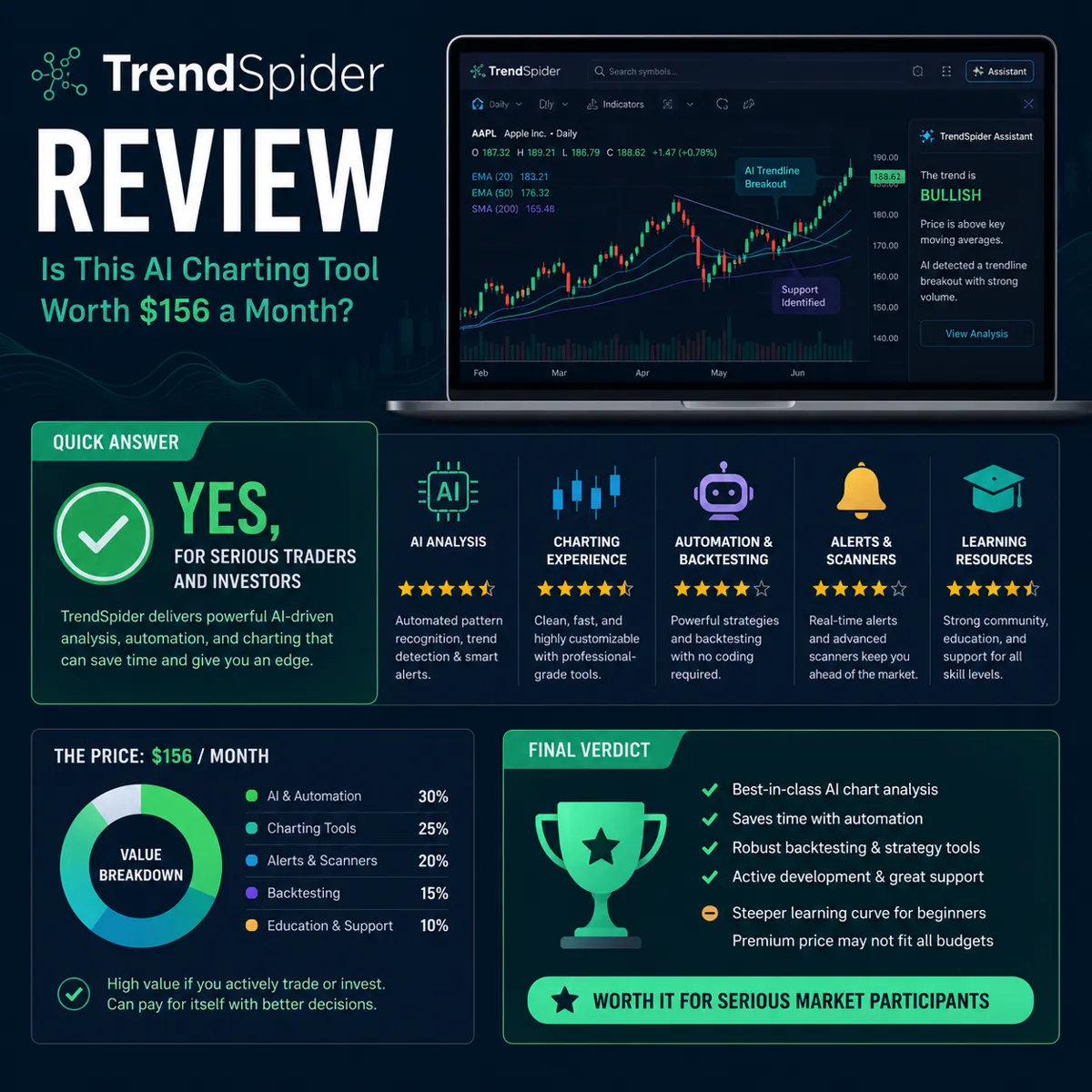
TrendSpider Review: Is This AI Charting Tool Worth $156 a Month?
Most traders spend more time drawing lines on charts than actually trading. TrendSpider promises to fix that with AI-powered automation that handles trendlines, pattern recognition, and multi-timeframe analysis while you focus on execution. But at $156/month for the entry-level plan, it costs more than Netflix, Spotify, and your gym membership combined.
The real question isn't whether TrendSpider works, it does. The question is whether you're the kind of trader who'll actually use what you're paying for, or if you're about to add another subscription to the pile of tools you opened twice and forgot about.
This review breaks down exactly what TrendSpider does, who benefits most, where it falls short, and whether the price tag makes sense for your trading style. No hype, no affiliate spin, just the setup.
What Is TrendSpider and How Does It Work?
TrendSpider is a cloud-based technical analysis platform that uses AI and automation to handle repetitive charting tasks. Instead of manually drawing trendlines, hunting for chart patterns, or flipping between timeframes, the software does it for you in real time.
Here's what that looks like in practice:
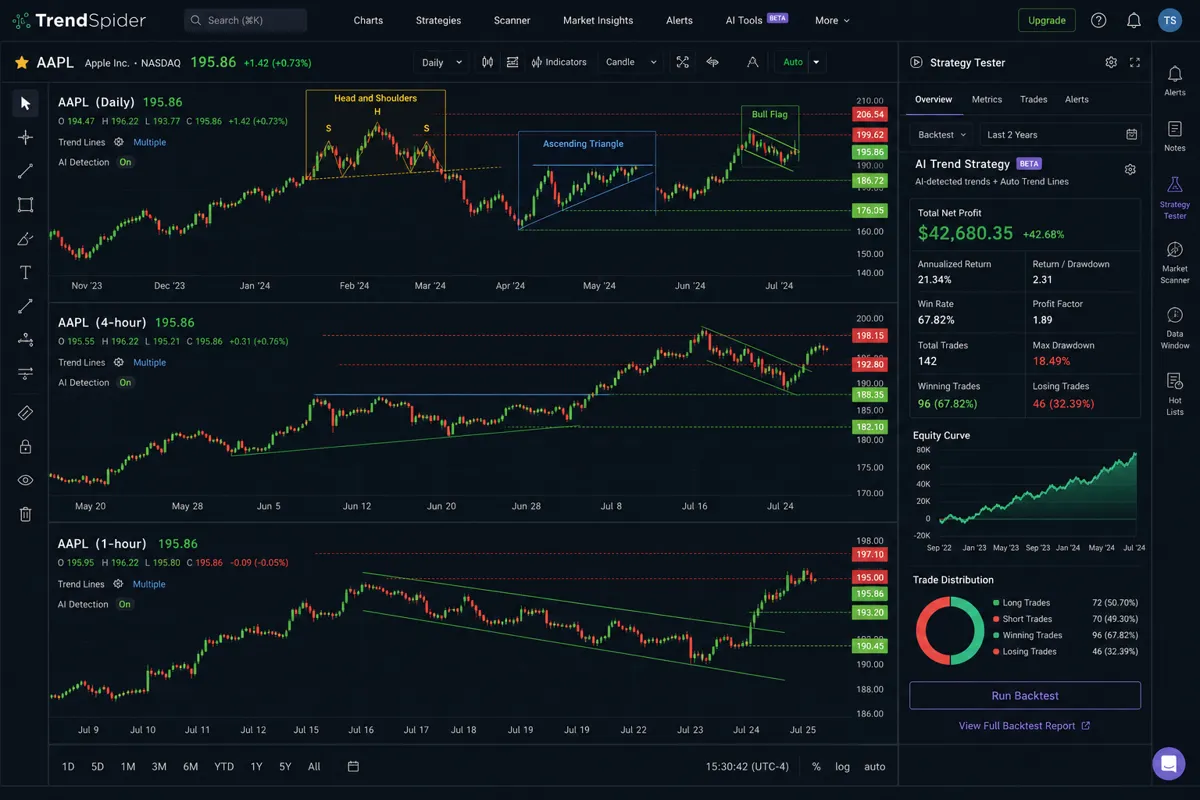
Automated trendlines: The platform scans price action across multiple timeframes and draws support and resistance lines automatically. When price breaks a level, the lines adjust. You're not stuck with outdated markup from three days ago.
Pattern recognition: TrendSpider's AI identifies classic technical patterns, head and shoulders, triangles, flags, wedges, and labels them on your chart. It's not perfect, but it catches setups you might miss when you're scanning 50 tickers.
Multi-timeframe analysis: You can view daily, 4-hour, and 1-hour charts on the same screen without opening separate windows. This is huge for swing traders who need to confirm a daily setup with intraday price action before entry.
Strategy tester: Backtest your entry and exit rules across thousands of historical charts. Want to know if buying breakouts above the 20-day moving average actually works? Run the test and get win rates, average gains, and drawdown data.
Dynamic alerts: Set alerts based on trendline breaks, pattern completions, or custom conditions. The system monitors your watchlist and notifies you when a setup triggers.
TrendSpider works on any browser and integrates with brokers like Interactive Brokers, TradeStation, and TD Ameritrade for one-click order execution. It's not a trading bot, you still make the decisions, but it removes the manual labor that eats up hours every week.
The platform is built for traders who already understand technical analysis and want to scale their process. If you don't know what a bull flag looks like or why multi-timeframe confirmation matters, TrendSpider won't teach you. It assumes you have a system and just need better tools to execute it.
TrendSpider Pricing Plans and What Features Are Included
TrendSpider offers three pricing tiers in 2026, and the gap between them is significant. Here's the breakdown:
| Plan | Monthly | Annual (per month) | Built for |
|---|---|---|---|
| Essential | $156/mo | $119/mo ($1,428/yr) | Swing traders who want automation basics |
| Elite | $396/mo | $299/mo ($3,588/yr) | Active traders who need backtesting and unlimited alerts |
| Advanced | Custom | Custom | Teams and heavy quant use |
Current tier details are on TrendSpider's pricing page. Prices below reflect what we verified in September 2026.
Essential Plan: $156/month (billed monthly) or $1,428/year ($119/month)
Automated trendlines and Fibonacci retracements
Multi-timeframe analysis (up to 8 charts)
Basic pattern recognition (triangles, channels, head and shoulders)
Dynamic price alerts (up to 100 alerts)
Raindrop charts and Heikin Ashi candles
Market scanner with pre-built scans
Real-time data for U.S. stocks and ETFs
This is the entry point. It's enough for swing traders who want automation but don't need advanced backtesting or unlimited alerts. The 100-alert cap becomes a constraint if you're monitoring a large watchlist.
Elite Plan: $396/month (billed monthly) or $3,588/year ($299/month)
Everything in Essential, plus:
Strategy tester with full backtesting capabilities
Unlimited dynamic alerts
Advanced pattern recognition (complex multi-leg patterns)
Options data and unusual options activity scanner
Custom indicator builder
Priority support and faster data refresh rates
This is the plan serious day traders and swing traders actually use. The strategy tester alone justifies the cost if you're building and refining a rules-based system. Unlimited alerts matter when you're tracking 50+ setups across multiple timeframes.
Elite Plus Plan: Custom pricing (contact sales)
Everything in Elite, plus:
API access for custom integrations
White-label charting for advisors or educators
Dedicated account manager
This tier is for professional traders, hedge funds, or educators who need institutional-grade tools. Most retail traders won't need it.
Add-ons:
Crypto data: +$20/month
Forex data: +$30/month
Futures data: +$50/month
If you trade multiple asset classes, the add-ons stack quickly. A day trader running stocks, crypto, and futures is looking at $500+/month on the Elite plan.
Free trial: 7 days, full access to Elite features. No credit card required upfront, but you'll need to enter payment info before the trial ends to continue.
The pricing is transparent but steep. TrendSpider positions itself as a professional tool, and the cost reflects that. If you're trading a $5,000 account and making two trades a month, the math doesn't work. If you're trading a $50,000+ account and making 20+ trades a month, the time savings and edge from automation can justify the expense.
Compare that to TradingView at $49.95/month for Premium or Trade Ideas at $99/month for standard scanning, and TrendSpider is clearly the premium option. The question is whether you need what you're paying for.
TrendSpider vs TradingView: Which Is Better for Technical Analysis?
This is the comparison every trader asks before subscribing. TradingView is the default charting platform for most retail traders, clean interface, massive community, affordable pricing. TrendSpider is the automation-first alternative that costs 3x as much. Here's where each one wins.
| TrendSpider | TradingView | |
|---|---|---|
| Starting price | $156/mo ($119/mo annual) | Free tier; Premium $49.95/mo |
| Automated trendlines and patterns | Yes, core feature | No, manual or community scripts |
| Backtesting | No-code strategy tester (Elite) | Pine Script coding required |
| Community and shared scripts | Small | Massive |
| Mobile app | Limited | Full iOS and Android |
| Learning curve | Steeper | Beginner friendly |
We also ran the pattern engine through a separate live-chart accuracy test: TrendSpider Pattern Scanner Test.
Full profiles of both are in our directory: TrendSpider and TradingView.
TradingView strengths:
Price: $49.95/month for Premium (multiple charts, alerts, indicators). TrendSpider Essential is $156/month.
Community: Millions of users sharing ideas, scripts, and strategies. TrendSpider has a smaller user base and less social interaction.
Ease of use: Intuitive interface that beginners can navigate in 10 minutes. TrendSpider has a steeper learning curve.
Mobile app: Full-featured iOS and Android apps. TrendSpider's mobile experience is limited.
Pine Script: Custom indicator coding with a massive library of user-created scripts. TrendSpider's custom indicators require more technical knowledge.
TrendSpider strengths:
Automation: Trendlines, Fibonacci levels, and pattern recognition happen automatically. TradingView requires manual drawing or custom scripts.
Multi-timeframe analysis: Native support for viewing multiple timeframes on one screen without switching tabs. TradingView can do this but it's clunkier.
Strategy tester: Built-in backtesting with detailed performance metrics. TradingView has a strategy tester but it's less intuitive for non-coders.
Dynamic alerts: Alerts adjust as trendlines move. TradingView alerts are static unless you rebuild them.
Raindrop charts: Unique visualization that shows volume and price action in a single view. TradingView doesn't have this.
Who should pick TradingView:
Beginners learning technical analysis
Traders who want a social community and idea-sharing
Anyone on a budget or trading a small account
Mobile-first traders who need full functionality on the go
Crypto traders who want exchange integrations and real-time data
Who should pick TrendSpider:
Active swing traders or day traders who spend hours drawing trendlines manually
Traders with a rules-based system who want to backtest and refine it
Anyone who values automation over customization
Desktop-focused traders who don't need mobile access
Traders managing larger accounts where the cost is a small percentage of capital
The honest answer: if you're still figuring out your system, start with TradingView. If you have a system and you're tired of doing the same chart work every day, TrendSpider is worth testing. The 7-day free trial gives you enough time to decide if the automation actually saves you time or just adds complexity.
For more on how AI tools compare across the board, check out our complete guide to AI stock tools.
Is TrendSpider Worth It for Beginner Traders?
No. TrendSpider is overkill for beginners, and the cost-to-value ratio doesn't make sense when you're still learning the basics.
Here's why: TrendSpider assumes you already know what you're looking for. The platform automates trendline drawing, pattern recognition, and multi-timeframe analysis, but it doesn't teach you why those things matter or how to use them in a trading system. If you don't understand support and resistance, an automated trendline is just another line on a chart.
What beginners actually need:
A simple charting platform to practice identifying setups manually
Educational resources that explain why patterns work (or don't)
Low-cost tools that don't punish you while you're learning
A way to paper trade and test ideas without risking real money
TrendSpider offers none of that. It's a power tool for traders who've already put in the reps. Handing it to a beginner is like giving a Formula 1 steering wheel to someone who just got their learner's permit.
Better alternatives for beginners:
TradingView Free or Essential ($12.95/month): Clean interface, easy to learn, massive community of traders sharing setups and ideas. You can manually draw trendlines and learn what actually matters before automating anything.
Webull or Moomoo: Free charting built into commission-free brokerage accounts. Basic but functional for learning price action and support/resistance.
Finviz: Free stock screener with visual charts. Great for learning how to scan for setups without paying for premium tools.
The other problem: TrendSpider's feature set creates analysis paralysis for new traders. You've got automated trendlines on five timeframes, pattern recognition flagging 12 different setups, dynamic alerts firing every 10 minutes, and a strategy tester showing conflicting backtest results. That's not clarity, that's noise.
Beginners don't need more information. They need a simple, repeatable process and the discipline to follow it. TrendSpider doesn't help with that. It's built for traders who already have a process and want to scale it.
When does TrendSpider make sense for a newer trader?
Only if you've been trading for at least six months, you have a defined system with clear entry and exit rules, and you're spending multiple hours a week doing manual chart work that could be automated. Even then, start with the 7-day free trial and see if you actually use the features you're paying for.
If you're still Googling "what is a bull flag" or "how do I set a stop loss," save the $156/month and put it toward education or a larger trading account. The tool won't fix a lack of process, and it won't teach you what you don't know.
For traders still building their foundation, our swing trade scanner guide offers better starting points.
TrendSpider for Swing Traders vs Day Traders: Who Benefits Most?
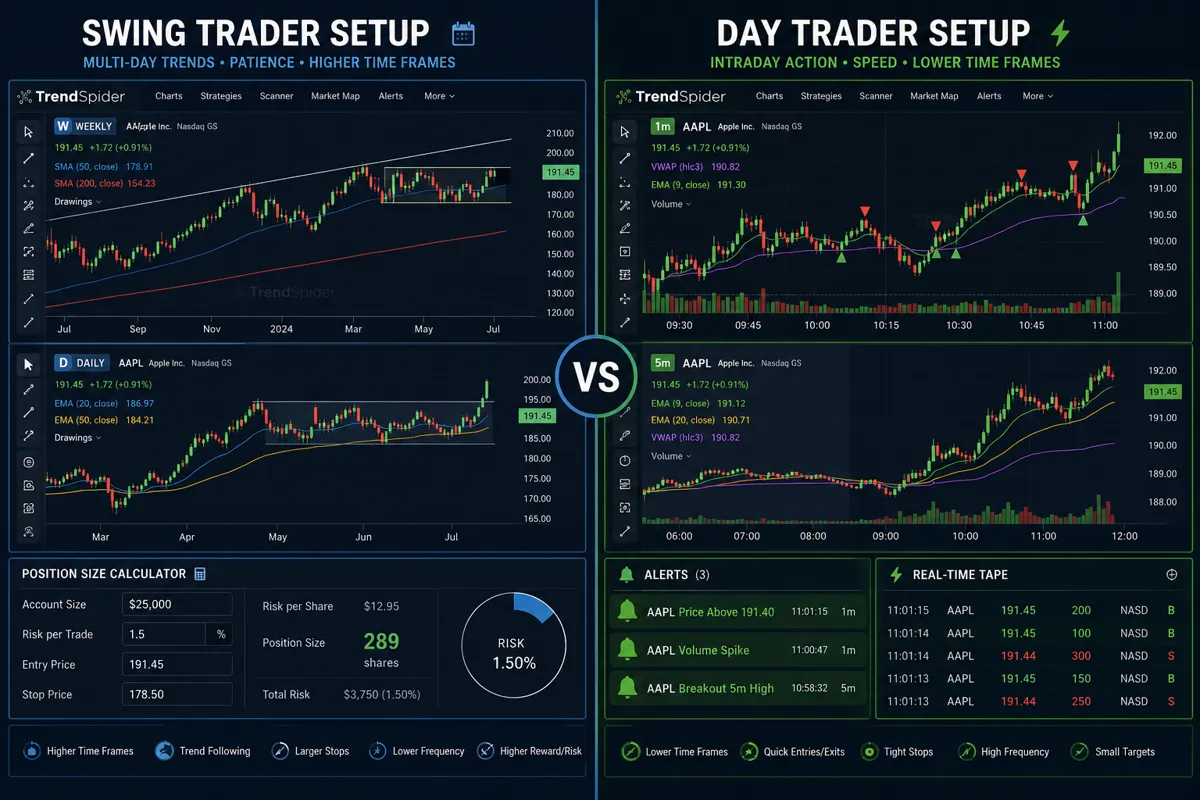
TrendSpider works for both swing traders and day traders, but the value proposition is different. Here's who gets the most out of the platform based on trading style.
Swing traders (holding 2-10 days):
TrendSpider is a near-perfect fit for swing traders who rely on daily and 4-hour charts to identify clean setups. The automation saves hours of manual work, and the multi-timeframe analysis makes it easy to confirm a daily breakout with intraday price action before entry.
What swing traders use most:
Automated trendlines on daily and weekly charts to spot support and resistance without drawing 50 lines manually
Pattern recognition to catch flags, triangles, and consolidations across a large watchlist
Dynamic alerts that notify you when a stock breaks out of a tight range or retests a key level
Strategy tester to backtest swing setups (e.g., "buy when price closes above the 20-day MA with volume 1.5x average")
Why it works: Swing trading is about patience and waiting for the right setup. TrendSpider monitors your watchlist 24/7 and alerts you when conditions align. You're not glued to the screen, you're notified when it's time to act.
Cost justification: If you're managing a $50,000+ account and making 10-20 swing trades per month, the $156/month Essential plan is 0.3% of your capital. The time saved and the edge from catching setups early can easily cover that cost.
Day traders (holding minutes to hours):
Day traders benefit from TrendSpider's speed and real-time automation, but the platform isn't built for ultra-fast scalping. It's better suited for intraday swing setups, trades that last 30 minutes to a few hours based on 5-minute or 15-minute charts.
What day traders use most:
Multi-timeframe analysis to confirm intraday breakouts with higher timeframe trends
Raindrop charts to visualize volume and price action in real time
Dynamic alerts for trendline breaks or pattern completions on short timeframes
Strategy tester to validate intraday setups and optimize entry/exit timing
Why it's not perfect: TrendSpider's data refresh rate is fast but not instant. If you're scalping 1-minute charts and need tick-by-tick execution, platforms like DAS Trader or Sterling Trader Pro are better. TrendSpider is for day traders who trade setups, not noise.
Cost justification: Day traders on the Elite plan ($396/month) need to be trading a $100,000+ account or making 50+ trades per month to justify the cost. The strategy tester and unlimited alerts are critical for refining a high-frequency system, but the price is steep for smaller accounts.
Who should skip TrendSpider:
Scalpers trading 1-minute charts with 10+ trades per day (too slow, too expensive)
Position traders holding weeks or months (automation doesn't add much value)
Traders with accounts under $25,000 who are limited by PDT rules (the cost eats into capital)
Bottom line: Swing traders get the best cost-to-value ratio. Day traders benefit if they're trading larger accounts and using the platform for intraday swing setups, not rapid-fire scalping. If you're still figuring out your style, start with a cheaper tool and upgrade once you know what you need.
For more on building a swing trading system, see our AI stock screener guide.
TrendSpider Alternatives That Are Cheaper
TrendSpider isn't the only game in town. We ranked the whole field in our best AI stock tools for 2026 roundup. If the $156/month price tag feels steep, here are the alternatives that offer similar functionality at lower cost, and where they fall short.
TradingView Premium: $49.95/month
TradingView is the default alternative. You get clean charting, custom indicators, and a massive community of traders sharing ideas. The Premium plan includes multiple charts, volume profile, and 400+ alerts.
What you lose: No automated trendlines or pattern recognition. You're drawing everything manually or using community scripts. Multi-timeframe analysis requires switching tabs. Backtesting exists but it's clunky unless you code in Pine Script.
Best for: Traders who want flexibility and don't mind manual chart work. If you're comfortable drawing your own lines and you value the social aspect, TradingView is the better deal.
Trade Ideas: $99/month (standard)
Trade Ideas is a real-time stock scanner with AI-driven trade signals. It's built for day traders who want to find setups fast, not analyze charts deeply.
What you lose: Limited charting functionality. Trade Ideas is a scanner first, a charting platform second. You'll still need TradingView or another tool for detailed technical analysis.
Best for: Day traders who prioritize scanning over charting. If you're hunting for momentum plays and breakouts in real time, Trade Ideas is faster than TrendSpider.
TC2000: $99/month (Gold plan)
TC2000 offers powerful scanning, charting, and backtesting with a one-time learning curve. It's desktop-focused and popular with swing traders who want deep customization.
What you lose: No automated trendlines. Pattern recognition requires manual setup. The interface feels dated compared to TrendSpider's modern design.
Best for: Traders who want a one-stop shop for scanning, charting, and backtesting without paying TrendSpider prices. TC2000 is a solid middle ground.
Finviz Elite: $39.95/month
Finviz is a visual stock screener with basic charting. Elite adds real-time data, advanced filters, and email alerts.
What you lose: Almost everything TrendSpider does. Finviz is a screener, not a charting platform. You're not getting automated trendlines, multi-timeframe analysis, or backtesting.
Best for: Beginners or casual traders who need a simple way to scan for setups and don't need advanced charting.
Moomoo: Free
Moomoo offers free advanced charting with technical indicators, drawing tools, and real-time data. It's built into a commission-free brokerage account.
What you lose: No automation, no pattern recognition, no strategy tester. You're doing everything manually. But for $0/month, it's hard to complain.
Best for: Traders on a budget who want functional charting without paying for premium tools. Moomoo is a great starting point before upgrading to TrendSpider or TradingView.
The honest comparison:
If you're trading a small account (under $25,000) or making fewer than 10 trades per month, TrendSpider is too expensive. Start with TradingView or Moomoo and upgrade when the manual work becomes a bottleneck.
If you're trading a larger account and spending 5+ hours a week drawing trendlines and hunting for patterns, TrendSpider's automation pays for itself. The time saved is worth more than the subscription cost.
For a full breakdown of AI trading tools, check out our AI trading bot comparison.
What Brokers Does TrendSpider Integrate With?
TrendSpider integrates with several major brokers, but the list isn't as long as you'd expect for a premium platform. Here's what works in 2026:
Supported brokers:
Interactive Brokers (IBKR)
TradeStation
TD Ameritrade (Schwab)
Tradier
How it works: Once connected, you can place trades directly from TrendSpider charts without switching to your broker's platform. The integration pulls in your account balance, positions, and order history so you can manage everything in one place.
What you can do:
Execute market, limit, and stop orders from the chart
View open positions and P/L in real time
Set dynamic alerts that trigger orders automatically (Elite plan only)
Monitor account balance and buying power
What's missing:
No support for Robinhood, Webull, Fidelity, or E*TRADE
Options trading integration is limited (you can view options data but execution is clunky)
Futures and forex integrations require additional data subscriptions and broker compatibility
Why this matters: If you're using a broker TrendSpider doesn't support, you'll need to manually execute trades in your broker's platform after analyzing charts in TrendSpider. That's not a dealbreaker, but it adds friction and slows down execution.
Workaround: Some traders use Tradier as a bridge. Tradier is a brokerage API that connects to TrendSpider and routes orders to other brokers. It's an extra step, but it expands compatibility.
The bigger issue: TrendSpider's broker integrations feel like an afterthought. The platform is built for analysis, not execution. If you're a day trader who needs one-click order entry with hotkeys and level 2 data, you're better off using a dedicated trading platform like DAS Trader or Sterling Trader Pro and keeping TrendSpider as a secondary analysis tool.
For swing traders who place 1-2 orders per day, the integration works fine. For day traders placing 10+ orders per session, the lack of speed and flexibility is a constraint.
If broker integration is a priority, compare TrendSpider to platforms like Alpaca or Webull, which offer tighter execution and broader compatibility.
Common Complaints About TrendSpider From Users
No tool is perfect, and TrendSpider has its share of frustrations. Here's what actual users complain about most, based on reviews from trading forums, Reddit, and customer feedback in 2026.
1. Steep learning curve
TrendSpider throws a lot at you on day one. Automated trendlines, raindrop charts, multi-timeframe analysis, dynamic alerts, strategy tester, it's overwhelming if you're not already comfortable with technical analysis. New users report spending 2-3 weeks just figuring out which features they actually need.
The fix: TrendSpider offers video tutorials and a knowledge base, but the onboarding process could be smoother. Start with the free trial and focus on one feature at a time. Don't try to use everything at once.
2. Automated trendlines aren't always accurate
The AI draws trendlines based on algorithms, not context. Sometimes it connects the wrong pivot points or draws lines that don't align with how a human trader would read the chart. You still need to review and adjust manually.
The reality: Automation saves time, but it's not a replacement for judgment. TrendSpider gets you 80% of the way there, you still need to validate the setup before trading it.
3. Limited mobile functionality
TrendSpider has a mobile app, but it's barebones compared to the desktop experience. You can view charts and check alerts, but you can't access the strategy tester, customize indicators, or do serious analysis on your phone.
Why it matters: If you're traveling or away from your desk, you're stuck with limited functionality. TradingView's mobile app is far superior.
4. High cost for small accounts
At $156/month for Essential or $396/month for Elite, TrendSpider is expensive relative to account size. If you're trading a $10,000 account, the annual cost is 18-47% of your capital. That's hard to justify unless you're consistently profitable.
The math: TrendSpider makes sense for accounts over $50,000 where the subscription is less than 1% of capital. Below that, the cost-to-value ratio doesn't work for most traders.
5. Pattern recognition misses setups
The AI catches most classic patterns, but it's not perfect. Users report missed flags, false positives on head-and-shoulders patterns, and inconsistent labeling across timeframes.
The takeaway: Use pattern recognition as a starting point, not a final answer. Always confirm the setup with price action, volume, and risk-reward before entering.
6. No crypto futures support
TrendSpider supports crypto spot data (Bitcoin, Ethereum, etc.) with a $20/month add-on, but it doesn't support crypto futures or perpetual contracts. If you're trading crypto derivatives, you'll need a different platform.
7. Customer support is slow
Elite plan users get priority support, but Essential plan users report waiting 24-48 hours for responses. For a premium-priced tool, that's frustrating.
8. Overkill for casual traders
If you're making 2-3 trades per month or holding positions for weeks, TrendSpider's automation doesn't add much value. You're paying for features you'll rarely use.
Who complains least: Active swing traders and day traders with larger accounts who trade 20+ times per month. They use the platform daily and the time savings justify the cost.
Who complains most: Beginners, small-account traders, and anyone expecting the AI to do all the work. TrendSpider is a tool, not a system. It won't make you profitable if you don't already have an edge.
For more on what works (and what doesn't) in AI trading tools, see our AI stock picker test results.
Does TrendSpider Work for Crypto Trading or Just Stocks?
TrendSpider supports crypto, but it's not the platform's strength. Here's what works and what doesn't in 2026.
What's included:
Crypto spot data for major coins (Bitcoin, Ethereum, Litecoin, etc.) via a $20/month add-on
Automated trendlines and pattern recognition on crypto charts
Multi-timeframe analysis for crypto pairs
Dynamic alerts for price breaks and pattern completions
What's missing:
No crypto futures or perpetual contracts (Binance, Bybit, etc.)
No DeFi token support (only major exchange-listed coins)
Limited exchange integrations (no direct trading from TrendSpider to Coinbase, Kraken, or Binance)
Crypto-specific indicators (funding rates, liquidation levels, on-chain data) aren't built in
The reality: TrendSpider treats crypto like any other asset class. The charting and automation work fine, but the platform doesn't offer the crypto-native features that serious crypto traders need.
Better alternatives for crypto traders:
TradingView: Full crypto exchange integrations, real-time data, and a massive crypto trading community. Crypto traders already use TradingView by default.
Coinigy: Built specifically for crypto with multi-exchange support and portfolio tracking.
3Commas: Crypto trading bots with automated strategies and exchange integrations.
When TrendSpider makes sense for crypto: If you're a stock trader who occasionally trades Bitcoin or Ethereum and you want to use the same charting platform for both, the $20/month crypto add-on is fine. But if crypto is your primary market, TrendSpider isn't the best tool for the job.
For a deeper dive into crypto trading tools, check out our AI trading bot breakdown.
How Accurate Is TrendSpider AI Pattern Recognition?
TrendSpider's AI pattern recognition is useful but not flawless. It catches most classic setups, triangles, flags, head and shoulders, channels, but it's not a replacement for your own chart reading. Here's what to expect.
What the AI does well:
Identifies symmetrical triangles, ascending triangles, and descending triangles with high accuracy
Flags bull flags and bear flags on clean breakouts
Detects head-and-shoulders patterns and inverse head-and-shoulders with clear necklines
Highlights channels and trendline breaks in real time
Where it struggles:
Complex patterns (cup-and-handle, double tops/bottoms) are hit-or-miss
False positives on choppy, low-volume stocks where the pattern isn't clean
Inconsistent labeling across timeframes (a flag on the daily chart might not show up on the 4-hour)
Doesn't account for context (a breakout in a bear market gets flagged the same as a breakout in a bull market)
The accuracy question: TrendSpider doesn't publish official accuracy metrics, but user reports suggest the AI correctly identifies 70-80% of classic patterns. That's solid, but it means 20-30% of flagged setups are either false positives or patterns that don't play out.
How to use it: Treat pattern recognition as a scanning tool, not a trading signal. Let the AI flag potential setups, then validate them manually by checking:
Volume confirmation (is the breakout on above-average volume?)
Risk-reward (is the stop loss tight enough to justify the trade?)
Market context (is the broader market supporting this move?)
Example: TrendSpider flags a bull flag on a daily chart. Before entering, you check the 4-hour chart for confirmation, verify that volume spiked on the breakout, and confirm that the stock is above its 50-day moving average. The AI got you 80% of the way there, you finish the job.
The bigger point: No AI is going to hand you perfect setups. TrendSpider's pattern recognition saves time by narrowing your watchlist from 100 stocks to 10 potential trades. You still need to do the work to separate the clean setups from the noise.
For more on how AI tools perform in real trading, see our AI portfolio analysis guide.
Can You Cancel TrendSpider Subscription Anytime?
Yes. TrendSpider operates on a month-to-month subscription with no long-term contract. You can cancel anytime, and you'll retain access until the end of your current billing cycle.
How to cancel:
Log in to your TrendSpider account
Go to Account Settings > Billing
Click "Cancel Subscription"
Confirm cancellation
What happens after you cancel:
You keep access until the end of the current billing period (no partial refunds)
Your saved charts, watchlists, and custom indicators are stored for 30 days
If you reactivate within 30 days, everything is restored
After 30 days, your data is deleted
No cancellation fees, no hidden charges. TrendSpider doesn't make it hard to leave, which is a good sign. Some platforms bury the cancel button or require you to call customer support, TrendSpider doesn't play that game.
Annual plans: If you prepay for a year to get the discounted rate ($119/month instead of $156/month on Essential), you're locked in for 12 months. No refunds if you cancel early. Only choose annual billing if you're confident you'll use the platform long-term.
Free trial: The 7-day free trial doesn't require a credit card upfront, but you'll need to enter payment info before the trial ends to continue. If you don't, the trial expires and you lose access. No automatic charges.
The smart move: Start with the monthly plan, even if the annual discount is tempting. Test the platform for 2-3 months to make sure you're actually using it before committing to a year.
TrendSpider Free Trial: How Long Does It Last?
TrendSpider offers a 7-day free trial with full access to Elite plan features. That's enough time to test the platform and decide if it's worth the cost.
What's included in the trial:
All Elite plan features (strategy tester, unlimited alerts, advanced pattern recognition)
Real-time data for U.S. stocks and ETFs
Automated trendlines and multi-timeframe analysis
Dynamic alerts and custom indicators
Full access to the knowledge base and video tutorials
What's not included:
Crypto, forex, or futures data (you'll need to add those separately after the trial)
Broker integrations (you can test them, but you'll need to connect your live brokerage account)
How to maximize the trial:
Day 1-2: Set up your workspace. Import your watchlist, customize your chart layout, and explore the interface. Don't try to use every feature, focus on the ones that matter for your trading style.
Day 3-4: Test automated trendlines and pattern recognition. Run the AI on your watchlist and see how many setups it flags. Validate a few manually to check accuracy.
Day 5-6: Use the strategy tester. Backtest your entry and exit rules on historical data. This is the feature that justifies the Elite plan cost, don't skip it.
Day 7: Decide. If you used the platform every day and it saved you time, subscribe. If you opened it twice and forgot about it, cancel before the trial ends.
No credit card required upfront: TrendSpider doesn't auto-charge you after the trial. You'll need to manually enter payment info to continue. That's a pro-consumer move.
One trial per email: You can't create multiple accounts to extend the trial. If you need more time, reach out to customer support and ask for an extension. Some users report getting an extra 3-7 days if they explain their use case.
The honest take: Seven days is enough to know if TrendSpider fits your workflow. If you're still on the fence after a week, the platform probably isn't for you.
Who Should Not Use TrendSpider?
TrendSpider isn't for everyone. Here's who should skip it and use something else.
1. Beginners still learning technical analysis
If you're still Googling "what is support and resistance" or "how do I read a candlestick chart," TrendSpider is too advanced. The platform assumes you already know what you're looking for. Start with TradingView Free or Moomoo and learn the basics before paying for automation.
2. Buy-and-hold investors
If you're buying index funds or blue-chip stocks and holding for years, TrendSpider adds zero value. You don't need automated trendlines or pattern recognition for a portfolio you check once a quarter. Save the $156/month.
3. Traders with accounts under $10,000
At $156/month, TrendSpider costs $1,872/year. That's 18% of a $10,000 account. The math doesn't work unless you're consistently profitable and the platform directly improves your edge. Start with free or low-cost tools and upgrade when your account grows.
4. Mobile-first traders
TrendSpider's mobile app is limited. If you do most of your trading on your phone, you'll be frustrated by the lack of functionality. TradingView's mobile app is far better.
5. Scalpers trading 1-minute charts
TrendSpider's data refresh rate is fast but not instant. If you're scalping with 10+ trades per day on 1-minute charts, you need a platform built for speed (DAS Trader, Sterling Trader Pro). TrendSpider is for traders who trade setups, not ticks.
6. Crypto-native traders
If crypto is your primary market and you're trading futures, perpetual contracts, or DeFi tokens, TrendSpider doesn't offer the tools you need. Use TradingView, Coinigy, or a crypto-specific platform.
7. Traders who don't have a system
TrendSpider is a tool, not a strategy. If you don't have clear entry and exit rules, the platform won't help you. It'll just give you more information to second-guess yourself with. Build a system first, then add tools that support it.
8. Anyone expecting the AI to do all the work
TrendSpider automates chart work, but it doesn't make trading decisions for you. If you're looking for a "set it and forget it" trading bot, this isn't it. You still need to validate setups, manage risk, and execute trades.
The pattern: TrendSpider works for active, experienced traders with larger accounts who already have a system and want to scale it. If you don't fit that profile, you're better off with a cheaper, simpler tool.
For alternatives that fit different trading styles, see our AI stock tool comparison.
Biggest Mistakes People Make When Using TrendSpider
Even experienced traders screw up when they first start using TrendSpider. Here are the most common mistakes and how to avoid them.
1. Trusting automated trendlines without validation
The AI draws lines based on algorithms, not context. Sometimes it connects the wrong pivot points or flags a breakout that isn't clean. Always review automated trendlines manually before trading them.
The fix: Use automation to narrow your watchlist, then validate setups with your own chart reading. The AI gets you 80% of the way there, you finish the job.
2. Overloading charts with too many indicators
TrendSpider makes it easy to add 10+ indicators to a single chart. That's not helpful, it's noise. Most profitable traders use 2-3 indicators max and focus on price action.
The fix: Pick three signals you trust (e.g., 20-day MA, RSI, volume) and mute the rest. Trade only those for 30 days and see if your results improve.
3. Ignoring the strategy tester
The strategy tester is the best feature on the Elite plan, but most users never touch it. They pay $396/month and skip the one tool that could actually improve their edge.
The fix: Spend one weekend backtesting your entry and exit rules. Run 100+ historical trades and see what your win rate, average gain, and max drawdown actually are. If the numbers don't work, adjust your system before risking real money.
4. Setting too many alerts
TrendSpider lets you set hundreds of dynamic alerts. New users go overboard and end up with 50+ notifications per day. That's not helpful, it's overwhelming.
The fix: Limit yourself to 10-15 high-probability setups. Only set alerts for trades you'd actually take. Quality over quantity.
5. Expecting the AI to replace judgment
Pattern recognition flags setups, but it doesn't tell you which ones are worth trading. You still need to check volume, risk-reward, and market context before entering.
The fix: Treat TrendSpider as a scanning tool, not a trading signal. The AI narrows your focus, you make the final call.
6. Not using multi-timeframe analysis
This is TrendSpider's killer feature, but many users stick to a single timeframe out of habit. You're missing confirmation signals and trading setups that don't align across timeframes.
The fix: Always check at least two timeframes before entering. If you're swing trading off the daily chart, confirm the setup with the 4-hour chart. If the timeframes don't agree, skip the trade.
7. Paying for features they don't use
Most traders on the Elite plan ($396/month) never use the strategy tester, custom indicators, or advanced pattern recognition. They're paying for features they don't need.
The fix: Start with the Essential plan ($156/month) and upgrade only if you're consistently using the features you're missing. Don't pay for Elite just because it sounds better.
8. Forgetting to paper trade first
TrendSpider makes it easy to connect your broker and start trading live. That's a mistake if you haven't tested your system first.
The fix: Paper trade for at least 30 days before risking real money. Use the strategy tester to validate your rules, then execute them in a simulated account. Only go live once you're consistently profitable on paper.
The pattern: Most mistakes come from overcomplicating the process or expecting the tool to do the thinking. TrendSpider is powerful, but it's not a replacement for discipline and a clear system.
For more on building a repeatable process, see our AI trading software guide.
Does TrendSpider Have a Mobile App or Only Desktop?
TrendSpider has a mobile app for iOS and Android, but it's a stripped-down version of the desktop platform. You can view charts and check alerts, but you can't access most of the features that justify the subscription cost.
What works on mobile:
View saved charts and watchlists
Check dynamic alerts and notifications
Basic charting with manual drawing tools
Real-time price data and quotes
What doesn't work on mobile:
Strategy tester (desktop only)
Custom indicator builder (desktop only)
Multi-timeframe analysis (limited functionality)
Raindrop charts (not available)
Broker integrations and order execution (clunky on mobile)
The reality: TrendSpider's mobile app is for monitoring, not analysis. If you're away from your desk and need to check if a setup triggered, the app works fine. But if you're trying to do serious chart work on your phone, you'll be frustrated.
How it compares to TradingView mobile:
TradingView's mobile app is far superior. You get full charting functionality, custom indicators, alerts, and a smooth user experience. If mobile trading is important to you, TradingView is the better choice.
When the mobile app is useful:
Checking alerts while you're away from your desk
Monitoring open positions and P/L
Quickly reviewing a chart before deciding whether to execute a trade
When it's not enough:
Doing deep technical analysis on the go
Backtesting strategies or building custom indicators
Executing complex multi-leg trades
The honest take: TrendSpider is a desktop-first platform. The mobile app is an afterthought. If you need full mobile functionality, you're better off with TradingView or a broker app like Webull or Moomoo.
For traders who work primarily from a desktop setup, this isn't a dealbreaker. But if you're traveling frequently or trading on the go, the limited mobile experience is a real constraint.
Conclusion
TrendSpider is a powerful AI charting tool that automates the grunt work of technical analysis, trendlines, pattern recognition, multi-timeframe analysis, and backtesting. For active swing traders and day traders with larger accounts who spend hours every week doing manual chart work, the $156/month Essential plan or $396/month Elite plan can justify the cost through time savings and improved edge.
But it's not for everyone. Beginners, small-account traders, buy-and-hold investors, and anyone without a clear trading system will find TrendSpider overwhelming and expensive. The platform assumes you already know what you're looking for and just need better tools to execute it.
Choose TrendSpider if:
You're an active trader making 20+ trades per month
You have a rules-based system and want to automate repetitive tasks
You're trading an account over $50,000 where the subscription is less than 1% of capital
You value time savings and are willing to pay for automation
Skip TrendSpider if:
You're still learning technical analysis or don't have a defined system
You're trading a small account (under $10,000)
You need full mobile functionality
You're looking for a cheap alternative to TradingView
The 7-day free trial gives you enough time to test the platform and decide if it fits your workflow. Start there, focus on the features that matter for your trading style, and cancel if it doesn't deliver. No long-term commitment, no cancellation fees.
TrendSpider won't make you profitable if you don't already have an edge. But if you have a system and you're tired of doing the same chart work every day, it's one of the best tools available in 2026.
Want the tools and systems behind this, without the hype? FullStack Alpha cuts the noise so you can keep the alpha. See the AI tools, scanners, and strategies we actually rate at aistockpickerapps.com.
FAQ
Is TrendSpider worth $156 a month for swing traders?
Yes, if you're making 10+ swing trades per month and spending hours drawing trendlines manually. The automation saves time and helps you catch setups earlier. For casual traders making 2-3 trades per month, it's overkill.
Can beginners use TrendSpider effectively?
No. TrendSpider assumes you already understand technical analysis. If you're still learning support and resistance or chart patterns, start with TradingView or a free tool and upgrade once you have a system.
Does TrendSpider work for day trading?
Yes, but it's better for intraday swing setups (trades lasting 30 minutes to a few hours) than rapid-fire scalping. The data refresh rate is fast but not instant. Scalpers need a platform built for speed like DAS Trader.
What's the difference between TrendSpider Essential and Elite?
Essential ($156/month) includes automated trendlines, pattern recognition, and basic alerts. Elite ($396/month) adds the strategy tester, unlimited alerts, advanced patterns, and options data. Elite is worth it if you backtest strategies regularly.
Can you use TrendSpider without connecting a broker?
Yes. You can use TrendSpider purely for analysis and execute trades manually in your broker's platform. Broker integration is optional but convenient if your broker is supported.
Does TrendSpider support crypto and forex?
Crypto spot data is available for $20/month extra. Forex data costs $30/month. Crypto futures and DeFi tokens aren't supported. If crypto is your primary market, TradingView is a better choice.
How accurate is TrendSpider's AI pattern recognition?
The AI correctly identifies 70-80% of classic patterns (triangles, flags, head-and-shoulders). It's useful for scanning but not perfect. Always validate flagged setups manually before trading.
Can you cancel TrendSpider anytime?
Yes. TrendSpider operates month-to-month with no long-term contract. Cancel anytime through account settings and you'll keep access until the end of your billing cycle.
Is TrendSpider better than TradingView?
TrendSpider offers more automation (automated trendlines, pattern recognition, strategy tester). TradingView is cheaper ($49.95/month vs $156/month), has better mobile functionality, and a larger community. Choose TrendSpider if you value automation; choose TradingView if you want flexibility and lower cost.
Does TrendSpider have a free trial?
Yes. TrendSpider offers a 7-day free trial with full access to Elite plan features. No credit card required upfront. That's enough time to test the platform and decide if it's worth subscribing.
What brokers work with TrendSpider?
TrendSpider integrates with Interactive Brokers, TradeStation, TD Ameritrade (Schwab), and Tradier. It doesn't support Robinhood, Webull, Fidelity, or E*TRADE.
Is TrendSpider good for small accounts under $10,000?
No. At $156/month ($1,872/year), the cost is 18% of a $10,000 account. That's too expensive unless you're consistently profitable and the platform directly improves your edge. Start with free or low-cost tools and upgrade when your account grows.