QuantConnect vs Trade Ideas: Which Platform for Traders?
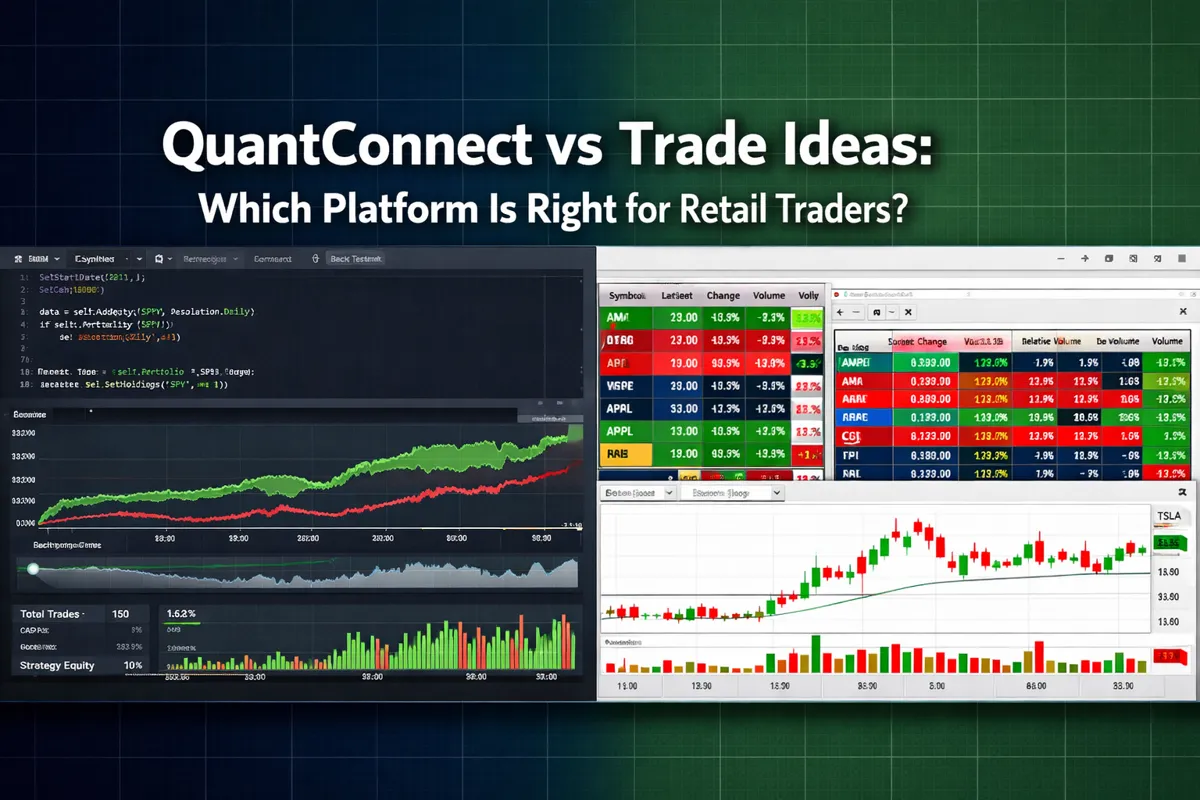
The average retail trader spends more on subscriptions than they make in their first year of trading. That's not a skill problem — it's a tool-selection problem. QuantConnect and Trade Ideas sit at opposite ends of the trading software spectrum, and picking the wrong one doesn't just waste money. It wastes months of learning time you can't get back. One is a full algorithmic trading platform where you write code and backtest strategies. The other is a real-time stock scanner with AI-powered alerts built for discretionary traders. Both are legitimate tools. Neither is right for everyone. This breakdown cuts through the marketing and shows you exactly which platform matches your actual trading style, skill level, and goals in 2026.
Key Takeaways
QuantConnect is an open-source algorithmic trading platform requiring Python or C# coding skills, built for traders who want to design, backtest, and automate strategies with institutional-grade data.
Trade Ideas is a real-time stock scanner with AI-driven alerts designed for discretionary day and swing traders who need fast setups without writing code.
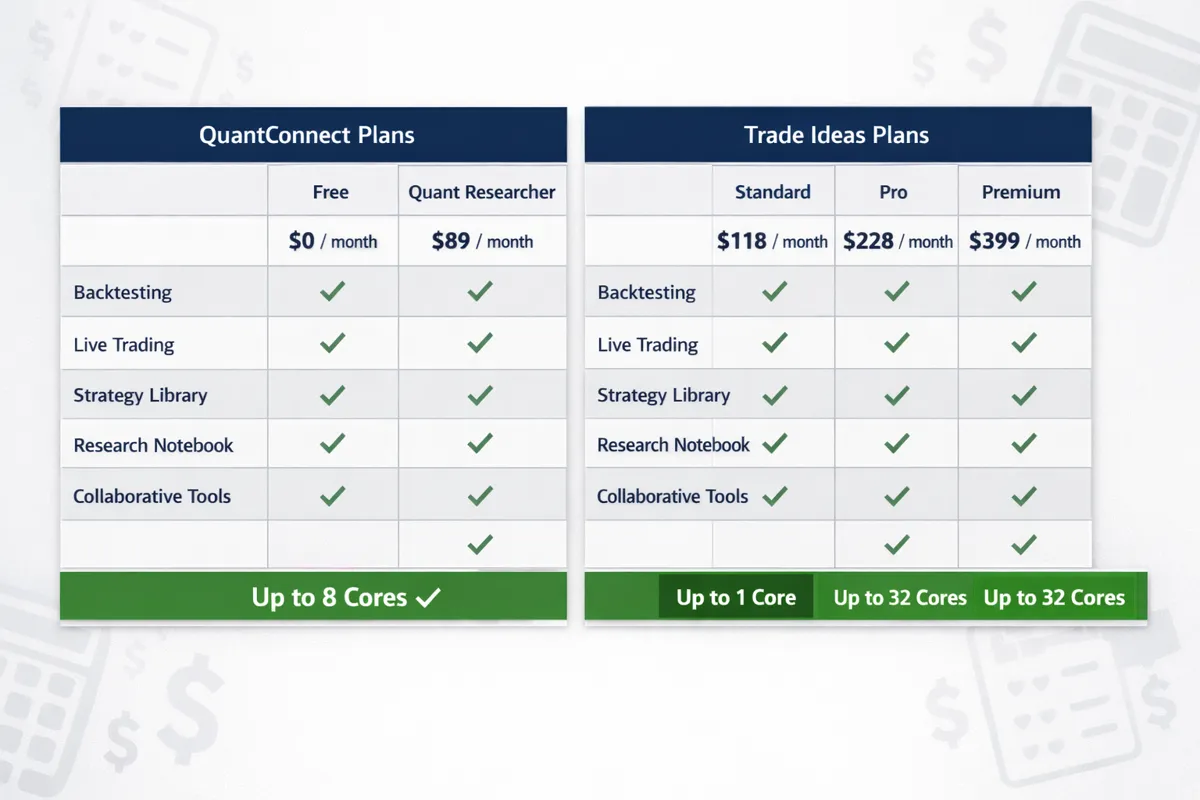
QuantConnect offers a free tier with cloud backtesting; paid plans start at $8/month for live trading, scaling to $400+/month for teams needing high-frequency execution.
Trade Ideas pricing starts at $118/month for standard scanning, with premium tiers reaching $228/month for full AI features and real-time Level 2 data.
Choose QuantConnect if you can code, want full control over strategy logic, and plan to automate execution based on quantitative models.
Choose Trade Ideas if you're a discretionary trader who needs pre-market scanners, intraday alerts, and visual setups without building algorithms from scratch.
Common mistake: beginners pick QuantConnect thinking they'll "learn to code while trading" — the learning curve is steep, and most quit before deploying a single live algorithm.
Neither platform guarantees profitability; both require disciplined risk management, position sizing, and a tested process before risking real capital.
QuantConnect vs Trade Ideas: Which Platform Is Right for Retail Traders?
QuantConnect and Trade Ideas serve fundamentally different trading workflows. QuantConnect is an algorithmic trading platform where you write code in Python or C# to design, backtest, and deploy automated strategies. Trade Ideas is a real-time stock scanner with AI-powered alerts that surfaces setups for discretionary traders who manually execute trades. The right choice depends on whether you're building automated systems or scanning for manual entries.
QuantConnect appeals to traders with programming experience who want to test quantitative strategies against historical data and automate execution. You write the logic, define entry and exit rules, backtest across years of tick data, and deploy algorithms that trade without human intervention. It's built for systematic traders who think in code and want full control over every parameter.
Trade Ideas is designed for active traders who need fast, visual information to make discretionary decisions. It scans thousands of stocks in real time, flags unusual volume, breakouts, and gap plays, and uses AI to suggest trades based on historical patterns. You still click the buy button — the platform just tells you where to look.
If you're evaluating these two platforms, you're likely asking the wrong question. They don't compete. One is for algo traders. The other is for discretionary traders. The real question is: do you want to automate a rules-based system, or do you want a scanner that finds setups you execute manually? Answer that first, and the platform choice becomes obvious.
What Is QuantConnect and How Does It Work?
QuantConnect is an open-source algorithmic trading platform that lets you design, backtest, and deploy automated trading strategies using Python or C#. It provides cloud-based infrastructure, institutional-grade historical data, and live brokerage integrations so you can test ideas against decades of market data and execute them automatically once deployed.
The workflow is straightforward: you write a trading algorithm in the browser-based IDE, define your entry and exit logic, backtest it against historical price data, optimize parameters, and deploy it to trade live through supported brokers like Interactive Brokers, OANDA, or Alpaca. The platform handles data feeds, execution, and infrastructure — you focus on strategy logic.
QuantConnect's free tier includes unlimited backtesting with minute-resolution data for U.S. equities, forex, crypto, and futures. Paid tiers unlock tick-level data, faster backtesting, live trading, and additional compute resources. The platform is popular with quant traders, data scientists, and developers who want to apply systematic strategies without building infrastructure from scratch.
The learning curve is real. If you've never written code, QuantConnect will feel like learning a new language while trying to trade. If you're comfortable with Python and understand basic market mechanics, it's one of the most powerful tools available to retail traders in 2026. The platform doesn't hold your hand — it assumes you know what you're building and why.
For a deeper look at how algorithmic systems fit into retail trading, see our guide on algorithmic trading AI and what retail traders get wrong.
What Is Trade Ideas Platform Used For?
Trade Ideas is a real-time stock scanner and AI-powered alert system used by day traders and swing traders to identify high-probability setups before they break out. It monitors thousands of stocks simultaneously, filters for unusual volume, price action, and technical patterns, and surfaces opportunities that match your criteria.
The platform's core feature is its scanner suite. You can run pre-built scans for gap-ups, breakouts, unusual volume spikes, and momentum plays, or build custom filters based on price, volume, float, and technical indicators. Scans update in real time, so you see setups as they develop — not after they've already moved.
Trade Ideas also includes Holly, an AI engine that analyzes historical patterns and suggests trades based on what's worked in similar market conditions. Holly doesn't execute trades — it flags opportunities and provides context. You still make the final call. The AI is trained on years of intraday data, and while it's not perfect, it's better than manually scanning hundreds of tickers every morning.
The platform is built for discretionary traders who need speed and visual clarity. You're not writing code or backtesting strategies. You're watching a live feed of setups, clicking into charts, and deciding whether to take the trade. It's a scanner, not an execution system. If you're a day trader who needs pre-market movers, intraday breakouts, and real-time alerts, Trade Ideas is one of the most widely used tools in the space.
For more on how AI-driven scanners fit into active trading workflows, check out our breakdown of 7 swing trade scanners that find setups before they break out.
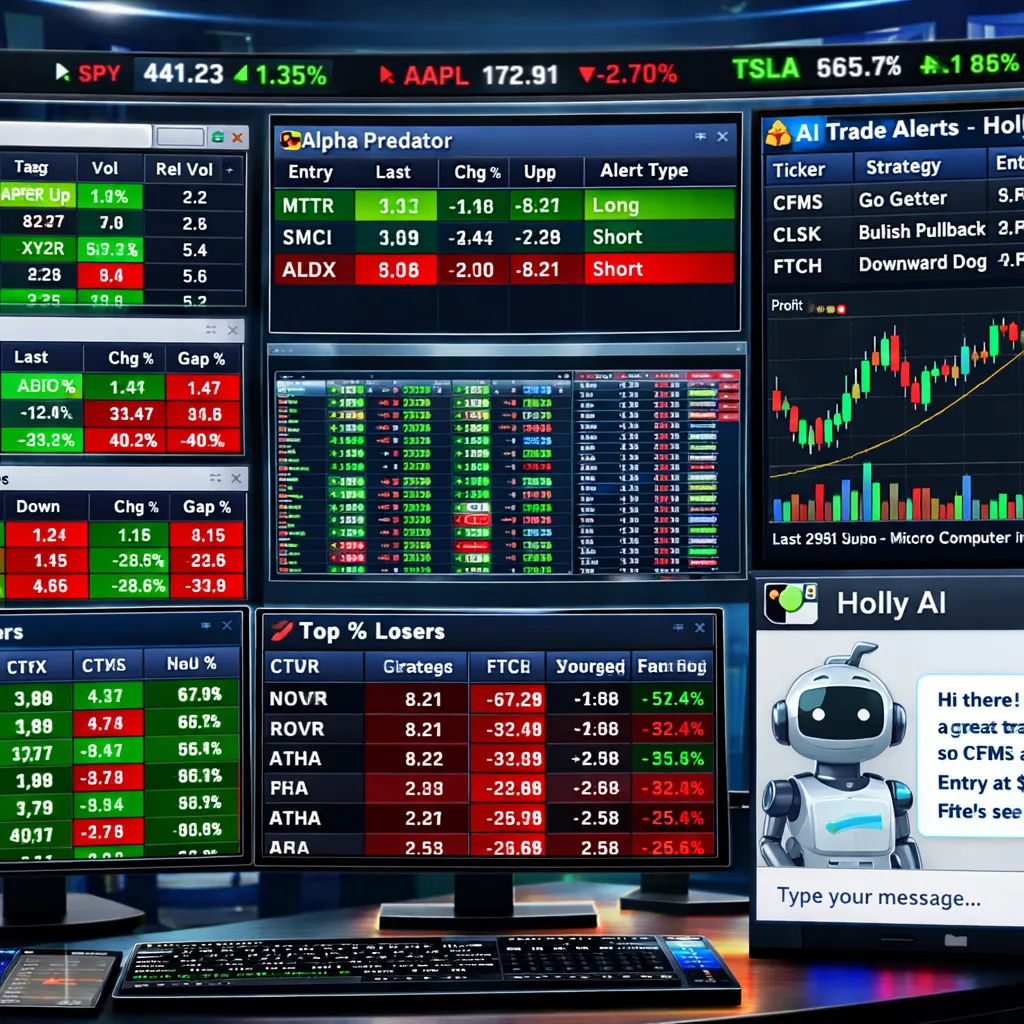
QuantConnect vs Trade Ideas: Main Differences
The core difference is automation versus discretion. QuantConnect is for traders who want to automate rules-based strategies. Trade Ideas is for traders who want to find setups and execute them manually. One requires coding. The other requires pattern recognition and fast decision-making.
Coding requirement: QuantConnect requires Python or C# programming skills. You write algorithms, define logic, and deploy code. Trade Ideas requires zero coding — you configure scanners, set alerts, and click trades.
Backtesting: QuantConnect offers institutional-grade backtesting with tick-level data, walk-forward analysis, and parameter optimization. Trade Ideas offers basic backtesting on AI-generated signals, but it's not designed for rigorous strategy validation.
Execution: QuantConnect automates execution once your algorithm is deployed. Trade Ideas sends alerts — you still click the buy button.
Data: QuantConnect provides historical data for equities, forex, crypto, and futures going back decades. Trade Ideas focuses on real-time U.S. equity data with Level 2 quotes on premium tiers.
Use case: QuantConnect is for systematic traders building quantitative strategies. Trade Ideas is for active traders scanning for discretionary setups.
Learning curve: QuantConnect has a steep learning curve if you're not a programmer. Trade Ideas is intuitive for anyone who's used a stock screener.
Cost: QuantConnect starts free and scales based on data and compute needs. Trade Ideas starts at $118/month and scales based on features and AI access.
If you're comparing these two, you're likely in one of two camps: you either want to build an algo and let it trade for you, or you want a scanner that tells you what's moving so you can trade it yourself. The platforms don't overlap. Pick based on your workflow, not features.
For a side-by-side look at how Trade Ideas stacks up against other scanning platforms, see our comparison of TrendSpider vs Trade Ideas.
Which Is The Best for the price ?
Better for Beginner Traders: QuantConnect or Trade Ideas?
Trade Ideas is better for beginners who want to start trading quickly without learning to code. QuantConnect is better for beginners with programming experience who want to learn systematic trading from the ground up. Most beginners should start with Trade Ideas unless they already know Python and have a specific strategy they want to automate.
Beginners using Trade Ideas can start scanning for setups on day one. The platform's pre-built scans surface gap-ups, breakouts, and unusual volume plays without requiring any configuration. You can watch the scanner, click into charts, and paper trade setups to learn price action and risk management. The learning curve is about understanding market structure, not software.
Beginners using QuantConnect face a steeper path. You need to learn Python or C#, understand how to structure an algorithm, grasp backtesting concepts like overfitting and look-ahead bias, and debug code when things break. If you're not already a programmer, expect months of learning before you deploy a live algorithm. The platform doesn't teach you to trade — it assumes you already have a strategy and want to automate it.
Common mistake: beginners pick QuantConnect thinking they'll "learn to code while trading." That rarely works. You end up learning neither well. If you want to learn algorithmic trading, learn Python first, then learn trading, then combine them. Trying to do all three at once is a recipe for frustration and blown accounts.
If you're a beginner with no coding background, start with Trade Ideas or a similar scanner. Learn to read price action, manage risk, and execute a repeatable process. Once you've proven you can trade profitably with manual execution, then consider automating. If you're a beginner who already codes, QuantConnect is a powerful way to apply systematic thinking to the market — just don't skip the paper trading phase.
For more on building a solid foundation before adding tools, see our guide on AI stock trading for retail traders.
How Much Does QuantConnect Cost Per Month?
QuantConnect offers a free tier with unlimited backtesting and limited live trading. Paid plans start at $8/month for the Quant Researcher tier, which unlocks live trading with one algorithm, faster backtesting, and tick-level data. Team and institutional plans scale to $400+/month for high-frequency execution, multiple algorithms, and priority support.
The free tier is surprisingly robust. You get access to minute-resolution data for U.S. equities, forex, crypto, and futures, unlimited backtesting in the cloud, and the ability to deploy one live algorithm with limited compute. It's enough to test ideas and learn the platform without spending a dollar.
The Quant Researcher plan at $8/month is the entry point for serious algo traders. It includes live trading with one algorithm, tick-level data, faster backtesting, and more compute resources. If you're deploying a single strategy and don't need high-frequency execution, this tier covers most retail use cases.
Higher tiers unlock multiple live algorithms, dedicated servers, institutional data feeds, and priority support. These are designed for teams, hedge funds, or traders running complex multi-strategy portfolios. Most retail traders won't need them.
QuantConnect's pricing is transparent and scales with usage. You're not paying for features you don't use. If you're backtesting ideas, the free tier works. If you're deploying a live algorithm, $8/month is cheaper than most scanner subscriptions. The cost becomes significant only if you need high-frequency execution or multiple strategies running simultaneously.
For context on how QuantConnect's pricing compares to other algo platforms, check out our comparison of AI trading platforms.
Trade Ideas Pricing Plans for Retail Traders
Trade Ideas offers three main pricing tiers: Standard at $118/month, Pro at $168/month, and Premium at $228/month. All plans include real-time scanning, pre-built filters, and access to the core platform. Higher tiers add AI-powered trade suggestions, Level 2 data, and advanced backtesting features.
The Standard plan includes real-time scanning, unlimited custom filters, and basic alerts. It's enough for most swing traders and part-time day traders who need pre-market scans and intraday breakout alerts. You won't get Holly AI or Level 2 data, but you'll see the same setups as premium users — just without the AI context.
The Pro plan at $168/month adds Holly AI, which analyzes patterns and suggests trades based on historical performance. You also get access to simulated trading, more advanced backtesting, and priority support. This tier makes sense for full-time day traders who want AI-driven insights and faster execution on high-probability setups.
The Premium plan at $228/month includes everything in Pro plus real-time Level 2 quotes, extended hours scanning, and the most aggressive AI settings. It's designed for active day traders who need every edge and trade frequently enough to justify the cost.
Trade Ideas also offers annual billing at a discount, typically saving 10-15% compared to monthly plans. If you're committed to the platform, annual billing makes sense. If you're testing it out, start monthly and cancel if it doesn't fit your workflow.
The pricing is steep compared to basic screeners, but Trade Ideas isn't a basic screener. It's a real-time scanning engine with AI-driven alerts and institutional-grade speed. If you're a serious day trader, the cost is a business expense. If you're a casual swing trader, the Standard plan is probably enough — or you might be better off with a cheaper alternative.
For a broader look at AI-powered trading tools and their pricing, see our ranking of the top AI trading tools of 2026.
Can I Use QuantConnect Without Coding Experience?
No. QuantConnect requires Python or C# programming skills to write, backtest, and deploy trading algorithms. There's no drag-and-drop interface, no visual strategy builder, and no way to automate a strategy without writing code. If you can't code, QuantConnect isn't usable in its current form.
The platform assumes you understand programming fundamentals: variables, loops, conditionals, functions, and object-oriented concepts. You don't need to be a software engineer, but you need enough coding fluency to translate a trading idea into executable logic. If you've never written a line of code, expect a steep learning curve before you can deploy even a simple moving average crossover strategy.
That said, QuantConnect's documentation is thorough, and the community is active. If you're willing to learn Python specifically for trading, the platform is one of the best environments to do it. You'll learn by building real strategies, backtesting them against real data, and seeing immediate results. It's not easy, but it's practical.
If you want to automate strategies without coding, look at platforms like Composer, TrendSpider's strategy builder, or broker-native automation tools. These offer visual interfaces where you can build rules-based strategies by clicking and dragging. They're less powerful than QuantConnect, but they're accessible to non-programmers.
Bottom line: if you can't code and don't plan to learn, skip QuantConnect. If you're willing to invest the time to learn Python, it's one of the most powerful tools available to retail traders who want full control over their strategies.
For more on how automation fits into retail trading, see our breakdown of automated trading bots and what the real results show.
Does Trade Ideas Require Programming Knowledge?
No. Trade Ideas requires zero programming knowledge. The platform is designed for discretionary traders who want to scan for setups, set alerts, and execute trades manually. Everything is point-and-click, and the interface is built for speed and visual clarity, not code.
You configure scanners by selecting filters from dropdown menus: price range, volume, float, technical indicators, and pattern types. You can save custom scans, set alerts, and run multiple scanners simultaneously. No coding required. If you've used any stock screener before, Trade Ideas will feel familiar within an hour.
The AI features also require no programming. Holly analyzes patterns and suggests trades based on historical data, but you're not writing algorithms or defining logic. You're just reviewing AI-generated signals and deciding whether to take them. The platform does the heavy lifting — you make the final call.
That said, Trade Ideas rewards traders who understand market structure, price action, and risk management. The scanner will surface setups, but it won't tell you which ones fit your strategy or how to size your position. You still need to know what you're looking for and why. The platform is a tool, not a strategy.
If you're a discretionary trader who wants to find setups faster without learning to code, Trade Ideas is one of the best options available. If you want to automate execution or backtest complex strategies, you'll need a different platform.
For more on how AI-driven scanners fit into active trading workflows, check out our guide on 7 AI tools swing traders are using to catch moves before everyone else.
QuantConnect Backtesting Accuracy Issues
QuantConnect's backtesting engine is one of the most accurate available to retail traders, but no backtesting platform is perfect. Common issues include survivorship bias, look-ahead bias, slippage assumptions, and data quality gaps. Understanding these limitations is critical before deploying a live algorithm based on backtest results.
Survivorship bias: QuantConnect's historical data includes delisted stocks, which reduces survivorship bias compared to platforms that only include currently traded tickers. However, corporate actions, splits, and mergers can still introduce edge cases that distort results.
Look-ahead bias: This occurs when your algorithm accidentally uses future data to make past decisions. QuantConnect's event-driven architecture helps prevent this, but it's still possible to introduce look-ahead bias through improper data handling or indicator calculations. Always validate that your logic only uses data available at the time of each decision.
Slippage and fill assumptions: Backtests assume your orders fill at the price you specify, but real markets don't work that way. QuantConnect lets you model slippage and fill delays, but the defaults are optimistic. If your strategy trades low-volume stocks or uses market orders during volatile periods, real-world execution will be worse than backtested results.
Data quality: Minute and tick data can have gaps, especially for less liquid assets. QuantConnect's data is institutional-grade, but no dataset is perfect. Always inspect your backtest logs for missing bars or unusual price spikes that might indicate data issues.
Overfitting: The biggest risk isn't the platform — it's you. If you optimize parameters until your backtest looks perfect, you've probably overfit to historical noise. Walk-forward analysis, out-of-sample testing, and parameter sensitivity checks are essential to avoid this trap.
QuantConnect's backtesting is as good as it gets for retail traders, but backtested performance is not a guarantee of live results. Treat backtests as a filter, not a forecast. If a strategy looks too good to be true in backtesting, it probably is.
For more on the gap between backtested and live performance, see our guide on algorithmic trading AI and what retail traders get wrong.
Trade Ideas Scanner Not Finding Stocks Properly
If Trade Ideas isn't surfacing the setups you expect, the issue is usually filter configuration, data latency, or unrealistic expectations. The scanner works — but it only finds what you tell it to look for. Here's how to troubleshoot.
Check your filters: The most common issue is overly restrictive filters. If you're scanning for stocks with volume over 5 million shares, price between $10-$50, float under 50 million, and a specific technical pattern, you might be filtering out 99% of the market. Loosen one filter at a time and see what appears.
Verify data feed: Trade Ideas relies on real-time data feeds. If your subscription doesn't include Level 1 or Level 2 data, or if your broker integration is delayed, you'll miss fast-moving setups. Check your data settings and confirm you're receiving real-time quotes.
Adjust scan frequency: Some scans update every few seconds, others update every minute. If you're day trading and your scan updates too slowly, you'll see setups after they've already moved. Increase scan frequency for intraday strategies.
Understand what the scanner can't do: Trade Ideas finds stocks that match your criteria, but it can't predict which ones will actually break out. If you're scanning for tight consolidations near resistance, the scanner will show you every stock that fits — but most won't break out. That's not a scanner problem. That's trading.
Test with a known setup: Find a stock that's clearly breaking out on high volume, then configure a scan that should catch it. If the scanner doesn't flag it, your filters are wrong. If it does, your filters are fine — you just need to refine your criteria.
Most "scanner not working" issues are user error, not platform failure. Trade Ideas is one of the most reliable scanning tools in the market, but it requires clear criteria and realistic expectations. If you're not seeing setups, the problem is usually the filter logic, not the software.
For more on how to use scanners effectively, see our breakdown of 7 swing trade scanners that find setups before they break out.
Alternatives to QuantConnect for Algorithmic Trading
If QuantConnect doesn't fit your workflow, several alternatives offer algorithmic trading with varying levels of complexity, cost, and broker support. The best alternative depends on whether you prioritize ease of use, institutional-grade infrastructure, or specific asset class support.
Composer is a no-code alternative that lets you build automated strategies using a visual interface. You define rules by clicking and dragging, backtest against historical data, and deploy strategies that rebalance automatically. It's less powerful than QuantConnect but accessible to non-programmers. Best for long-term strategies and ETF-based portfolios.
QuantRocket is a self-hosted platform for serious quant traders who want full control over infrastructure. It's more complex than QuantConnect but offers deeper customization, support for more data providers, and no cloud dependency. Best for traders with DevOps experience who want to run strategies on their own servers.
Alpaca offers a free API for algorithmic trading with Python, JavaScript, and other languages. It's simpler than QuantConnect — you write scripts that execute trades via API calls, but you handle your own backtesting and infrastructure. Best for developers who want lightweight automation without a full platform.
TradeStation provides a proprietary scripting language (EasyLanguage) for building automated strategies. It's less flexible than Python but integrates directly with TradeStation's brokerage and data feeds. Best for traders who want a single platform for charting, backtesting, and execution.
MetaTrader 5 is the standard for forex and CFD algo trading. It uses MQL5, a C-like language, and offers extensive backtesting and optimization tools. Best for forex traders who want a mature, widely supported platform.
Each alternative has trade-offs. QuantConnect's strength is its open-source ecosystem, institutional data, and cloud infrastructure. If those don't matter to you, one of these alternatives might fit better. For a broader comparison of algo platforms, check out our AI trading platforms comparison.
Is Trade Ideas Worth It for Day Traders?
Trade Ideas is worth it for full-time day traders who trade frequently enough to justify the cost and need real-time scanning to find setups faster than manual chart review. It's not worth it for casual traders, swing traders who check charts once a day, or beginners still learning price action.
The platform's value comes from speed and volume. If you're scanning hundreds of stocks every morning, monitoring intraday breakouts, and executing multiple trades per session, Trade Ideas saves hours of manual work. The AI-driven alerts surface high-probability setups you'd miss otherwise, and the real-time data ensures you're not chasing moves that already happened.
If you're trading a few times a week, checking pre-market movers, and holding positions for days, Trade Ideas is overkill. You can get 80% of the value from a free screener like Finviz or a cheaper alternative like TradingView's built-in scanner. The premium features — Holly AI, Level 2 data, sub-second scanning — only matter if you're actively day trading.
The cost is the filter. At $118-$228/month, Trade Ideas is a business expense. If you're making consistent profits and the scanner helps you find better setups, it pays for itself. If you're still figuring out your strategy or trading small size, the subscription cost will eat into your returns.
Most day traders who stick with Trade Ideas say the same thing: it's expensive, but it's faster than anything else. If speed and real-time alerts are critical to your edge, it's worth it. If you're not sure, start with the Standard plan for one month and track whether it actually improves your results. If it doesn't, cancel and save the money.
For more on evaluating whether AI tools are worth the cost, see our guide on AI stock trading software worth the subscription.
Common Mistakes When Starting with QuantConnect
The most common mistake is jumping into live trading before thoroughly backtesting and paper trading your algorithm. QuantConnect makes it easy to deploy code, but easy deployment doesn't mean your strategy is ready. Most beginners skip validation steps and lose money on preventable errors.
Overfitting to historical data: Optimizing parameters until your backtest looks perfect is a trap. You're fitting to noise, not signal. Walk-forward analysis and out-of-sample testing are essential to validate that your strategy generalizes to unseen data.
Ignoring slippage and commissions: Backtests assume perfect fills at your target price. Real markets don't work that way. If your strategy trades frequently or uses market orders, slippage and commissions will erode returns. Model realistic transaction costs before deploying.
Not handling edge cases: What happens if your data feed drops? What if a stock halts mid-trade? What if your algorithm tries to buy more shares than your account can afford? Beginners write happy-path code and get blindsided by edge cases in live trading.
Skipping paper trading: QuantConnect offers paper trading with live data. Use it. Run your algorithm in paper mode for at least a month to catch bugs, validate execution logic, and confirm that live performance matches backtested expectations.
Underestimating the learning curve: If you're new to Python, new to trading, or new to quantitative strategies, expect months of learning before you deploy a profitable algorithm. Most beginners quit after a few weeks because they underestimated the complexity.
Not logging and monitoring: Once your algorithm is live, you need to monitor it. Log every trade, track performance metrics, and set alerts for unexpected behavior. Algorithms don't fix themselves — you need to catch issues before they compound.
QuantConnect is a powerful platform, but it doesn't prevent bad decisions. The platform gives you the tools — you're responsible for using them correctly. If you're starting out, focus on learning the platform, validating your strategy, and paper trading before risking real capital.
For more on avoiding common algo trading mistakes, see our guide on algorithmic trading AI and what retail traders get wrong.
Who Should Use QuantConnect vs Who Should Use Trade Ideas?
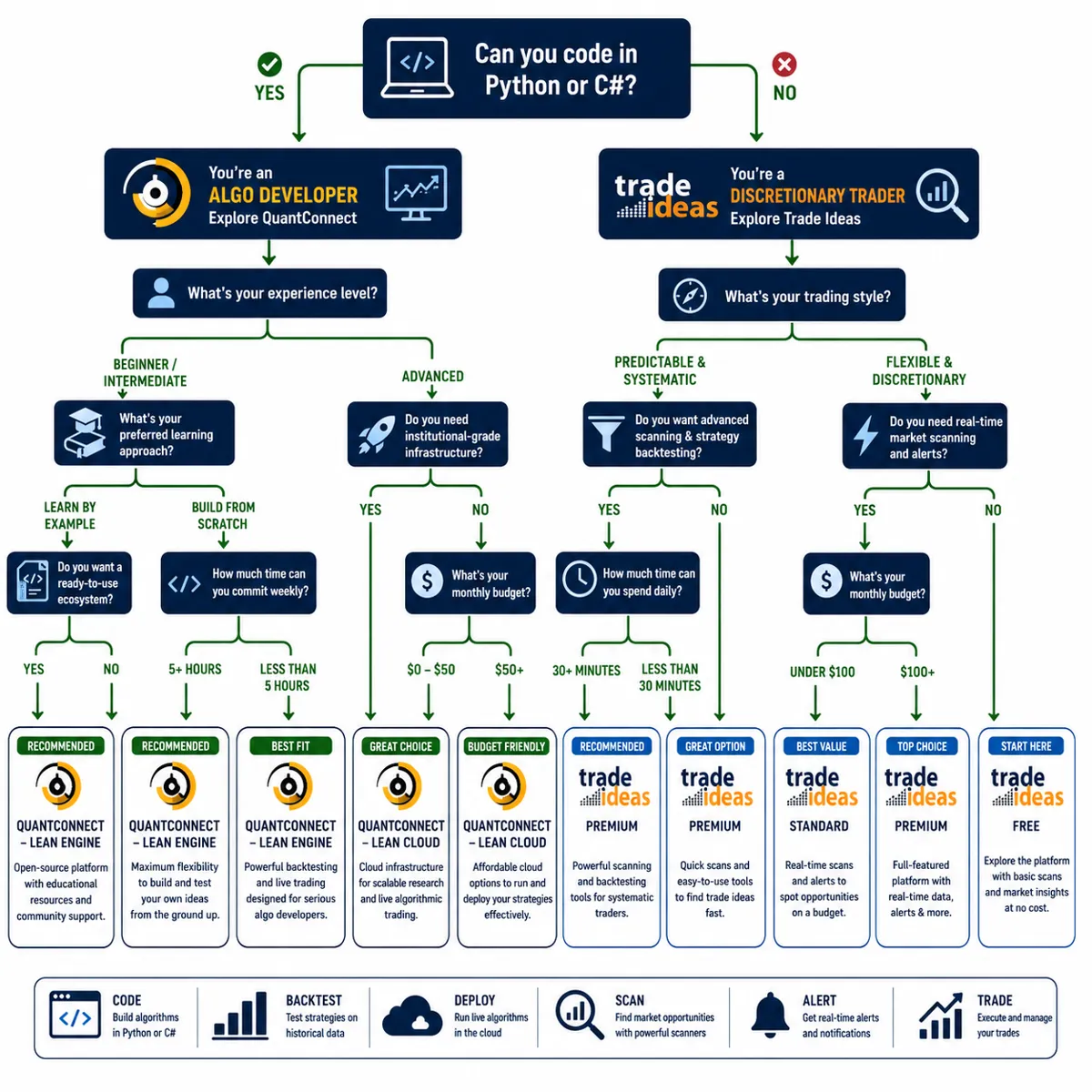
Choose QuantConnect if you can code, want to automate rules-based strategies, and need institutional-grade backtesting. Choose Trade Ideas if you're a discretionary trader who needs real-time scanning and AI-driven alerts without writing code.
Use QuantConnect if:
You know Python or C# and want to apply programming skills to trading.
You have a quantitative strategy you want to backtest and automate.
You want full control over entry logic, exit rules, and risk parameters.
You're comfortable debugging code and handling technical issues.
You plan to run strategies that trade automatically without manual intervention.
Use Trade Ideas if:
You're a day trader or active swing trader who needs fast, visual setups.
You want pre-market scans, intraday breakout alerts, and unusual volume flags.
You prefer discretionary trading and want to execute trades manually.
You don't code and don't plan to learn.
You need AI-driven insights without building algorithms from scratch.
Don't use QuantConnect if:
You can't code and don't want to learn.
You prefer discretionary trading and want to make decisions in real time.
You're looking for a plug-and-play solution with no technical setup.
Don't use Trade Ideas if:
You want to automate execution and let strategies run without manual input.
You're a long-term investor who checks positions once a week.
You're on a tight budget and can't justify $118+/month for scanning.
The platforms don't compete. They serve different workflows. If you're still unsure, ask yourself: do I want to write code that trades for me, or do I want a scanner that shows me what to trade? That question decides the platform.
For more on choosing the right tools for your trading style, check out our AI stock trading guide for retail traders.
QuantConnect vs Trade Ideas vs Composer: Quick Comparison
Here's a side-by-side breakdown of QuantConnect, Trade Ideas, and Composer to help you see where each platform fits.
QuantConnect is for traders who want full control and are willing to code. Trade Ideas is for active traders who need fast scanning and manual execution. Composer is for investors who want automated strategies without coding. Pick based on your workflow, not features.
For a deeper dive into no-code automation, check out our comparison of AI trading platforms.
Frequently Asked Questions
Can I use QuantConnect for day trading?
Yes, but QuantConnect is better suited for strategies that don't require sub-second execution. The platform supports live trading with minute-level data and can execute intraday strategies, but it's not optimized for high-frequency trading. If your strategy relies on tick-level speed or ultra-low latency, you'll need a more specialized platform.
Does Trade Ideas work for swing trading?
Yes. Trade Ideas is popular with day traders, but its scanners work just as well for swing traders who need pre-market gap scans, breakout alerts, and multi-day setups. The Standard plan is enough for most swing traders who check scans once or twice a day.
Can I backtest strategies on Trade Ideas?
Trade Ideas offers basic backtesting on AI-generated signals, but it's not designed for rigorous strategy validation. If you want to backtest custom strategies with detailed performance metrics, you'll need a dedicated backtesting platform like QuantConnect, TradingView, or TrendSpider.
Is QuantConnect free to use?
QuantConnect's free tier includes unlimited backtesting with minute-resolution data and limited live trading with one algorithm. Paid plans start at $8/month and unlock tick-level data, faster backtesting, and more compute resources.
What brokers does QuantConnect support?
QuantConnect integrates with Interactive Brokers, Alpaca, OANDA, Bitfinex, Coinbase Pro, and several other brokers. The full list is available in the platform's documentation. Broker support varies by asset class and region.
Can I use Trade Ideas without a broker account?
Yes. Trade Ideas is a scanning and alert platform — it doesn't execute trades. You can use it to find setups and then execute trades through any broker you choose. Some users integrate Trade Ideas with broker platforms for faster execution, but it's not required.
How long does it take to learn QuantConnect?
If you already know Python and understand basic trading concepts, expect 2-4 weeks to get comfortable with the platform. If you're learning Python from scratch, expect 3-6 months before you can build and deploy a reliable algorithm.
Does Trade Ideas work on mobile?
Trade Ideas offers a mobile app for iOS and Android, but the full platform is desktop-only. The mobile app provides alerts and basic scanning, but serious day traders use the desktop version for speed and screen real estate.
Can I run multiple strategies on QuantConnect?
Yes, but the free tier limits you to one live algorithm. Paid plans unlock multiple live algorithms, allowing you to run several strategies simultaneously across different asset classes or timeframes.
Is Trade Ideas worth it for beginners?
Not usually. Beginners are better off learning price action and risk management with free or cheaper tools before investing $118+/month in a premium scanner. Trade Ideas is most valuable once you already know what setups you're looking for.
Can I use QuantConnect without a broker?
Yes. You can backtest strategies indefinitely without connecting a broker. Live trading requires a supported broker account, but backtesting and paper trading work without one.
Does Trade Ideas guarantee profitable trades?
No. Trade Ideas surfaces setups based on technical criteria and historical patterns, but it doesn't guarantee profitability. The scanner shows you where to look — you're still responsible for execution, risk management, and position sizing.
Conclusion
QuantConnect vs Trade Ideas isn't a fair fight because they're not competing. One is for traders who want to automate rules-based strategies with code. The other is for traders who want to scan for setups and execute them manually. The right platform depends entirely on your workflow, skill set, and trading style.
Choose QuantConnect if you can code, want full control over strategy logic, and plan to automate execution. It's one of the most powerful tools available to retail algo traders, but the learning curve is real. If you're not willing to learn Python and invest months in backtesting and validation, it's the wrong tool.
Choose Trade Ideas if you're a discretionary trader who needs fast, real-time scanning and AI-driven alerts. It's expensive, but it's one of the best scanners in the market for day traders and active swing traders who trade frequently enough to justify the cost.
Don't pick based on hype or features. Pick based on how you actually trade. If you're still unsure, start with the free tier of QuantConnect or a one-month trial of Trade Ideas and see which workflow feels natural. The best platform is the one you'll actually use consistently.
FullStack Alpha cuts the noise so you can keep the alpha. See the AI tools, scanners, and systems we actually rate at aistockpickerapps.com.