Composer Trading Review: Build Bots Without Code in 2026
Last updated: July 11, 2026
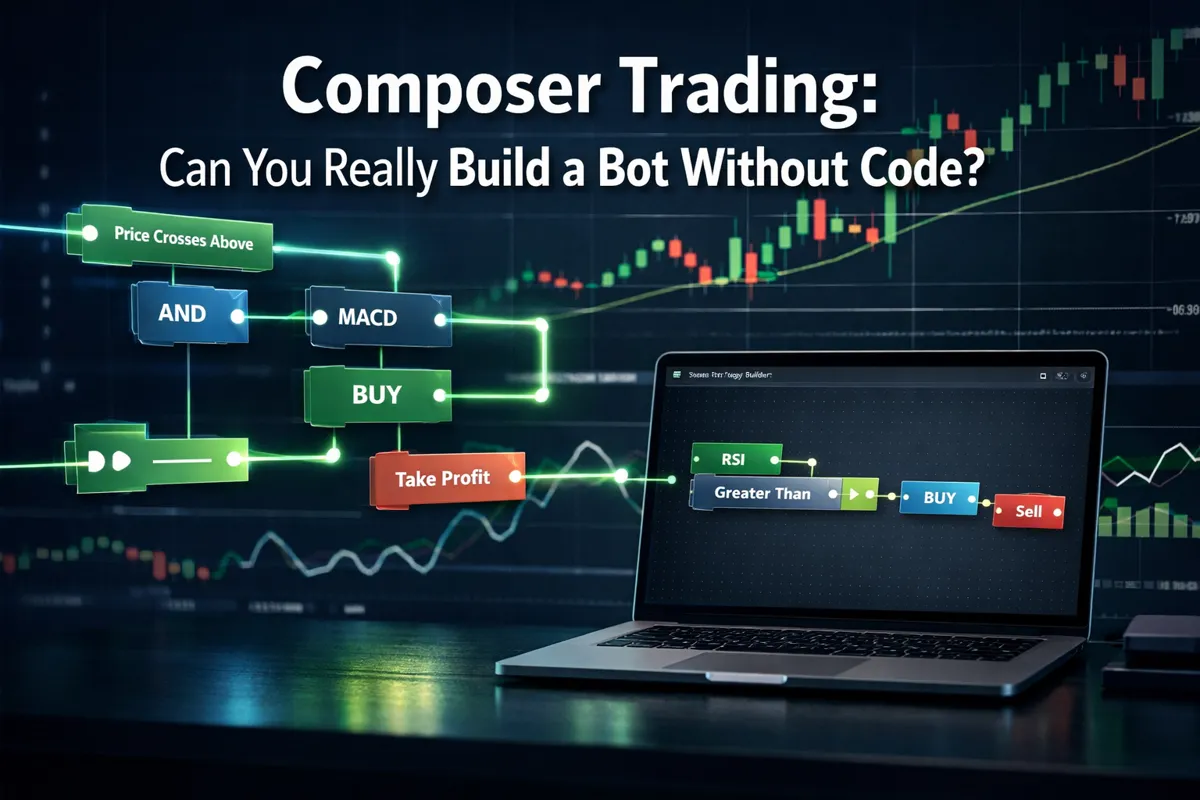
Most retail traders who try to automate their strategies hit the same wall: they either pay a developer thousands of dollars or spend months learning Python only to realize their code doesn't work in live markets. Composer Trading promises a different path — a visual, no-code platform where you drag and drop logic blocks to build automated trading strategies. The pitch sounds perfect for traders who want the benefits of algorithmic trading without the coding barrier. But does it actually deliver, or is this another overpromised fintech tool that looks slick in demos and falls apart when real money's on the line?
Quick Answer
Composer Trading is a legitimate no-code platform that lets you build automated trading strategies using a visual editor instead of writing code. You connect pre-built logic blocks (buy signals, sell triggers, rebalancing rules) to create strategies that execute automatically through connected brokerage accounts. The platform works best for long-term investors and swing traders running ETF-based strategies with weekly or monthly rebalancing — not day traders looking for high-frequency execution. Pricing starts free with limited features, then scales to paid tiers for backtesting, live trading, and advanced strategy tools. It's not a magic money printer, and your results depend entirely on the quality of your strategy logic, but the no-code promise is real.
Key Takeaways
Composer uses a visual "symphony" editor where you connect logic blocks to build strategies without writing a single line of code — genuinely accessible for non-programmers.
Best suited for ETF rotation strategies, sector allocation models, and rules-based rebalancing — not high-frequency day trading or options strategies.
Free tier exists but is limited; paid plans start around $10-$20/month for backtesting and live execution, with higher tiers unlocking more strategies and assets.
Backtesting is built-in but uses simplified assumptions — real slippage, commissions, and market impact aren't fully modeled, so live results often differ.
Connects to select brokerages (Alpaca, Interactive Brokers, others) for automated execution, but you can't use it with Robinhood or most traditional retail brokers.
Common failure mode: traders build overfitted strategies that backtest beautifully but fail in live markets because they're optimized to past data, not robust logic.
Composer vs. QuantConnect: Composer is simpler and visual; QuantConnect offers more power and flexibility but requires coding in Python or C#.
Composer vs. TrendSpider: TrendSpider is a charting and analysis platform with automation features; Composer is purpose-built for strategy automation and portfolio management.
Not a scam, not a get-rich-quick scheme — it's a tool. Your edge (or lack of one) determines your results, not the platform itself.
Who shouldn't use it: day traders needing sub-minute execution, options traders, anyone expecting the platform to generate profitable strategies for them automatically.
What Is Composer Trading and How Does It Work?
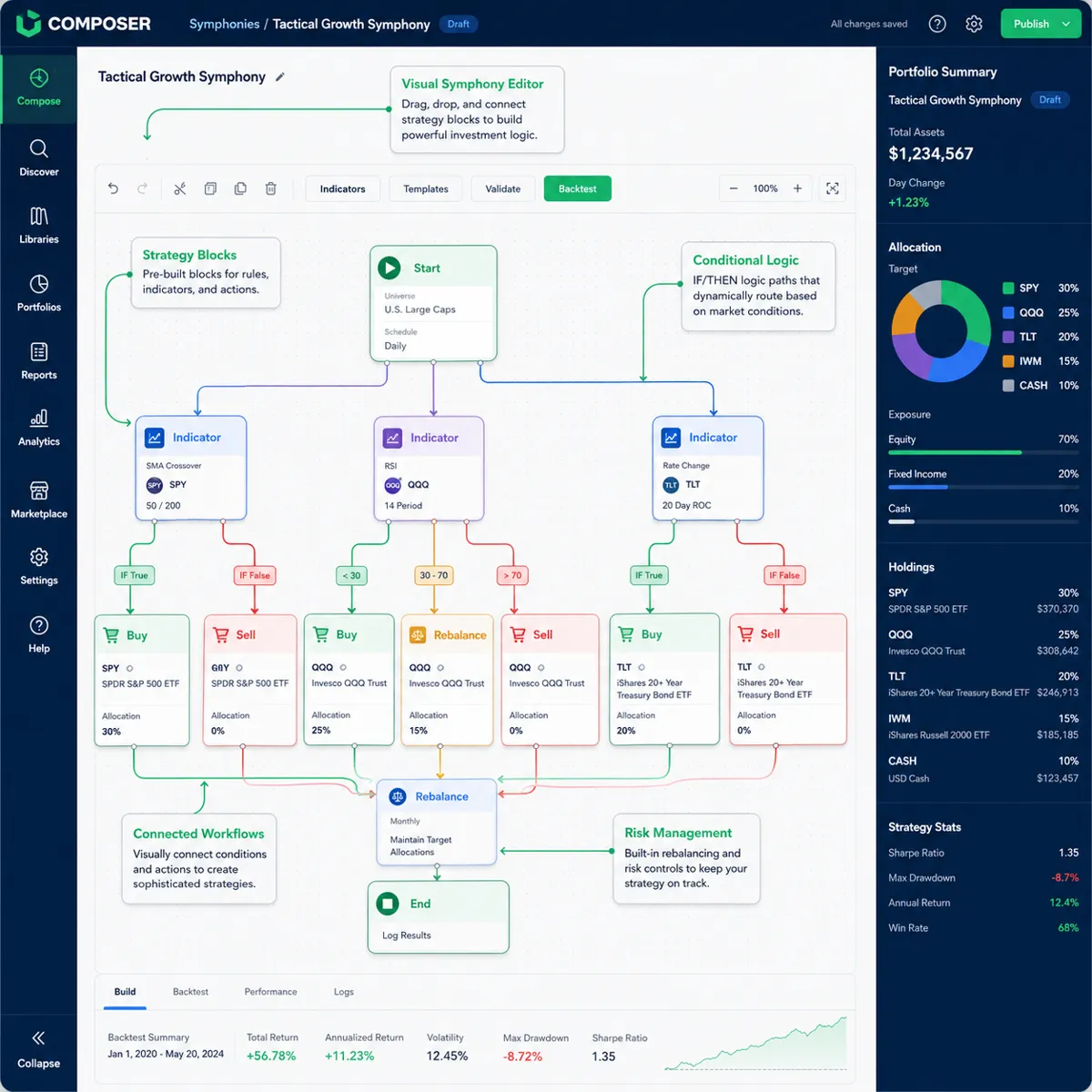
Composer Trading is a no-code algorithmic trading platform that lets you design, backtest, and automate investment strategies using a visual programming interface. Instead of writing Python scripts or learning a proprietary coding language, you build strategies by connecting pre-made logic blocks in what Composer calls a "symphony." Each block represents a specific action or condition: buy an asset, sell when a condition is met, rebalance monthly, allocate based on momentum, and so on.
The platform targets retail investors who understand market logic and want to automate their ideas but lack programming skills. You define the rules — "if the S&P 500 is above its 200-day moving average, allocate 70% to QQQ and 30% to TLT; otherwise, go 100% cash" — and Composer translates that into executable trades through a connected brokerage account.
Here's the basic workflow:
Build your strategy using the visual editor. Drag blocks onto the canvas, connect them with logic flows, and set parameters (tickers, thresholds, timeframes).
Backtest the strategy against historical data to see how it would have performed. Composer shows equity curves, drawdowns, Sharpe ratios, and other metrics.
Paper trade (optional) to watch it run in real-time without risking capital.
Connect a brokerage (Alpaca, Interactive Brokers, or others supported) and go live. Composer executes trades automatically based on your rules.
Monitor and adjust as needed. You can pause, tweak, or stop strategies anytime.
The platform handles execution, rebalancing, and order routing. You're responsible for the strategy logic and risk management. Composer doesn't tell you what to trade — it's the infrastructure that automates what you already want to do.
What it's not: Composer isn't an AI that picks stocks for you, a signal service that tells you what to buy, or a high-frequency trading engine. It's automation infrastructure for rules-based strategies, primarily focused on ETFs and equities with daily or slower rebalancing frequencies.
Can You Actually Build Trading Bots on Composer Without Coding Experience?
Yes — and this is the platform's core value proposition. You genuinely don't need to write code. The visual editor uses a flowchart-style interface where each block is a pre-built function: technical indicators, fundamental filters, allocation rules, risk controls. You connect them with arrows to define logic flow, set parameters in dropdown menus and input fields, and the platform generates the executable strategy behind the scenes.
What "no-code" actually means here:
You're not writing Python, JavaScript, or any scripting language.
You're not debugging syntax errors or dealing with API authentication.
You don't need to understand data structures, loops, or object-oriented programming.
What you still need to understand:
Market logic. You need to know what a moving average is, how rebalancing works, what "momentum" means in a portfolio context. Composer doesn't teach you strategy design — it just removes the coding barrier.
Basic conditional logic. If-then thinking: "If condition A is true, do action B; otherwise, do action C." This is the foundation of any automated strategy, and you need to think through the logic even if you're not coding it.
Risk management. The platform won't stop you from building a strategy that goes 100% into a single leveraged ETF with no stop loss. You're responsible for defining sensible risk controls.
The learning curve: If you've never automated anything before, expect a few hours to get comfortable with the interface. The drag-and-drop mechanics are intuitive, but translating your mental strategy into a visual flowchart takes practice. Composer offers templates and pre-built strategies you can clone and modify, which speeds up the learning process.
Where beginners struggle: Not with the tool itself, but with strategy design. Building a bot is easy. Building a bot that doesn't lose money is hard. The no-code interface makes it dangerously simple to create complex, overfitted strategies that backtest beautifully but fail in live markets. If you don't understand why a strategy works (the underlying market behavior it exploits), the ease of building it becomes a liability.
For a deeper dive into whether automated trading bots actually make money, we've run the real numbers on multiple platforms.
Composer Trading vs TradingView: Which Is Better for Beginners?
This is an apples-to-oranges comparison — the tools serve different purposes, and the "better" choice depends on what you're trying to do.
TradingView is a charting and analysis platform with social features and some automation capabilities (via Pine Script and third-party integrations). It's where traders go to analyze price action, draw support and resistance, run technical indicators, and share ideas. TradingView's automation (through Pine Script strategies and alerts) requires coding, and execution typically happens through webhooks to external brokers or bots.
Composer is purpose-built for strategy automation and portfolio management. It's not a charting platform — the visual editor is about logic flow, not drawing trendlines. Composer's strength is in automating rules-based, multi-asset strategies (ETF rotation, sector allocation, risk parity models) without code. Execution is native and direct through connected brokerages.
For beginners:
Choose TradingView if you want to learn technical analysis, study charts, follow other traders' ideas, and manually execute trades based on what you see. TradingView is the better learning environment for understanding price action and setups.
Choose Composer if you already have a strategy idea (even a simple one) and want to automate it without learning to code. Composer is the better tool for hands-off, rules-based execution.
Can you use both? Absolutely. Many traders use TradingView for analysis and idea generation, then build the automation in Composer. TradingView helps you identify the setup; Composer executes it consistently without you watching the screen.
Cost comparison: TradingView's free tier is generous for charting. Paid plans ($12.95–$59.95/month in 2026) unlock more indicators, alerts, and chart layouts. Composer's free tier is more limited, and you'll likely need a paid plan ($10–$20+/month) to backtest and run live strategies. If you're serious about automation, budget for both.
For a broader look at AI trading platforms beginners are starting with in 2026, we've ranked the tools by ease of use and real-world results.
How Much Does Composer Trading Cost Per Month in 2026?
Composer operates on a freemium model with tiered pricing. As of 2026, here's the typical structure (exact pricing may vary; always check the official site for current rates):
Free Tier:
Access to the visual editor and strategy builder.
Limited backtesting (often capped by time range or number of tests).
Paper trading to test strategies in real-time without capital.
Community-shared strategies you can clone and modify.
Limitations: No live trading, restricted asset universe, fewer advanced blocks.
Paid Tiers (approximate):
Basic/Starter Plan: ~$10–$20/month. Unlocks live trading with one or two strategies, full backtesting, and access to more asset classes (broader ETF universe, some equities).
Pro Plan: ~$30–$50/month. Multiple live strategies, advanced logic blocks (custom indicators, complex rebalancing rules), priority support, and deeper historical data for backtesting.
Premium/Institutional Plan: $100+/month. Unlimited strategies, API access, white-glove support, and institutional-grade execution features.
What you're paying for:
Infrastructure: Automated execution, rebalancing, and order routing through connected brokerages.
Data: Historical price data for backtesting, real-time market data for live strategies.
Compute: The platform runs your strategies on its servers, monitors conditions, and executes trades without you being online.
Support and updates: Access to new features, strategy templates, and customer service.
Hidden costs to consider:
Brokerage fees: Composer doesn't charge commissions, but your connected broker might. Alpaca (a common integration) offers commission-free trading for most equities and ETFs, but other brokers may charge per trade or have account minimums.
Slippage and market impact: Not a direct fee, but frequent rebalancing or trading illiquid assets will cost you in execution quality.
Opportunity cost of capital: If you're paying $50/month and running a $5,000 portfolio, that's 1% annual cost before you make a dime. Make sure your strategy's edge justifies the subscription.
Is it worth it? Depends on your portfolio size and strategy complexity. If you're automating a simple buy-and-hold strategy, you probably don't need Composer — just set it manually and rebalance quarterly. If you're running a multi-asset rotation strategy that rebalances weekly based on momentum and volatility signals, and you'd otherwise spend hours managing it manually, the subscription pays for itself in time saved and execution consistency.
For a detailed breakdown of what you actually pay for versus what you get across AI trading platforms, we've done the math.
Composer Trading Review: Is It Worth It for Automated Investing?
The honest verdict: Composer is a well-built tool that delivers on its no-code promise, but it's not a magic solution. Whether it's worth it depends on three things: your strategy quality, your portfolio size, and how much you value automation over manual execution.
What Composer does well:
Genuinely no-code. The visual editor works as advertised. You can build and deploy strategies without touching a line of code.
Clean interface. The platform is intuitive, well-designed, and doesn't feel like enterprise software from 2005.
Built-in backtesting. You can test ideas quickly and iterate without needing separate data sources or tools.
Automated execution. Once live, strategies run without you. No more forgetting to rebalance or missing a signal because you were in a meeting.
Transparency. You see exactly what the bot is doing — every trade, every rebalance, every condition check. No black-box mystery.
Where Composer falls short:
Backtesting limitations. The backtester uses simplified assumptions. Slippage, commissions, and market impact are modeled lightly or not at all. Strategies that look great in backtest often underperform live because real execution is messier.
Asset class restrictions. Composer is strongest with ETFs and equities. Options strategies, futures, forex, and crypto are either unsupported or limited. If your edge is in derivatives, this isn't your platform.
Execution speed. Rebalancing happens daily or slower. If you need intraday or sub-minute execution, Composer won't cut it. This is a long-term automation tool, not a day trading bot.
No strategy generation. Composer doesn't create strategies for you. It's infrastructure, not intelligence. If you don't have a profitable idea to automate, the platform won't help you find one.
Overfitting risk. The ease of tweaking parameters and re-running backtests makes it dangerously simple to overfit strategies to historical data. You can build something that "worked" perfectly from 2015–2025 but has zero edge going forward.
Who should use Composer:
Long-term investors who want to automate rules-based strategies (ETF rotation, sector allocation, risk parity).
Swing traders running weekly or monthly rebalancing strategies based on technical or fundamental signals.
Traders who understand strategy design but don't want to learn Python or manage their own execution infrastructure.
Anyone currently managing a multi-asset portfolio manually and tired of the time commitment.
Who should skip it:
Day traders needing high-frequency execution or sub-minute signals.
Options traders (limited support, better platforms exist).
Beginners who don't yet understand what makes a strategy profitable — the tool won't teach you that.
Anyone expecting the platform to generate profitable strategies automatically. It won't.
Bottom line: Composer is worth the subscription if you have a sound strategy and a portfolio large enough that the monthly cost is negligible relative to your capital. If you're running a $50,000 portfolio and paying $20/month, that's 0.05% annual cost — trivial if the automation saves you hours and improves execution consistency. If you're running a $5,000 portfolio, the cost is 0.5% annually, which is harder to justify unless your strategy significantly outperforms.
For a head-to-head comparison of the best AI trading tools of 2026, we've tested Composer against its competitors.
Why Is My Composer Trading Bot Losing Money?
If your Composer bot is bleeding capital, the platform isn't the problem — your strategy is. Automation doesn't create edge; it just executes your logic consistently. If the logic is flawed, consistent execution means consistent losses.
Common reasons Composer bots fail:
1. Overfitting to historical data.
You tweaked parameters until the backtest looked perfect, but you optimized for past noise, not future signal. The strategy "learned" the specific quirks of 2015–2025 data and has no edge in 2026. Fix: Build strategies on robust logic (trend-following, mean reversion, momentum) with wide parameter ranges. If changing a moving average from 49 to 51 days kills your backtest, you don't have a strategy — you have a curve-fit.
2. Ignoring transaction costs.
Backtests often underestimate slippage, commissions, and market impact. A strategy that rebalances daily and trades 10 positions might backtest at 12% annual return but deliver 6% live after real-world friction. Fix: Reduce turnover. Favor strategies that trade less frequently and hold positions longer. Test with conservative slippage assumptions (0.05%–0.10% per trade).
3. No risk management.
You built a strategy that goes 100% long with no stop loss, no position sizing rules, and no drawdown controls. When the market turns, you ride it all the way down. Fix: Add risk controls. Define max drawdown limits, use stop losses, diversify across assets, and don't allocate more than 20%–30% to any single position.
4. Strategy doesn't match current market regime.
A momentum strategy that crushed it in 2020–2021 (strong trending bull market) gets chopped to pieces in 2026 (choppy, range-bound tape). Fix: Understand what market conditions your strategy needs to work. If you're running a trend-following bot in a sideways market, expect pain. Either adapt the strategy or wait for a regime shift.
5. Execution timing issues.
Your strategy triggers a buy signal at market open, but Composer executes at 9:35 AM after the gap has already filled. You're consistently entering at worse prices than the backtest assumed. Fix: Understand your platform's execution timing. If you're trading volatile, low-float names, execution slippage will hurt. Stick to liquid ETFs and large-cap equities where slippage is minimal.
6. Revenge trading via tweaks.
Your bot loses for two weeks, so you panic-edit the logic, add new conditions, and redeploy. Now you're running a different strategy every month, none of which have time to prove themselves. Fix: Give strategies time to work. If you backtested over 5+ years and the logic is sound, a two-week drawdown is noise. Stick to the plan or kill the strategy entirely — don't Frankenstein it mid-run.
7. No edge to begin with.
You automated a strategy that sounded good but has no actual statistical or behavioral edge. "Buy the dip" isn't a strategy. "Buy SPY when it's down 2% from the 20-day high and RSI is below 30" might be a strategy, but only if that condition historically predicts a bounce with enough frequency and magnitude to overcome costs. Fix: Before automating, validate the edge. Does the signal actually predict future returns? Run statistical tests, not just eyeball backtests.
What to do if your bot is losing:
Stop live trading immediately. Don't throw good money after bad while you diagnose the issue.
Review the backtest assumptions. Did you model slippage, commissions, and realistic execution? Re-run with conservative assumptions.
Check recent trades. Are you getting stopped out repeatedly? Entering at bad prices? Holding through drawdowns with no exit plan?
Compare backtest to live results. If they diverge significantly, your backtest was unrealistic. If they match and both are losing, your strategy has no edge.
Paper trade a revised version. Fix the obvious issues (add risk controls, reduce turnover, tighten logic) and paper trade for 30–60 days before going live again.
Automation amplifies your edge — or your mistakes. If you're losing, the bot is just doing what you told it to do. The fix is better strategy design, not a better platform.
For more on why AI trading bots fail and what the real results show, we've analyzed the data.
Best Alternatives to Composer for No-Code Trading Bots
Composer isn't the only no-code or low-code trading automation platform. Here are the top alternatives, each with different strengths:
QuantConnect
What it is: An algorithmic trading platform that supports Python and C# for strategy development. Not truly "no-code," but offers extensive libraries and a large community.
Best for: Traders willing to learn basic Python who want more flexibility and power than Composer offers.
Pros: Institutional-grade backtesting, supports equities, options, futures, forex, and crypto. Free tier is generous.
Cons: Requires coding. Steeper learning curve than Composer.
Pricing: Free tier available; paid plans for live trading and more data.
TrendSpider
What it is: A charting and technical analysis platform with automation features (alerts, auto-trendlines, strategy backtesting).
Best for: Technical traders who want automated alerts and pattern recognition, not full portfolio automation.
Pros: Excellent charting tools, multi-timeframe analysis, automated technical analysis.
Cons: Not a full bot-building platform. Automation is limited to alerts and signals, not execution.
Pricing: ~$40–$60/month depending on tier.
3Commas
What it is: A crypto-focused trading bot platform with pre-built bots and a visual editor for custom strategies.
Best for: Crypto traders who want to automate DCA, grid trading, or arbitrage strategies.
Pros: Easy to use, integrates with major crypto exchanges, large template library.
Cons: Crypto-only. Not suitable for equities or ETFs.
Pricing: ~$20–$75/month depending on features.
Alpaca + Custom Bots
What it is: Alpaca is a commission-free brokerage with a robust API. You can build custom bots using Python or use third-party tools that integrate with Alpaca.
Best for: Developers or traders comfortable with light coding who want full control.
Pros: No commissions, excellent API documentation, supports equities and crypto.
Cons: Requires coding or using third-party bot builders.
Pricing: Free brokerage; bot-building tools vary.
Composer vs. QuantConnect vs. TrendSpider (Quick Comparison)
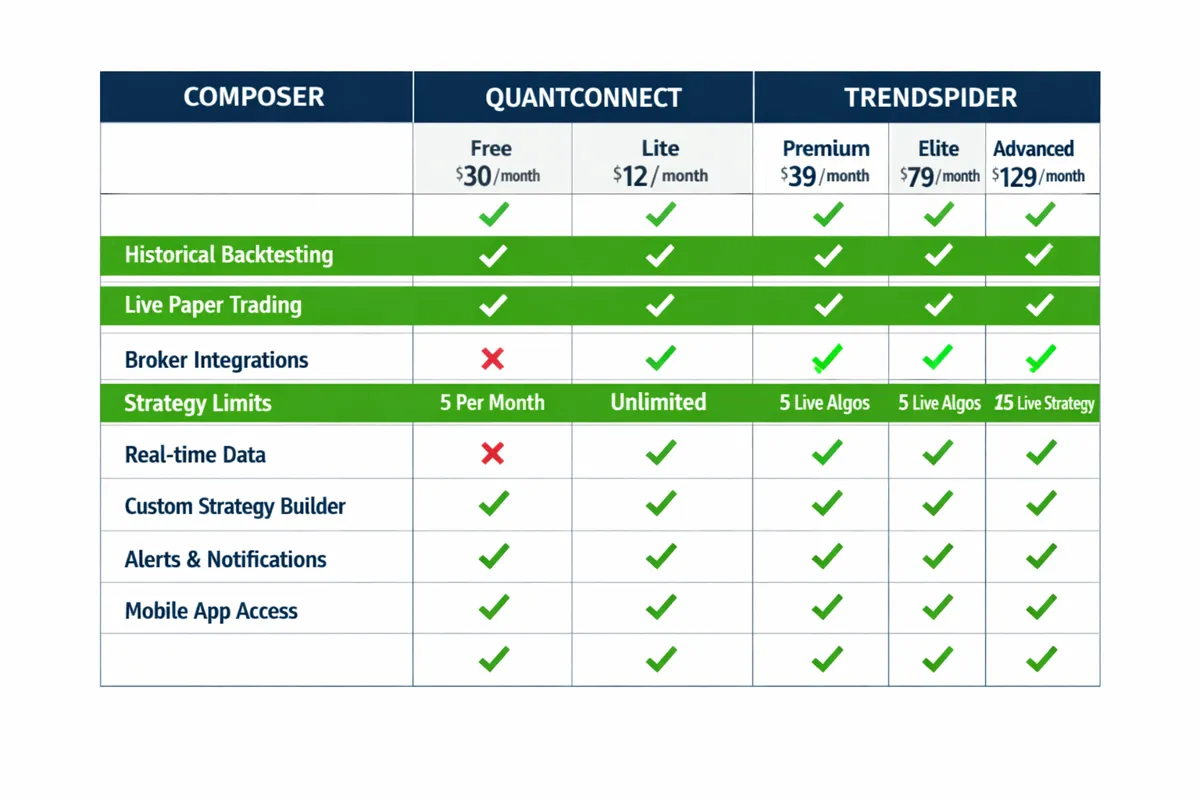
FeatureComposerQuantConnectTrendSpiderNo-code?Yes (visual editor)No (Python/C# required)Partial (alerts, not full bots)Asset classesETFs, equitiesEquities, options, futures, forex, cryptoEquities, crypto (charting only)BacktestingBuilt-in, simplifiedInstitutional-grade, detailedBuilt-in for technical strategiesLive executionYes (via connected brokers)Yes (via supported brokers)No (alerts only)Best forLong-term automation, ETF strategiesFlexible, multi-asset algo tradingTechnical analysis, manual tradingPricing~$10–$50/monthFree tier; paid for live trading~$40–$60/month
Which should you choose?
Composer if you want no-code automation for ETF/equity strategies and don't need high-frequency execution.
QuantConnect if you're willing to learn Python and want maximum flexibility across asset classes.
TrendSpider if you're a technical trader who wants better charting and automated alerts, not full portfolio automation.
For a full breakdown of trading bot platforms and which ones actually deliver, we've tested the top contenders.
Is Composer Trading Good for Day Traders or Long-Term Investors?
Short answer: Composer is built for long-term investors and swing traders, not day traders.
Why Composer doesn't work for day trading:
Execution speed. Composer rebalances strategies on a daily or slower cadence. If you need to enter and exit positions intraday based on minute-by-minute price action, Composer won't execute fast enough.
No intraday data in backtesting. Backtests use daily close prices, not intraday bars. You can't test a strategy that buys breakouts at 10:00 AM and sells at 3:00 PM.
Asset focus. Composer is optimized for ETFs and large-cap equities, not the low-float, high-volatility names day traders favor.
No Level 2 data or order flow. Day trading edge often comes from reading the tape, watching bid-ask spreads, and reacting to order flow. Composer doesn't surface any of that.
Why Composer works well for long-term investors:
Rules-based rebalancing. If you run a strategy that rebalances monthly based on momentum, valuation, or volatility signals, Composer automates the grunt work.
ETF rotation strategies. Sector rotation, risk parity, and tactical asset allocation models are Composer's sweet spot.
Set-it-and-forget-it execution. You define the rules once, and the bot handles execution without you checking in daily.
Reduced emotional trading. Automation removes the temptation to tinker, panic-sell, or chase performance.
What about swing trading? Composer can work for swing traders who hold positions for days to weeks and rebalance based on weekly signals. If your strategy is "buy stocks breaking out of tight consolidation and hold for 5–10 days," you can automate the entry and exit rules in Composer. Just understand that execution happens once per day (typically at market open or close), so you won't catch intraday breakouts.
Bottom line: If you're a day trader, look elsewhere. Composer isn't built for your use case. If you're a long-term investor or swing trader running rules-based strategies, Composer is one of the best no-code tools available.
For more on AI tools that spot setups before the opening bell, we've covered the platforms day traders actually use.
Common Mistakes When Building a Bot on Composer Trading
Building a bot is easy. Building a bot that doesn't blow up your account is hard. Here are the mistakes traders make most often on Composer — and how to avoid them.
1. Overfitting the backtest.
You tweak parameters until the equity curve looks perfect, but you've optimized for noise, not signal. The strategy has no edge going forward. Fix: Use simple, robust logic. If your strategy has 15+ parameters, you're probably overfitting. Stick to 3–5 core rules and wide parameter ranges.
2. Ignoring drawdowns.
Your backtest shows 20% annual returns, so you go all-in. Then the strategy hits a 30% drawdown in month two, and you panic-exit at the bottom. Fix: Look at max drawdown, not just returns. If you can't stomach a 30% drawdown, don't run a strategy that historically had 35% drawdowns. Size your position accordingly.
3. No stop loss or risk controls.
You build a strategy that buys and holds with no exit plan. When the market tanks, you ride it all the way down. Fix: Define exit rules. Use stop losses, trailing stops, or time-based exits. Don't let a position bleed indefinitely.
4. Trading illiquid assets.
You automate a strategy that trades small-cap stocks or niche ETFs with low volume. Slippage eats your returns. Fix: Stick to liquid assets. If average daily volume is under 500,000 shares, execution quality will suffer.
5. Rebalancing too frequently.
Your strategy rebalances daily, generating 200+ trades per year. Transaction costs and slippage kill your edge. Fix: Reduce turnover. Favor weekly or monthly rebalancing unless your edge genuinely requires daily action.
6. Not paper trading first.
You backtest, see good results, and go live immediately with real money. The strategy fails because live execution doesn't match backtest assumptions. Fix: Paper trade for 30–60 days. Watch how the bot executes in real-time, check slippage, and verify the logic works as expected.
7. Chasing past performance.
You see a community-shared strategy that returned 40% last year and clone it. That strategy was optimized for 2025's market conditions and has no edge in 2026. Fix: Understand why a strategy works, not just that it worked. If you can't explain the underlying edge, don't trade it.
8. No position sizing rules.
You allocate equal capital to every signal, regardless of volatility or risk. High-volatility positions blow up your account. Fix: Use volatility-based position sizing. Allocate less capital to high-volatility assets and more to stable ones.
9. Ignoring correlation.
You run five strategies that all buy tech stocks. When tech sells off, all five strategies lose simultaneously. Fix: Diversify across uncorrelated strategies and asset classes. Don't run five momentum strategies on the same sector.
10. Giving up too soon.
Your strategy loses for two weeks, so you kill it and start over. You never give any strategy time to prove itself. Fix: Define a testing period upfront (e.g., 90 days or 50 trades). If the strategy underperforms after that period, kill it. But don't bail after one bad week.
The meta-mistake: Thinking the platform will do the hard work for you. Composer is infrastructure, not intelligence. It automates execution, but you're responsible for strategy design, risk management, and ongoing monitoring. If you don't have a profitable idea to automate, the tool won't help you find one.
Can Composer Trading Bots Handle Complex Strategies Without Code?
Yes, but with limits. Composer's visual editor can handle moderately complex strategies — multi-asset allocation, conditional rebalancing, technical indicator combinations, and rules-based risk management. But there's a ceiling. If your strategy requires custom math, machine learning models, or intricate logic that doesn't fit into pre-built blocks, you'll hit the platform's limits.
What "complex" means in Composer:
Multi-asset strategies. You can build strategies that allocate across 10+ ETFs based on momentum, volatility, or fundamental signals.
Conditional logic. If-then-else flows, nested conditions, and multi-step decision trees are all supported.
Technical indicators. Moving averages, RSI, MACD, Bollinger Bands, and other standard indicators are available as blocks.
Rebalancing rules. You can define custom rebalancing schedules (monthly, quarterly, or triggered by specific conditions).
Risk controls. Stop losses, trailing stops, max drawdown limits, and position sizing rules can be built into the strategy.
What Composer can't do (or does poorly):
Custom indicators. If you want to use a proprietary indicator or a non-standard calculation, you're out of luck unless it's already a block.
Machine learning models. You can't train a neural network or run a random forest model within Composer. If your edge is in ML, you need QuantConnect or a custom Python setup.
High-frequency strategies. Anything requiring sub-minute execution or tick-level data won't work.
Options strategies. Limited support. If your edge is in multi-leg options spreads, Composer isn't the right tool.
Custom data sources. You can't pull in alternative data (sentiment, satellite imagery, credit card transactions) unless Composer already integrates it.
The practical test: If you can describe your strategy in plain English using standard trading terms (buy when X crosses above Y, rebalance monthly to equal weight, sell if drawdown exceeds Z%), Composer can probably handle it. If your strategy requires custom code, external APIs, or non-standard data, you'll need a more flexible platform.
Example of a complex strategy Composer can handle:
"Allocate across five sector ETFs (XLK, XLF, XLE, XLV, XLI) based on 3-month momentum. Rebalance monthly to equal-weight the top three performers. If the S&P 500 drops below its 200-day moving average, shift 50% to TLT (bonds) and 50% to cash. Exit any position that drops more than 10% from its entry price."
Example of a strategy Composer can't handle:
"Train a random forest model on 50 technical and fundamental features to predict next-week returns. Rank all S&P 500 stocks by predicted return, go long the top 20 and short the bottom 20, rebalance daily based on updated predictions."
Bottom line: Composer handles 80% of what retail traders want to automate. If you're in the 20% who need custom code, machine learning, or high-frequency execution, you'll outgrow the platform quickly.
Does Composer Trading Work with Robinhood or Other Brokerages?
No, Composer does not integrate with Robinhood. This is a common dealbreaker for traders who already have capital in Robinhood and don't want to transfer to a new broker.
Supported brokerages (as of 2026):
Alpaca: Commission-free trading, popular with algo traders, supports equities and crypto. This is the most common integration for Composer users.
Interactive Brokers (IBKR): Institutional-grade execution, supports equities, options, futures, and forex. Higher account minimums and more complex fee structure.
Others: Composer occasionally adds new broker integrations. Check the official site for the current list.
Why Robinhood isn't supported:
Robinhood doesn't offer a robust API for third-party platforms like Composer. While Robinhood has an internal API for its own app, it's not designed for external algo trading platforms to connect and execute trades programmatically. This is a deliberate choice by Robinhood, not a limitation of Composer.
What to do if you're on Robinhood:
Transfer to a supported broker. Alpaca is the easiest option — commission-free, no account minimums, and built for algo trading. You can initiate an ACATS transfer from Robinhood to Alpaca (typically takes 5–7 business days).
Keep Robinhood for manual trades. If you want to keep your Robinhood account for other reasons, you can run Composer strategies in a separate Alpaca account and manage them independently.
Wait for integration (unlikely). Robinhood has shown little interest in supporting third-party algo platforms. Don't hold your breath.
Other brokerage considerations:
Commissions: Alpaca is commission-free for most equities and ETFs. IBKR charges small per-share fees but offers better execution quality for large orders.
Account minimums: Alpaca has no minimum. IBKR typically requires $0 to open but may have minimums for margin or certain account types.
Asset support: If you want to trade options or futures, IBKR is the better choice. Alpaca focuses on equities and crypto.
Bottom line: If you're serious about using Composer, plan to open an account with a supported broker. Alpaca is the path of least resistance for most retail traders.
Is Composer Trading Safe and Legit or a Scam?
Composer is legitimate. It's a registered financial technology company, not a scam or fly-by-night operation. Your funds are held at the connected brokerage (Alpaca, IBKR, etc.), not at Composer itself, which means your capital is protected by standard brokerage safeguards (SIPC insurance, segregated accounts, regulatory oversight).
What "safe" means in this context:
Your money is at the broker, not Composer. Composer connects to your brokerage account via API and executes trades on your behalf, but it never holds your funds. If Composer went out of business tomorrow, your capital would still be safe at your broker.
SIPC insurance. U.S. brokerages like Alpaca and IBKR are SIPC members, which means your account is insured up to $500,000 (including $250,000 in cash) in the event of broker failure.
Regulatory oversight. Composer operates within U.S. financial regulations. It's not an offshore, unregulated platform.
What "safe" does NOT mean:
Your strategy is guaranteed to make money. Composer is a tool. If your strategy loses money, that's on you, not the platform.
No risk of loss. Automated trading carries the same market risk as manual trading. You can lose money — potentially all of it — if your strategy is bad or the market moves against you.
No technical risk. Software can have bugs. APIs can fail. Execution can be delayed. These are rare but possible. Always monitor your live strategies, especially in the first few weeks.
Red flags that Composer is NOT:
Composer doesn't promise guaranteed returns. (If a platform does, that's a scam.)
Composer doesn't ask you to send funds directly to them. (Your money stays at your broker.)
Composer doesn't use high-pressure sales tactics or fake urgency. (Scams do.)
Composer doesn't operate offshore or hide its corporate structure. (Scams do.)
Due diligence checklist before using any trading platform:
Verify the company is registered. Check FINRA BrokerCheck or the SEC's website to confirm the company is legitimate.
Read the terms of service. Understand what you're agreeing to, especially around data access and trade execution.
Check reviews from real users. Look for honest feedback on Reddit, Twitter, and trading forums — not just testimonials on the company's site.
Start small. Don't fund your account with your life savings on day one. Test with a small amount, verify execution works as expected, then scale up.
Bottom line: Composer is legit. It's not a scam, and your funds are safe at the brokerage level. But "safe" doesn't mean "profitable." You can lose money on a legitimate platform if your strategy is bad. The platform's job is to execute your logic consistently — not to guarantee you make money.
Who Should Not Use Composer Trading Platform?
Composer isn't for everyone. Here's who should skip it and look elsewhere.
1. Day traders.
If you need intraday execution, sub-minute signals, or high-frequency trading, Composer won't work. The platform rebalances daily at best, and backtests use daily close prices. You need a platform built for speed — TradingView with webhooks, QuantConnect, or a custom Python bot.
2. Options traders.
Composer's options support is limited. If your edge is in multi-leg spreads, iron condors, or volatility arbitrage, you need a platform with robust options tools — tastyworks, OptionAlpha, or IBKR's native tools.
3. Beginners with no strategy.
If you don't yet understand what makes a strategy profitable, Composer won't teach you. The platform is infrastructure, not education. You need to learn strategy design first — through paper trading, backtesting on other platforms, or studying proven frameworks. Start with AI stock trading education before automating.
4. Traders who need custom indicators or ML models.
If your edge requires proprietary calculations, machine learning, or alternative data sources, Composer's pre-built blocks won't cut it. You need QuantConnect, a custom Python setup, or a platform that supports custom code.
5. Crypto-focused traders.
Composer supports some crypto through Alpaca, but it's not a crypto-native platform. If you're trading altcoins, DeFi, or running grid bots on Binance, use 3Commas or a crypto-specific bot platform.
6. Traders with tiny accounts.
If you're running a $1,000 account, a $20/month subscription is 2.4% annual cost before you make a dime. That's a steep hurdle. Composer makes sense for accounts of $10,000+ where the subscription cost is negligible relative to capital.
7. Anyone expecting the platform to generate strategies for them.
Composer doesn't have an AI that builds profitable strategies automatically. You're responsible for the logic. If you're looking for a tool that tells you what to trade, you want a signal service or a robo-advisor, not Composer.
8. Traders who can't handle drawdowns.
If you panic-sell after two losing weeks, automation will hurt more than it helps. You'll constantly tweak and restart strategies, never giving them time to work. Automation requires discipline and patience.
Who SHOULD use Composer:
Long-term investors running rules-based ETF strategies.
Swing traders with weekly or monthly rebalancing logic.
Traders who understand strategy design and want to automate execution.
Anyone managing a multi-asset portfolio manually and tired of the time commitment.
Bottom line: Composer is a powerful tool for the right user. If you're not in that group, don't force it. Find a platform that matches your trading style and skill level.
Conclusion
Composer Trading delivers on its no-code promise — you genuinely can build and deploy automated trading bots without writing a single line of code. The visual editor is intuitive, the backtesting is built-in, and the execution infrastructure works as advertised. But the platform is infrastructure, not intelligence. It automates your logic consistently, but it doesn't create profitable strategies for you. If your strategy has no edge, Composer will execute that lack of edge with ruthless efficiency.
The platform works best for long-term investors and swing traders running rules-based ETF strategies with weekly or monthly rebalancing. It's not built for day traders, options traders, or anyone needing high-frequency execution. Pricing is reasonable for accounts of $10,000+, but the subscription cost becomes a drag on smaller portfolios.
The biggest risk isn't the platform — it's overconfidence. The ease of building bots makes it dangerously simple to deploy overfitted, untested strategies with real money. Paper trade first. Understand why your strategy works, not just that it backtested well. Define risk controls. Give strategies time to prove themselves before tweaking or abandoning them.
Composer isn't a magic money printer. It's a tool that removes the coding barrier to automation. Whether that automation makes you money depends entirely on the quality of your strategy design, your risk management, and your discipline. If you have a sound strategy and the patience to let it work, Composer is one of the best no-code platforms available in 2026. If you're still figuring out your edge, spend time on strategy development before you automate anything.
Want the tools and systems behind profitable automation, without the hype? Start at aistockpickerapps.com.