Trading Journal Template | Build One With Claude and Google Sheets
A free trading journal template you build yourself in Google Sheets, with an AI chat writing the formulas, will beat a $35-a-month subscription for most traders in their first six months. That's the whole argument of this Trading Journal Template | Build One With Claude and Google Sheets walkthrough: you don't need a paid app to start, you need columns and the discipline to fill them in. Paid journals earn their keep later, once you've got enough trades for their reports to say something. Right now, you need a habit.
Quick Answer
Build a trading journal template in Google Sheets with 15 columns, then ask Claude or ChatGPT to write the formulas for R multiple, win rate, expectancy, and results by setup. Total cost: zero. Total setup time: under an hour. Move to a paid journal like TradeZella (from $35/mo) or Edgewonk (annual plan) only when manual entry becomes the reason you stop journaling, not before.
Quick pick: trading journal template
- Google Sheets + Claude Best for traders who want full control, free. Claude Pro optional at $20/mo.
- TradeZella Best for auto-import and tag reports, from $35/mo.
- Edgewonk Best for rule-adherence scoring, annual plan only.
Skip it if: you place fewer than two trades a month and won't review them.
Key Takeaways
- A working trading journal template needs 15 columns, starting with date, ticker, setup name, entry, stop, planned risk in dollars, and exit.
- TradeZella runs $35/mo on Essential, $59/mo Pro, $99/mo Ultra, with no free plan, per the TradeZella pricing page.
- Claude Pro is $20/mo, but the free tier of Claude and ChatGPT's free tier write spreadsheet formulas fine.
- Reddit trader u/ImGiftedMerryXmas calls the Sheets plus AI combo the "Best solution I found" after years of use.
- Tradervue, TraderSync, Trademetria, and Edgewonk all offer auto-import; a DIY template does not, and that's the trade.
- Track rule adherence and mistake tags, not only P&L, or your journal turns into a receipt instead of a tool.
What should a trading journal template include?
A trading journal template should include trade details, the setup, risk management numbers, psychological notes, and post-trade analysis. Five components, nothing more. Miss any one of them and the journal can't answer the only question that matters: why did this work or not?
Most traders log entry, exit, and profit. That's a receipt. A receipt tells you what happened to your money without telling you what happened to your process.
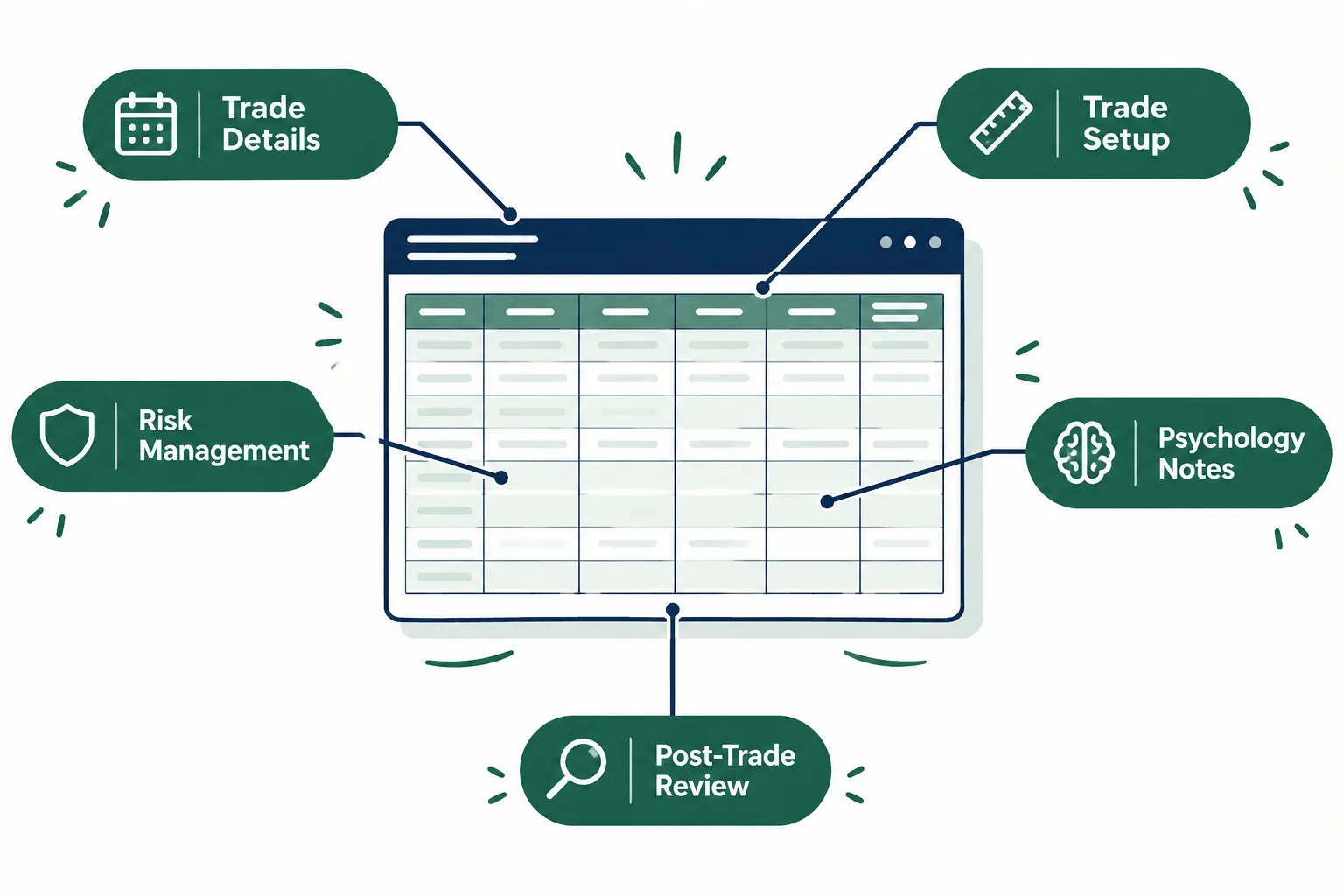
Trade details. Date, time, ticker, direction (long or short), position size, commissions and fees. Boring, mandatory. Fees matter more than new traders think, since 40 round trips a month at $1 each quietly eats a small account.
Trade setup. Name the pattern. A hammer candlestick pattern off support is a different animal from a breakout out of tight consolidation. If you can't name the setup, you didn't have one, you had a hunch. Tag it anyway and label it "no setup" so the data tells you later how those did.
Risk management. Stop price, planned risk in dollars, R multiple on exit. R is just your risk unit: lose what you planned, that's negative 1R. Make triple it, that's plus 3R. Thinking in R instead of dollars stops you from revenge trading after one ugly day.
Psychological factors. One line. Were you calm, bored, chasing, or trading because you were down and wanted it back? Use a short dropdown so you actually fill it in during trading hours.
Post-trade analysis. A screenshot link and two sentences. Did you follow the plan? What would you do again?
Read more on finding a repeatable edge in our guide to finding a trading edge before you risk a dollar.
Trading journal template: which columns matter most?
The columns that matter most in a trading journal template are planned risk in dollars, result in R, rule followed (yes or no), and mistake tag. Those four turn a log into a feedback loop. Everything else is bookkeeping.
Here's the full 15-column layout to build:
- Date
- Ticker
- Setup name
- Direction
- Entry
- Stop
- Target
- Size
- Planned risk in dollars
- Exit
- Result in R
- Fees
- Rule followed (yes or no)
- Mistake tag
- Screenshot link and notes
That's the trading journal template. Fifteen headers in row one of a blank Google Sheet, then freeze the row.
The decision rule: if a column won't change a trade you take next month, cut it. Traders quit journals because they built a 40-column monster and filling it in took longer than the trade.
The mistake tag column is where the money hides. Use a short fixed list: chased entry, moved stop, oversized, no setup, exited early, held past plan. Six tags, a dropdown, one click. After 60 trades you'll see one tag showing up in most of your losers, and that one tag is your actual problem. Not your indicator.
Common mistake: logging trades at the end of the week from memory. Memory edits. Log within the trading day or the notes become fiction.
How do you build one with Claude and Google Sheets step by step?
Open a blank Google Sheet, type the 15 headers, then paste a prompt into Claude or ChatGPT asking for the formulas. The AI writes the math, you paste it into a Stats tab, and you're logging trades in under an hour. No coding, no template download, no subscription.
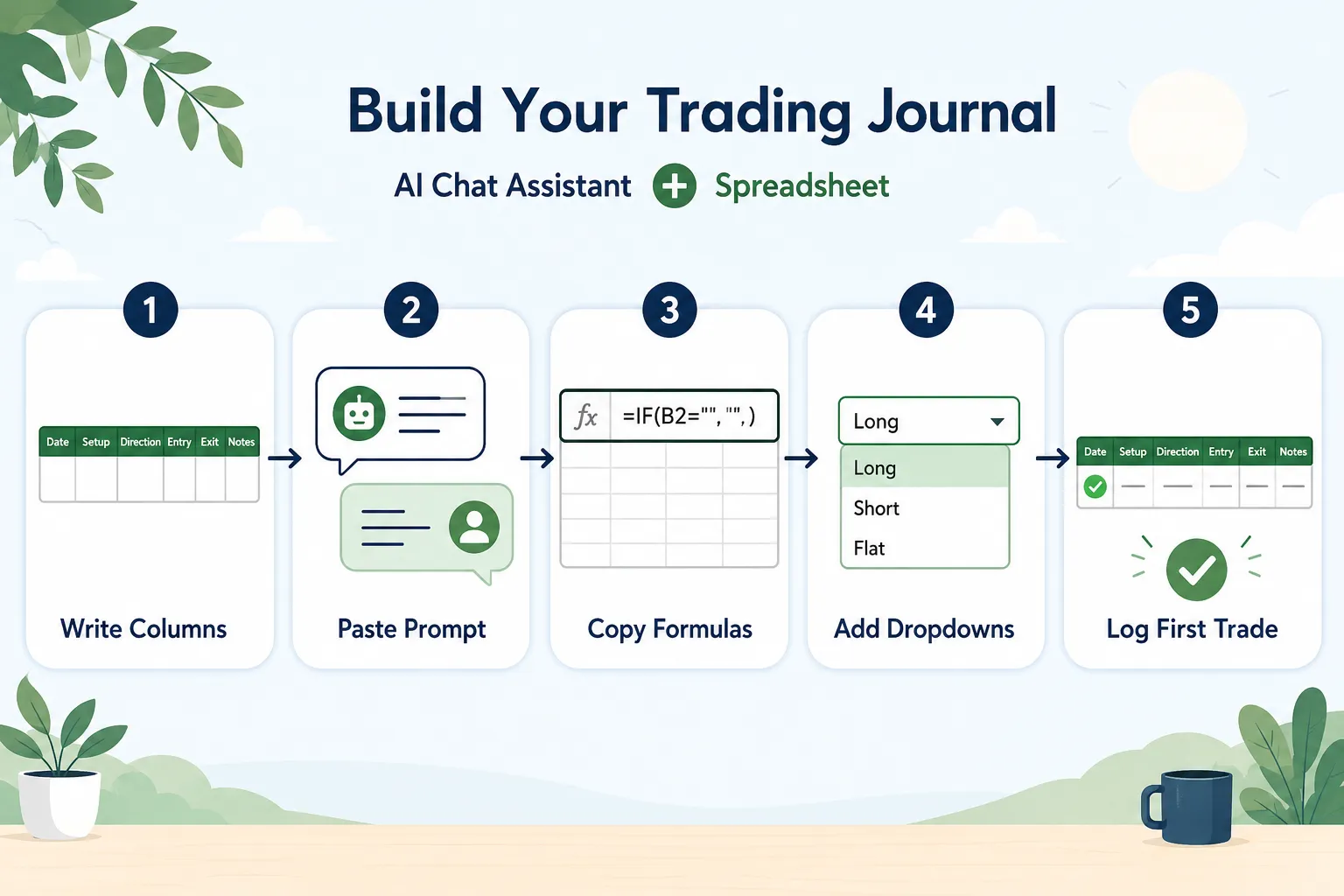
Here's the build, step by step.
| Step | What to do | Where |
|---|---|---|
| 1 | Create a blank sheet, name tab one "Trades", type the 15 headers in row 1, freeze row 1 | Google Sheets |
| 2 | Add a second tab named "Stats" and a third named "Setups" | Google Sheets |
| 3 | Paste prompt A (below) to get the R multiple and expectancy formulas | Claude or ChatGPT |
| 4 | Paste the returned formulas into the Stats tab | Google Sheets |
| 5 | Paste prompt B to get data validation dropdowns for setup name and mistake tag | Claude or ChatGPT |
| 6 | Log one old trade as a test and check the R multiple computes | Google Sheets |
The prompts, as a numbered list so you can copy them line by line:
- "I have a Google Sheets trading journal with these columns in row 1 of a tab named Trades: date, ticker, setup name, direction, entry, stop, target, size, planned risk in dollars, exit, result in R, fees, rule followed, mistake tag, notes. Write the Google Sheets formula for result in R in column K, assuming long and short trades. Explain each part in one line."
- "Using the same Trades tab, write formulas for a Stats tab that calculate: total trades, win rate, average win in R, average loss in R, expectancy per trade in R, and net R after fees. Use ARRAYFORMULA or QUERY where it keeps things simple."
- "Write a QUERY formula that groups my trades by setup name and shows count, win rate, and average R for each setup, sorted by average R descending."
- "Give me the data validation setup for a dropdown in the mistake tag column with these options: chased entry, moved stop, oversized, no setup, exited early, held past plan, none."
- "Write a formula that shows my win rate and average R only for trades where rule followed equals yes, so I can compare disciplined trades to undisciplined ones."
That last one is the sleeper. Run it after 50 trades and you may find your rule-followed trades carry the account while your rule-broken trades drag it flat. The fix isn't a new strategy. Systems over hacks.
Never paste broker passwords or account numbers into an AI chat. Column headers and anonymized numbers only. The AI needs structure, not your login.
Prefer the pre-built route? Compare free and paid options in our free trading journal guide. You can also run expectancy without building anything using the trading expectancy calculator.
What should you track instead of only P&L?
Track rule adherence, mistake tags, and results by setup instead of only P&L. P&L is an outcome; those three are inputs you control. A profitable week with three broken rules is a warning, not a win.

Three things worth tracking that your broker statement will never show you:
- Rule adherence rate. Divide rule-followed trades by total trades. Below 80% and no strategy change will help you. Vendor-affiliated Reddit user u/QuanTradin noted that "Edgewonk and TraderSync both let you tag each trade against your own rule checklist, and the adherence column ends up more useful than the P&L one." Treat that as a vendor-adjacent view, since that user promotes their own product in the same thread, but the logic stands and you can replicate it with one column.
- Expectancy by setup. If three of your five setups have negative expectancy, you don't need a sixth setup. You need to stop trading three.
- Time-of-day performance. Some traders bleed in the midday chop and make it back in power hour. You cannot know that without timestamps.
Edge case: fewer than 30 trades means your win rate is noise. Log anyway, but don't rebuild your strategy off a 12-trade sample. Backtest instead, and do it honestly: see how to backtest a trading strategy without fooling yourself.
Screenshots matter too. Link a chart image for every trade. Six months later, "overextended" means nothing in text and everything in a picture. Free charting from TradingView or Finviz covers it, and we compared them in our free stock charts breakdown.
When should you move to a paid journal?
Move to a paid journal when manual entry is the reason you've stopped journaling, or when you're placing more than roughly 20 trades a week. Auto-import solves a volume problem. It does not solve a discipline problem, and paying $59 a month won't make you review anything.
Reddit user u/Top_Direction2960 put the failure mode plainly: "But after two years of such journaling I had to admit that it had turned into friction." Friction is the signal. If logging 25 scalps by hand means you log zero, auto-import is worth real money.
What paid platforms offer that a DIY template cannot:
- Auto-import from most major brokers, so fills, commissions and fees land automatically
- Automatic price charts attached to each trade, no screenshot step
- Trade notes and daily notes stored together with the executions
- Tag reports that slice results by any tag you create
- Advanced filtering and a dashboard view of trading performance over time
- Coaching and mentoring sharing, where a mentor sees your trades without your broker login
Tradervue offers a version of this. Tradervue publishes its plans on its own pricing page, so follow company pricing there rather than trusting a third party.
Confirmed pricing as published by the vendors:
- TradeZella: Essential $35/mo, Pro $59/mo, Ultra $99/mo, no free plan (TradeZella pricing)
- Edgewonk: annual plan only, and the Edgewonk pricing page has shown both $197 and $169, so check it directly before buying
- Claude Pro: $20/mo (Anthropic pricing)
TradeZella drawbacks: no free plan at all, so there's no way to test it with your own data first, and the monthly cost is real money against a $3,000 account. Edgewonk drawbacks: annual-only billing means a full-year commitment up front, and the published price has appeared at two different figures, which makes budgeting awkward. Tradervue drawbacks: pricing has to be confirmed on its own page, and broker coverage varies, so confirm your broker before subscribing.
For a wider field of journal options, see our roundup of the best trading journal tools.
How does a DIY template compare to Excel, Notion and paid journals?
A DIY Google Sheets trading journal template wins on price and control, Excel wins offline, Notion wins on notes, and paid journals win on automation. Pick based on your trade volume and whether manual entry will kill the habit.
| Option | Setup time | Automation | Rule tracking | Price |
|---|---|---|---|---|
| Google Sheets template (AI-built) | 30 to 60 min | None, manual entry | Yes, your own columns | Free |
| Excel trading journal | 30 to 60 min | None, manual or CSV paste | Yes, with pivot tables | Included with Microsoft 365 |
| Notion journal template | 20 to 40 min | None, light formulas only | Yes, but weak math | Free personal plan |
| TradeZella | Minutes, after broker link | Auto-import, dashboard | Yes, tag reports | From $35/mo |
| Edgewonk | Under an hour | CSV and broker import | Yes, rule checklist scoring | Annual plan, see pricing page |
Unlike a paid app, your own template never locks your data behind a lapsed subscription. Search "trading journal excel" or "trading journal notion" and you will find hundreds of downloads, and most of them are the same idea in a different wrapper. Whether you want a trading journal template Excel version, a trading journal template Google Sheets version, a trading journal template Notion build, or a PDF to print and write on by hand, the 15 columns stay identical. Only the container changes. Forex traders use the same structure, swapping ticker for currency pair and adding pip value.
Notion's strength is the notes side, which makes it closer to project management than a stats engine. Use it if your journal is mostly written review. Use Sheets if you want expectancy math that actually computes.
Excel is strong if you already live there. Pivot tables group trades by setup faster than most people expect, and the file sits on your drive with no cloud dependency. The trade: no live sharing, and mobile editing is clumsy mid-session.
What do real users say?
Real users describe two things: the Sheets plus AI combo works, and over-engineered journals eventually become friction. Both quotes below come from public Reddit threads, reproduced exactly as written.
"I've used Google Sheets for yeeeaaars. Then I ask Chat GPT to give me formulas to work out things. Best solution I found." u/ImGiftedMerryXmas, r/Daytrading
"But after two years of such journaling I had to admit that it had turned into friction." u/Top_Direction2960, r/Trading
The lesson from the second quote is design, not abandonment. Cap your template at 15 columns, use dropdowns instead of free text wherever you can, and set a 10-minute Friday review.
What are the alternatives?
The alternatives to a DIY trading journal template are a broker's built-in trade history, a Notion or Excel build, or a paid platform like Tradervue, TradeZella, TraderSync, Trademetria or Edgewonk. None of them replace the review habit.

- Broker trade history. Free, automatic, and useless for setup tagging. Fine as a data source to paste into your sheet.
- Notion. Good for written review and screenshots, weak on expectancy math.
- Paid platforms. Tradervue, TradeZella, TraderSync, Trademetria and Edgewonk all deliver auto-import, tag reports and dashboards. Worth it above roughly 20 trades a week.
- Prop firm dashboards. If you trade a prop firm account, the firm's dashboard tracks drawdown and daily loss limits, but it won't tag your setups.
If your real problem is finding setups rather than reviewing them, the journal isn't the fix. Start with day trading tools or swing trading tools depending on your holding period, and check the plain English day trading definition if the terms are new to you.
Final Verdict
Build the free trading journal template in Google Sheets first. Fifteen columns, five AI prompts, one hour, zero dollars. Run it for 60 trades, and only then decide whether $35 a month buys you something your own sheet couldn't.
Maintaining a trading journal is the cheapest edge available to a retail trader, and it's the one most people skip because it isn't exciting. Discipline beats prediction. The sheet is where you find out whether you have either.
Stop paying for a journal before you've proven you'll use one. We sorted the free calculators and templates that do the math without a subscription.
Run your numbers before you pay for anything.
FAQ
How do I make my own trading journal?
Open a blank Google Sheet, add 15 columns (date, ticker, setup, direction, entry, stop, target, size, planned risk, exit, result in R, fees, rule followed, mistake tag, notes), then ask Claude or ChatGPT for formulas covering R multiple, win rate and expectancy. Add dropdowns for setup and mistake tags. Log every trade the same day.
What is the best template for a trading journal?
The best trading journal template is the simplest one you'll actually fill in. A 15-column Google Sheets or Excel layout covering trade details, setup, risk, psychology and post-trade review beats a 40-column monster. Paid journals like TradeZella from $35/mo add auto-import, which matters only at higher trade volume.
What should a trading journal include?
A trading journal should include trade details, the named setup, risk management numbers (stop, planned risk in dollars, result in R), a one-line psychological note, and post-trade analysis with a screenshot link. Add a rule-followed column and a mistake tag. Those last two reveal more about your trading performance than P&L does.
Is there a free trading journal?
Yes. A free trading journal Google Sheets template costs nothing and you own the data permanently. The free tiers of Claude and ChatGPT will write the formulas for you, so you don't need Claude Pro at $20/mo. Unlike TradeZella, which has no free plan, a DIY sheet never expires.
Can ChatGPT or Claude build a trading journal?
Yes, both write working Google Sheets and Excel formulas for R multiple, win rate, average win and loss, expectancy, and results by setup. Give the AI your exact column headers and ask for one formula at a time. Never paste broker passwords or account numbers into an AI chat.
Is Excel good for a trading journal?
Excel is a strong choice for an Excel trading journal if you already use it. Pivot tables group trades by setup and time of day quickly, and the file stays offline on your machine. The downsides: no live sharing, clumsy mobile entry, and no auto-import from brokers.
Prices move faster than a low float stock on no news, so confirm current plans on each company's own pricing page.
This is education, not financial advice.
Your market edge starts with the right tool. Stay alpha.
Some links on this page may be affiliate links, which may earn us a commission at no extra cost to you.