AI Trading App Settings: 5 Defaults to Change Before You Trade
Last updated: September 12, 2026
Quick Answer
Five defaults decide how much damage a new ai trading app can do before you notice: auto execute, position size, stop loss, alert frequency, and the data feed. Switch execution to approval only, cap each trade at 1 to 2% of your account, attach a hard stop at entry, mute nonessential alerts, and confirm whether your quotes are real time or delayed . None of this promises profit. It just makes sure the app risks only what you actually agreed to.
Key Takeaways
- An August 2026 setup guide recommends approval only mode for accounts under $1,000 and manual confirmation until at least 20 live trades have been reviewed .
- Cap every trade at 1 to 2% of account value, the range most 2026 risk frameworks converge on .
- Attach a hard, exchange side stop loss at entry, never bot side only, so the limit holds even if the app crashes .
- Staged rollout beats bravado: backtest, paper trade 2 to 4 weeks, then run 10 to 25% of intended capital before enabling automation .
- StockHero, moomoo, and Webull all offer paper or simulated modes on free tiers; use them before funding anything.
- Barebone AI tops several beginner roundups this year, but a ranking is not a substitute for checking its execution settings yourself.
What Is an AI Trading App and How Does It Work?
An ai trading app scans market data with a model, generates buy or sell signals, and either asks for your approval or sends the order to a brokerage automatically. That last clause is the entire risk story. The distance between "suggests" and "executes" is the distance between a research tool and a machine spending your money.
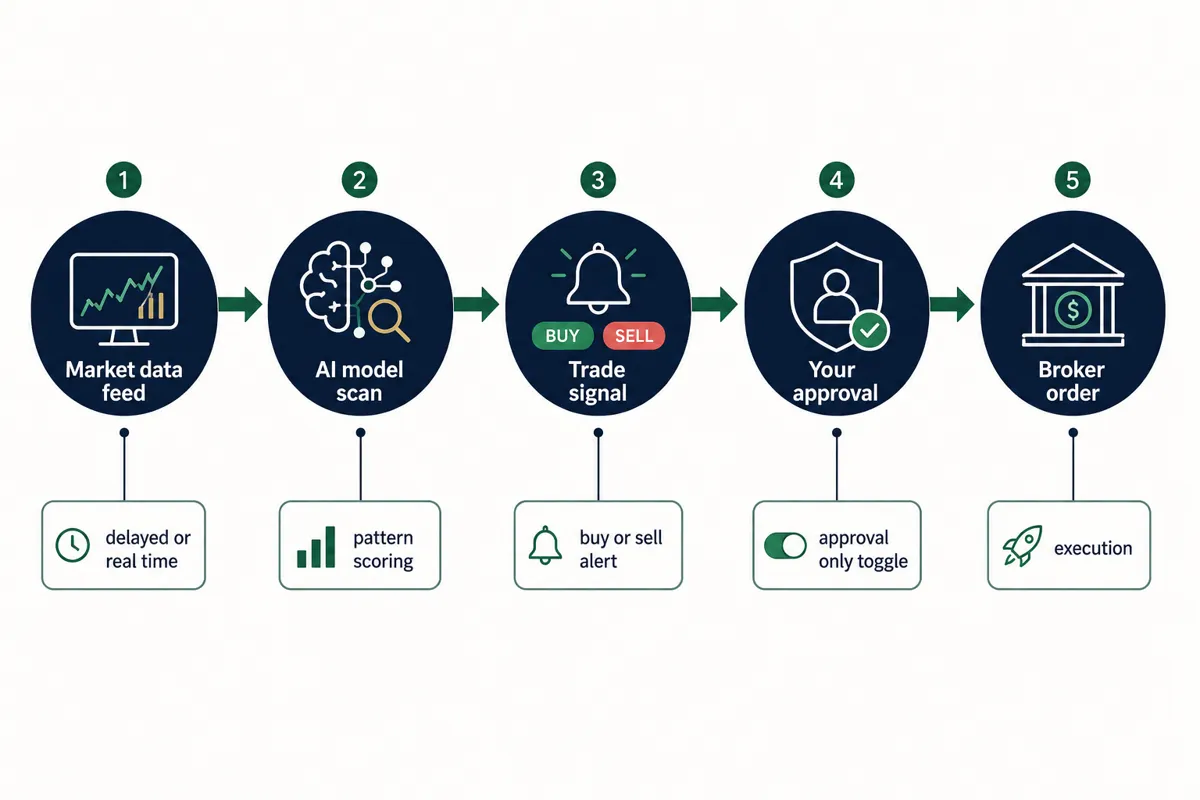
Most of these apps are pattern scanners with a language model bolted on for plain English summaries, not some agentic investment research terminal from a sci fi film. StockHero, for example, runs a bots marketplace where you rent prebuilt strategies rather than build your own. Before downloading anything, read what to check before you download an AI trading app, and read the Terms of service before connecting a brokerage.
AI Trading App vs Manual Trading: Which Is Better?
Neither wins outright; they fail differently. Automated trading removes hesitation and revenge trading, but it also removes the pause where a human notices something is off. Manual trading keeps judgment in the loop and invites overtrading. The practical middle for beginners is a bot that proposes and a human who approves. Systems over hacks.
How Much AI Is Inside the Best AI Trading App Lists?
Less than the marketing implies. Plenty of tools on any best ai trading app roundup are public models with a dashboard and a subscription button. Roundups crown Barebone AI as the best overall pick for beginners, and moomoo for paper trading plus AI analysis, but a listicle rank tells you nothing about defaults. What one app does well falls short in another, which is exactly why the five settings below matter more than the logo.
Setting 1: Switch From Auto Execute to Approval Only
The single most important change: turn off auto execute before your first trade. In approval only mode the app proposes and you confirm; in auto mode it trades while you sleep. An August 31, 2026 guide recommends approval only for accounts under $1,000 and keeping manual confirmation until you've reviewed at least 20 live trades .
The default: many bot platforms, StockHero's marketplace bots included, are built around hands off execution once connected. Their pitch is choose, run bot, relax. The smarter sequence is setup, test, evaluate.
Why it's wrong for you: you haven't seen this model trade yet. Twenty reviewed trades is the minimum sample to judge whether its logic matches your risk tolerance . Auto execution is defensible only above $10,000 and only after a full strategy review .
Change it to: approval only, or notifications only if the app offers it. If an app has no approval mode at all, say no and keep shopping. Our guide on what to know before you automate trades covers why this toggle is the first safety switch.
Setting 2: Cap Your Position Size Before the First Trade
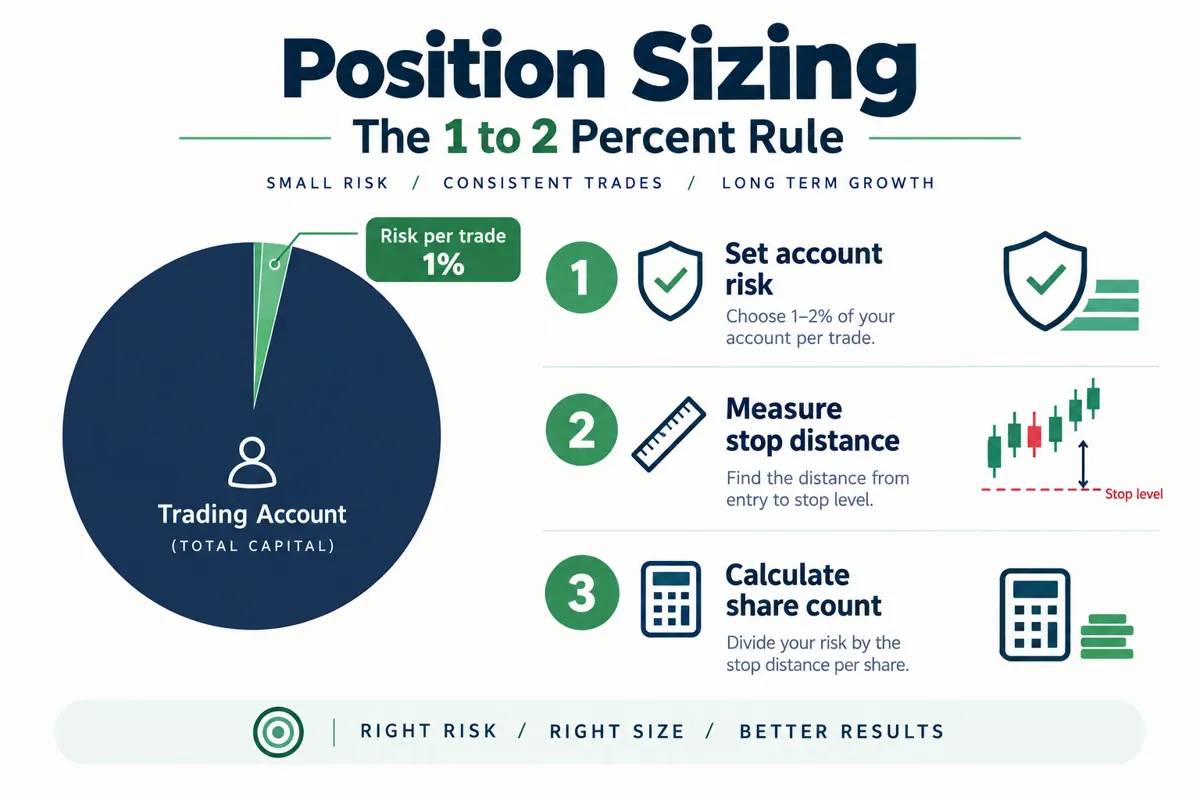
Cap every trade at 1 to 2% of total account value, no matter what the algorithm suggests . Multiple 2026 risk frameworks for AI and crypto bots land on the same range and call it a simple, durable rule for retail traders .
The default: many bots size by fixed dollar amounts or by percentage of available buying power, which on a $2,000 account can mean one signal eating half your capital.
Why it's wrong: fixed share counts ignore your account entirely. Newer AI agent documentation bakes fixed fractional sizing into the strategy inputs precisely because static sizing keeps blowing up small accounts .
Change it to: a hard per trade maximum. Risk 1% ($20 on a $2,000 account), divide by your stop distance, and that's your share count . StockHero and similar platforms expose allocation caps per bot; set them before the first signal fires. The free swing trade position size calculator does the math in ten seconds. Position sizing is unglamorous, which is exactly why it works.
Setting 3: Replace the Default Stop Loss
Default stop loss settings are often missing, arbitrary, or tied to the model's logic instead of your wallet . Replace them with a risk based level you can afford to lose on a single trade, attached at entry.
The default: a stop loss (the price where a losing trade closes automatically) set as a generic percentage, or worse, managed only inside the bot's software. If the service crashes, that soft stop evaporates.
Why it's wrong: risk resources are blunt about this: every bot trade needs a hard, exchange side stop attached at entry, not added later . Bot side logic is a promise; an exchange side order is a contract. And a flat 2% stop on a volatile name gets you stopped out by ordinary noise while a 2% stop on a sleepy ETF is too loose.
Change it to: a stop sized by both your account and the stock's volatility. ATR based stops, which use average true range to measure normal price movement, keep the stop outside routine chop . Whether you're on StockHero, a brokerage app, or a signal service, confirm the stop lands at your broker, not just in the app's memory .
Setting 4: Cut the Alert Frequency Down
Default notification settings are built to maximize engagement, not good decisions. Turn off everything except order fills, stop triggers, and your one or two primary signals.
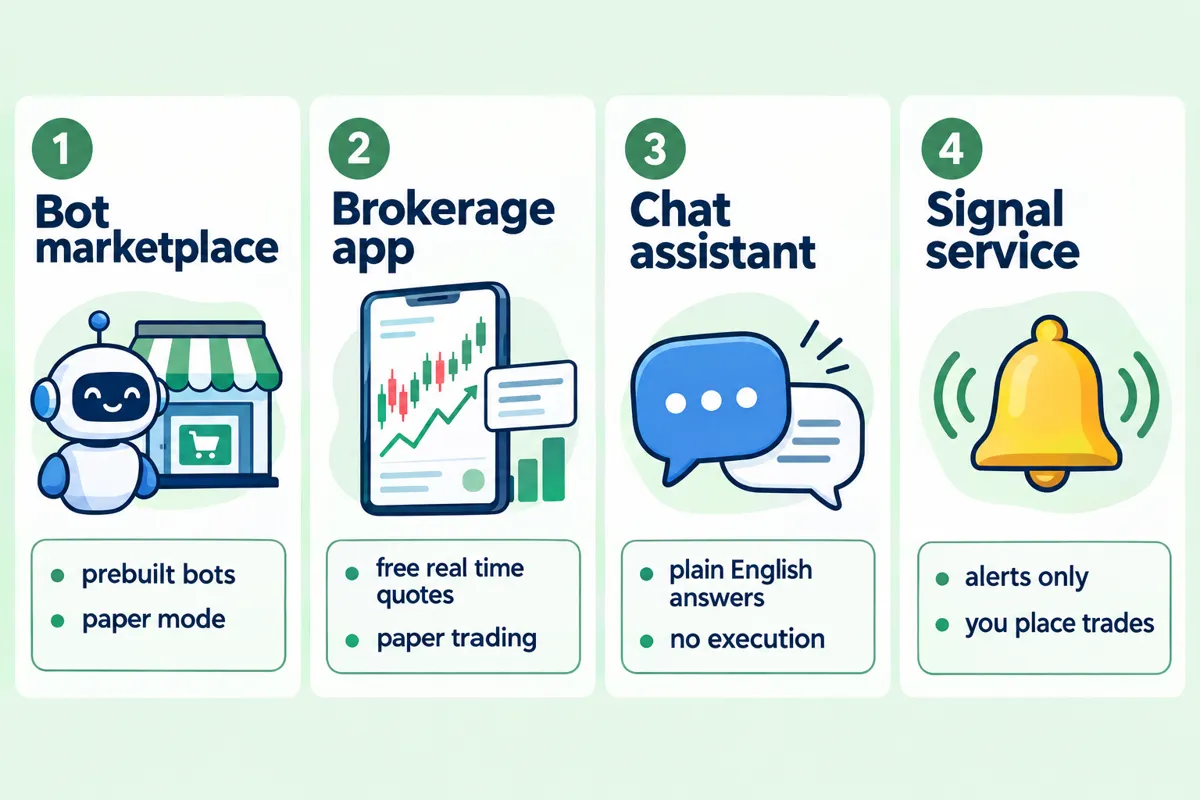
Why it matters: alert fatigue is how a decent signal service turns into a slot machine in your pocket. Fifteen pings a day trains you to either ignore all of them or chase all of them, and both paths end in overtrading. Analysis paralysis at power hour is not a strategy.
Change it to: fills and stops on, price movement alerts, news blasts, and "trending now" notifications off. Keep the watchlist short. If you want alerts that respect your attention, see the AI stock alert apps that buzz before the move rather than accepting whatever the ai trading app defaults ship. Cut the noise, keep the alpha.
Setting 5: Check Whether Your Data Feed Is Real Time or Delayed
Confirm whether your free tier shows real time quotes or delayed ones before you act on a single signal. A scan that surfaces a mover minutes late is a history lesson, not a trade.
The default: many free plans run on delayed data while the interface looks perfectly live. The app rarely advertises the lag; it's buried in the fine print near the privacy policy.
Why it's wrong: intraday entries on stale quotes produce bad fills. You approve a trade based on a price that no longer exists, and the slippage compounds across every trade the bot takes.
When delayed is fine: swing trades held for days, ETF rebalancing, and research. Brokerage apps like Webull and moomoo include real time US quotes on their free tiers, which is one honest reason beginners start there. Standalone signal apps vary widely, so verify, don't assume. If you day trade on delayed data, well, play stupid games.
Which AI Investing App Fits Your Account Size?
The right ai investing app depends on account size and how much automation you can supervise, not on which listing has the prettiest star rating. Here are the picks at a glance, then the table.
What Beginner Friendly Actually Means
Beginner friendly means approval only by default, a free paper mode, visible position controls, and plain English explanations. It does not mean fewest buttons.
Barebone AI: Best Overall for Beginners
Several roundups rank Barebone AI first for new traders. What it does well, per those reviews, is onboarding simplicity. Where it falls short is the same place every ranked app falls short: you still have to verify its execution mode, sizing caps, and stop handling yourself before funding it. A barebone interface with aggressive defaults is worse than a cluttered one with safe defaults.
Moomoo: Best Paper Trading Plus AI
Moomoo pairs a full brokerage with free paper trading and AI analysis features, letting you rehearse the whole workflow with zero dollars at risk.
Webull: Cleanest Brokerage On Ramp
Webull offers free real time US market data and a paper trading mode, making it a sensible first brokerage for the AI curious who want a regulated financial base layer first.
Magnifi, AInvest Aime, Prospero.ai, and Incite AI
The Magnifi ai investing app owns the plain English Q&A niche: ask about ETFs or stocks in a sentence, get investment options back. AInvest Aime plays mentor style chat. Prospero.ai keeps it simple with free signals. Incite AI answers fast; treat its confidence with skepticism, since speed and accuracy are different products.
StockHero and the Bots Marketplace
StockHero, around since 2018, is the name beginners meet first in the stock trading bot category. Its homepage advertises an AI Trading Bot with a high win rate, asterisk included, plus counters claiming more than 2 million bots created, over 50 million in trade volume, and 100,000 plus users. Treat every one of those as vendor claimed until audited. Past performance disclaimers exist for a reason. StockHero does offer paper mode and per bot allocation limits, so the five settings above are all configurable there. What StockHero's customers say in testimonials and what its defaults do to a $500 account are separate questions; check what real users say off platform, then check whether AI trading bots actually make money.
<!DOCTYPE html>
<html lang="en">
<head>
<meta charset="UTF-8">
<meta name="viewport" content="width=device-width, initial-scale=1">
<style>
.cg-wrap{font-family:Arial,Helvetica,sans-serif;max-width:760px;margin:0 auto;background:#F8FAFC;border:1px solid #1F5E43;border-radius:10px;padding:16px}
.cg-title{color:#0A1128;font-size:1.15em;font-weight:bold;margin:0 0 10px;text-align:center}
.cg-table{width:100%;border-collapse:collapse;font-size:0.86em}
.cg-table th{background:#0A1128;color:#F8FAFC;padding:8px 6px;text-align:left}
.cg-table td{padding:8px 6px;border-bottom:1px solid #dfe5ec;color:#0A1128;vertical-align:top}
.cg-table tr:nth-child(even) td{background:#eef3f0}
.cg-acct{font-weight:bold;color:#1F5E43}
@media(max-width:640px){.cg-table{font-size:0.78em}.cg-table th,.cg-table td{padding:6px 4px}}
</style>
</head>
<body>
<div class="cg-wrap">
<p class="cg-title">AI Trading App Settings by Account Size</p>
<table class="cg-table">
<tr><th>Account</th><th>Auto execute setting</th><th>Max position size</th><th>Stop loss approach</th><th>Data feed needed</th></tr>
<tr><td class="cg-acct">Under $1,000</td><td>Off. Approval only for every order</td><td>1% of account per trade</td><td>Hard stop set at entry, risk based</td><td>Delayed is fine for swing signals</td></tr>
<tr><td class="cg-acct">$1,000 to $10,000</td><td>Approval only until 20 live trades reviewed</td><td>1 to 2% of account per trade</td><td>Exchange side stop plus volatility check</td><td>Real time for any intraday entry</td></tr>
<tr><td class="cg-acct">Over $10,000</td><td>Auto execute only after full strategy review</td><td>2% cap, sized by stop distance</td><td>ATR based stop attached at entry</td><td>Real time required, verify the source</td></tr>
</table>
</div>
</body>
</html>
Can You Actually Make Money With AI Trading Apps? Cost, Scams, and Regulation
Some traders profit with AI tools and most active traders lose money, with or without them, so no honest answer skips risk management. An ai trading app is an amplifier: it scales a disciplined process and it scales a sloppy one just as efficiently. Discipline beats prediction.
Costs run from free tiers (Prospero.ai, Webull, moomoo paper modes) to $20 to $100 plus per month for premium bots and scanners, and some free tools do 80% of what paid versions do. How much money you need is a separate question: technically you can start with $100, though a $500 to $2,000 account makes 1% position sizing workable. Since the PDT rule ended June 4, 2026, small accounts can trade actively without the old $25,000 gate, which makes these settings more urgent, not less.
AI Trading App Scams and How to Avoid Them
Red flags: guaranteed returns, unaudited win rate claims, pressure to wire funds, and apps pushing CFDs, forex, crypto leverage on unregulated venues. And read app store listings like an analyst. Google Play sells games, apps, movies & books, kids content, and trading bots from one storefront, and the furniture is identical everywhere: user guide, FAQs, videos, tutorials, updates, release notes, view the changelog, tap more vert, flag inappropriate, and under every gushing review, "212 people found review helpful. Find helpful? Yes." Listings like Sky Apper Star learn to farm that machinery fast, so a 4.8 star average tells you about onboarding, not signal quality. Our breakdown of legit AI trading bots versus scams goes deeper.
Is an AI Trading App Safe and Regulated?
The app itself usually isn't regulated; the brokerage underneath it is. Webull and moomoo operate as registered brokerages with regulatory oversight, while third party bots like StockHero connect through broker APIs and sit outside that perimeter. Grant read only access first, full trade permissions only after paper testing, and never hand a service your financial account password directly.
Common Mistakes, Troubleshooting, and Crypto vs Stocks
The most common mistakes are enabling automation on day one, skipping paper mode, sizing by gut feel, and trusting bot side stops. Every one of them is a settings problem, which means every one is fixable in about ten minutes.
When your ai trading app is not working: signals stopped firing usually means an expired broker connection or API key; refresh permissions. Orders rejected usually means insufficient buying power against the bot's default size, another argument for caps. Stale prices mean you're on delayed data. If a bot underperforms its backtest, that gap is normal; backtest without fooling yourself before blaming the market.
AI Trading Apps for Crypto vs Stocks
Crypto bots trade 24/7 on exchanges with thinner oversight, so risk limits and staged rollouts matter even more there . Stock focused apps operate in regulated market hours with brokerage protections. Beginners are better served starting with equities and ETFs, where the guardrails already exist.
Before Your First Trade: The Paper Mode Checklist
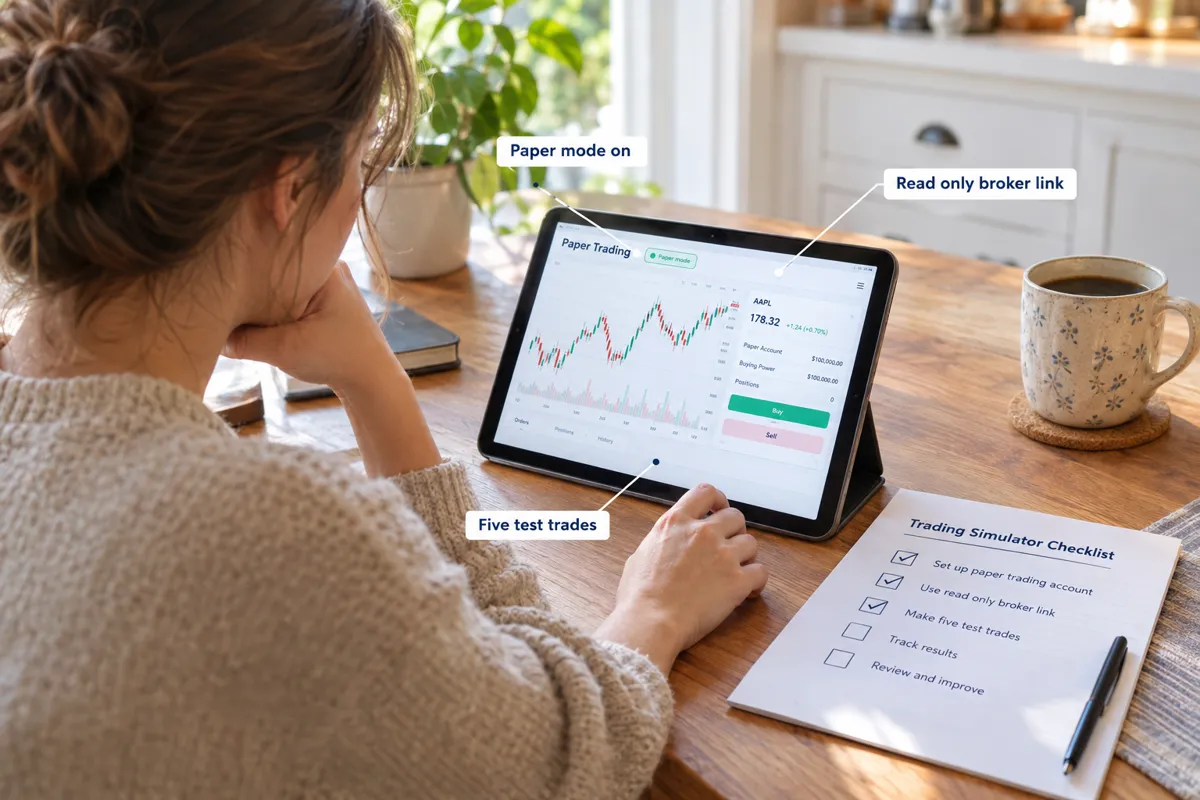
Automate nothing until the app has proven itself in simulation with your five settings applied. The 2026 risk playbooks agree on a staged rollout: backtest, paper trade 2 to 4 weeks, then go live with just 10 to 25% of intended capital .
Run this sequence:
- Connect the brokerage read only, or use the app's internal paper mode.
- Apply all five settings from this guide.
- Let the app propose at least five trades in paper mode; approve or reject each with a written reason.
- Compare fills against real time quotes to catch data lag.
- Review the results honestly. Only then fund it, small.
Do the DD now, in simulation, where mistakes are free lessons instead of expensive ones. Paper trade it first is not a slogan; it's the cheapest research a beginner will ever run.
Frequently Asked Questions
Do any AI trading apps work?
Some work as research and screening tools; none work as money printers. Apps with transparent logic, real risk controls, and regulated brokerage connections can genuinely speed up analysis and enforce discipline. About 70% of day traders lose money, so treat any app as a process aid, not an edge, and verify every win rate claim independently before funding it .
Which AI trading app is the best?
There's no universal best, only the best fit for your account and supervision level. Beginner roundups favor Barebone AI overall, moomoo for paper trading, Webull as a brokerage on ramp, and Magnifi for plain English questions. Judge any candidate by four things: approval only mode, position caps, exchange side stops, and honest data feed disclosure .
How do I start AI trading?
Start in simulation, not with cash. Pick an app with a free paper mode, apply the five settings in this guide, and let it propose 20 trades you review manually . Then backtest, paper trade for 2 to 4 weeks, and go live with only 10 to 25% of your intended capital . Scale up only after the live results match the test.
Can ChatGPT do stock trading?
No. ChatGPT can't execute trades, hold funds, or access live market data reliably, and its analysis can be confidently wrong. It's useful for explaining concepts and summarizing filings, not for signals. Purpose built platforms with brokerage integrations handle execution; a general chatbot handles conversation. Anyone selling a "ChatGPT trading bot" with guaranteed results is selling the asterisk, not the outcome.
What is an AI trading app and how does it work?
It's software that scans price and market data with a model, generates trade signals, and either asks your approval or executes automatically through a connected brokerage. The execution mode, sizing rules, and stop handling are all configurable, and the defaults usually favor activity over safety .
Does an AI trading app trade on its own?
Only if auto execute is enabled. Most platforms, StockHero included, support both hands off and approval only modes. Guidance in 2026 says keep manual approval until you've reviewed at least 20 live trades .
What is the best AI trading app for a beginner?
For beginners, prioritize free paper modes and safe defaults: moomoo or Webull for a regulated base, Barebone AI if roundup rankings sway you, and approval only mode everywhere. The best pick is whichever one lets you rehearse for free.
Is an AI investing app different from an AI trading app?
Yes. An investing app like Magnifi focuses on research, portfolios, and ETFs over longer horizons. A trading app generates short term signals and may execute orders. The investing side carries fewer execution risks; the trading side needs all five settings above.
Do I need real time data for an AI stock trading app?
For intraday trades, yes; delayed quotes cause bad fills. For swing trades held days or weeks, an ai stock trading app on delayed data is workable. Webull and moomoo include free real time US quotes, which many standalone signal apps don't.
What is the best AI investment app for a small account?
For accounts under $1,000, the best ai investment app is one with a real free tier and strict caps: Prospero.ai for free signals, moomoo or Webull for free paper trading. Keep risk near 1% per trade .
Can an AI trading tool connect to my existing broker?
Often, yes, through APIs. An ai trading tool like StockHero links to supported brokerages with granted permissions. Start read only, upgrade to trade access after paper testing, and never share your actual login credentials with a third party service.
How much does the best AI investing app cost per month?
Anywhere from free to roughly $100 monthly. The best ai investing app for a first year is frequently a free tier, since free versions often cover most beginner needs. Never pay more per month than about 1% of your account.
Final Verdict: Set These Five, Then Place the Trade
The app you chose matters less than the defaults you refuse to accept. Approval only execution, a 1 to 2% position cap, an exchange side stop attached at entry, muted alerts, and a verified data feed turn any decent ai trading app from a liability into a supervised assistant . As John Bogle put it about stock picking, don't look for the needle, buy the haystack; the settings version is simpler: don't look for the perfect bot, build the process that survives an imperfect one. Twenty reviewed trades, two to four weeks on paper, then small size. That's the whole playbook, and it's free.
One setup guide, five settings. There are 200+ AI stock tools catalogued in the FullStack Alpha directory, filterable by category, price, and what they actually do. Browse the directory at aistockpickerapps.com.
Some links on this page may earn a commission at no extra cost to you; the settings guidance above is never influenced by partners.
References
Ai Trading App 5 Settings To Change Before Your First Trade - https://aistockpickerapps.com/blog/ai-trading-app-5-settings-to-change-before-your-first-trade
Smart Risk Management - https://capitalcompanion.ai/docs/smart-risk-management/
Atr Indicator Stop Loss Settings That Actually Work - https://apptrading.ai/en/blog/atr-indicator-stop-loss-settings-that-actually-work/
Trading - https://app.neurotraderai.com/docs/guides/trading
Bloghow To Set Risk Limits Inside An Ai Trading System - https://stoxra.com/blog/bloghow-to-set-risk-limits-inside-an-ai-trading-system
Position Sizing - https://aitrading.cash/learn/foundations/position-sizing
Ai Trading Bot Risk Management Guide 2025 - https://3commas.io/blog/ai-trading-bot-risk-management-guide-2025
Risk Management Ai Forex Traders - https://aiforexeducation.com/risk-management-ai-forex-traders
Smart Risk Controls Ai Crypto Traders - https://thrive.fi/blog/trading/smart-risk-controls-ai-crypto-traders